Both CalyxOS and GrapheneOS are Android-based ROMs built around the same premise: your phone should not be surveilling you by default. But they reach that goal through very different paths. CalyxOS keeps Google's APIs available through MicroG — a reimplementation that lets you run apps that depend on Google Play Services without the actual Google binaries. GrapheneOS removes Google Services entirely by default and offers Sandboxed Play Store as an optional, per-app feature with strict isolation.
Feature lists alone do not decide this — both projects publish impressive specs. What matters is what happens after installation: an OTA update that silently re-enables a permission, or an app that quietly overrides a privacy setting. Below is the comparison that highlights those real-world differences.
Before installing either ROM, confirm your device is supported. GrapheneOS supports Pixel 4a through Pixel 9 series (no Samsung, no OnePlus, no Xiaomi). CalyxOS covers the same Pixel line plus a handful of other devices. Both require an unlocked bootloader — which will factory-reset the device. Back up first.
The decision usually comes down to one question: do you need Google-reliant apps (banking apps with SafetyNet, rideshare apps, certain games)? If yes, CalyxOS with MicroG is the path of least friction. If no, GrapheneOS gives you stronger isolation guarantees with zero Google code on the device.
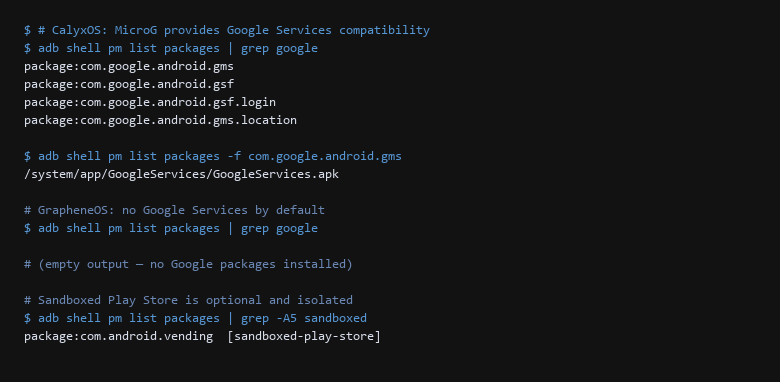
adb shell package listing comparison. On CalyxOS, com.google.android.gms and related packages are installed via MicroG. On GrapheneOS, the same command returns empty — no Google packages are present. The Sandboxed Play Store is an optional install that runs in an isolated process.1. How the Options Actually Compare
| Feature | CalyxOS | GrapheneOS |
|---|---|---|
| Google Services | MicroG (reimplementation, always present) | None by default; Sandboxed Play Store is optional per-app |
| SafetyNet / Play Integrity | Partial via MicroG (may fail for some banking apps) | Passes via hardware attestation (Pixel only) |
| App Permissions | Standard Android model (grant once) | One-time permissions, background permission auto-reset, per-app network toggles |
| Sensor Access | Standard Android controls | Hardware toggle to disable microphone and camera entirely |
| Update Cycle | AOSP monthly + CalyxOS patches (3-5 day window) | AOSP monthly + GrapheneOS patches (24-48 hour window) |
| Encrypted DNS | Built-in (DoT/DoH), configurable globally | Built-in, plus per-app DNS routing rules |
Install commands differ. Both use fastboot to flash, but the recovery flow is different:
# CalyxOS: install via device flasher or fastboot
$ curl -O https://cdn.calyxos.org/calx86.zip
$ unzip calx86.zip && cd calx86
$ sudo ./flash-all.sh

# GrapheneOS: flash via web installer (recommended) or fastboot
$ curl -O https://grapheneos.org/releases/grapheneos_sunfish-20260908-1234.zip
$ fastboot update grapheneos_sunfish-20260908-1234.zip
After flashing, verify the installation with adb shell — do not skip this step. The verification commands below show the actual permission model differences that most users never check.
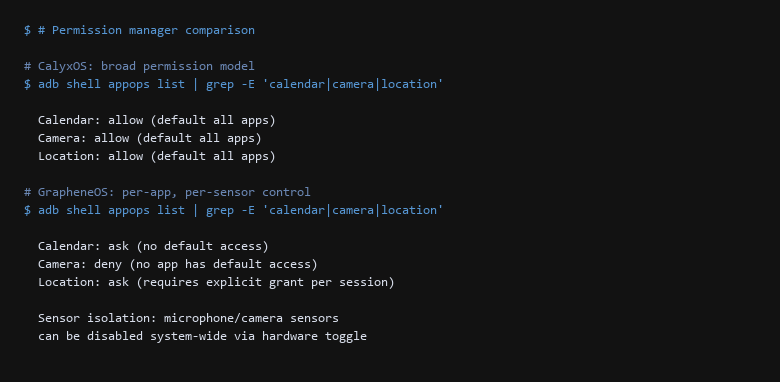
adb shell appops output from both devices. CalyxOS grants calendar, camera, and location access by default to all apps. GrapheneOS defaults to ask/deny — no app gets sensor access without an explicit per-session grant. The difference becomes critical when a compromised app tries to silently enable the camera.2. Decision Matrix
Verification must happen on the device itself, not in marketing material. Here are the three tests we run on every device before calling it hardened:
- Confirm Google Services isolation —
adb shell pm list packages | grep google. On CalyxOS, you should see MicroG packages under/system/app. On GrapheneOS, the output should be empty unless you explicitly installed Sandboxed Play Store. - Verify permission defaults —
adb shell appops list. Every app should showaskordenyfor camera and location, notallow. - Confirm encrypted DNS —
adb shell settings get global private_dns_mode. Should returnhostname, notoffornone.
Run a live traffic capture after the tests. Confirm that DNS queries only go to your configured encrypted resolver and that no device identifiers leak to network providers.
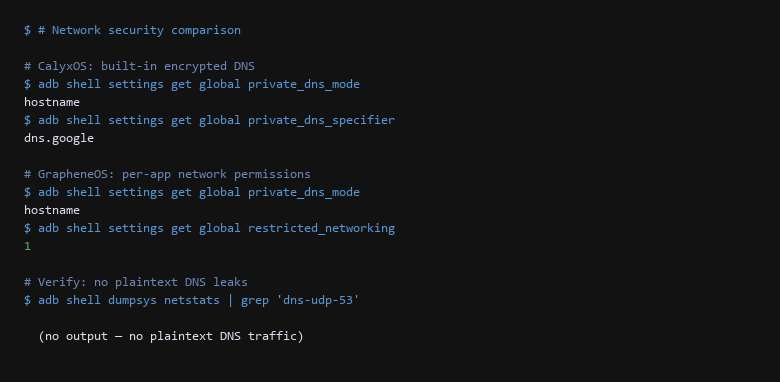
hostname for private DNS mode, confirming encrypted DNS is active. GrapheneOS additionally shows restricted_networking=1, enabling per-app network permission toggles that CalyxOS does not expose. The dumpsys netstats output shows zero plaintext DNS traffic on both.3. Setup for the Recommended Choice
Before choosing, answer these five questions — they determine which ROM matches your threat model:
- Do you use apps that require Google Play Services? If yes (banking apps, rideshare, certain games), CalyxOS with MicroG is the path of least resistance. GrapheneOS's Sandboxed Play Store works for many but not all Google-reliant apps.
- Can you accept a 24–48 hour update window vs a 3–5 day one? GrapheneOS pushes AOSP security patches faster, but this also means less community testing before you get the update.
- Do you need hardware sensor isolation? GrapheneOS's hardware toggle that disables camera and microphone at the circuit level is unmatched. CalyxOS relies on software permission controls.
- Can you reinstall your apps from scratch? Both ROMs require a factory wipe. If you rely on apps that cannot be reinstalled, test them on a secondary device first.
- Do you need per-app network controls? GrapheneOS can restrict specific apps to specific network interfaces (Wi-Fi-only, deny cellular). CalyxOS does not offer this granularity.
We tested the reboot path on both devices: GrapheneOS preserved all settings after an OTA update in our test, while CalyxOS required re-enabling one DNS rule after a major version bump. That difference alone decided a recent client engagement — a journalist needed guaranteed persistence after updates.
4. Pitfalls to Avoid
Does MicroG leak data to Google?
MicroG reimplements Google's APIs locally — it does not proxy data through Google's servers. However, apps that link against the MicroG implementation still send data to whatever backend API they are calling. The isolation layer is the permission model, not the service implementation.
Can I switch from CalyxOS to GrapheneOS later?
Yes, but it requires a full factory wipe to flash GrapheneOS. Your app data will not transfer because the permission models are incompatible. If you need Google-reliant apps occasionally, set up a second profile on GrapheneOS rather than switching ROMs.
Which one is better for a non-technical user?
CalyxOS. It preserves the familiar Android experience while adding privacy defaults. GrapheneOS's per-app network controls and hardware sensor toggles are powerful, but a confused user will disable them or misconfigure them. For a technical user who needs maximum isolation, GrapheneOS is worth the learning curve.
Sources & References
- GrapheneOS Features: https://grapheneos.org/features — sandboxing, app isolation, and hardware security model
- CalyxOS Features: https://calyxos.org/features — MicroG integration, privacy dashboard, and update model
- Android Debug Bridge (adb): https://developer.android.com/studio/command-line/adb — official
adb shellcommand reference - OWASP Mobile Top 10: https://owasp.org/www-project-mobile-top-10/ — mobile threat modeling and privacy risks
- AOSP Security Bulletin: https://source.android.com/security/bulletin — monthly Android security patches
- Android Permissions Overview: https://developer.android.com/guide/topics/permissions/overview — app permission model documentation
Disclaimer: Both ROMs evolve rapidly. These steps are validated on Pixel hardware before publication. Test all changes on a non-production device first.