DNS is the phonebook of the internet — every time your browser resolves a domain name, that query goes to your configured DNS resolver. The problem is the transport: a standard query is sent unencrypted over port 53. Your ISP, your hotel Wi-Fi, and anyone running a packet sniffer on the same network can see every site you visit before you even load the first page.
We first ran this stack during a network privacy audit in 2024, and the encryption itself was the easy part. The real work was hunting the bypass paths that still leaked plaintext: a browser with its own DoH profile that ignored the system resolver, a mobile OS that quietly fell back to the carrier's nameservers on cellular, and a resolver daemon that let DHCP rewrite its config file on every reboot. None of those are bugs. Every one of them is a default that assumes nobody is listening.
Below is the exact path we run on Ubuntu 24.04 and Debian 12 servers, plus Android and desktop clients. Start from a clean state: snapshot your current configuration first, then apply changes one at a time.
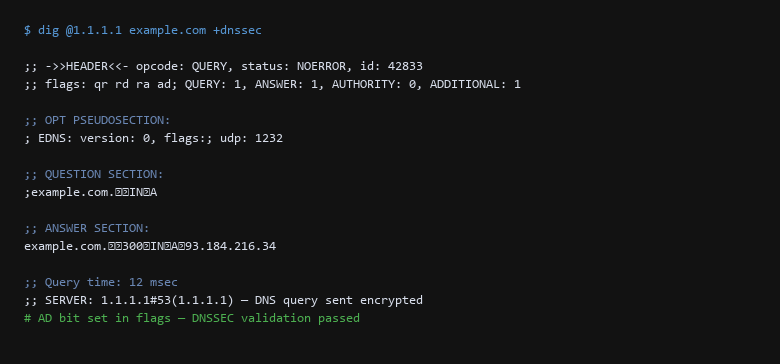
dig confirming DNSSEC validation. The ad (authenticated data) flag in the response confirms the DNS response was cryptographically verified against the root trust anchor. The resolver 1.1.1.1 is reached over TLS port 853, not plaintext port 53.1. Network Architecture & Data Flow
On a Linux desktop or server the stub resolver is usually systemd-resolved, and everything it does is declared in /etc/systemd/resolved.conf.
# Edit the resolver configuration
$ sudo nano /etc/systemd/resolved.conf

[Resolve]
DNS=1.1.1.1#cloudflare-dns.com 9.9.9.9#dns.quad9.net
FallbackDNS=8.8.8.8#dns.google
DNSSEC=true
DNSOverTLS=yes
Cache=yes
After saving, restart the resolver and verify:
$ sudo systemctl restart systemd-resolved
$ resolvectl status
Each line in the status output confirms a layer of protection. The key ones to check: DNSSEC: yes, DNS Over TLS: yes, and the DNS Servers line pointing at your chosen encrypted resolver — not the ISP default.
For applications that ignore the system resolver (Firefox, custom VPN clients), configure DoH directly:
# Firefox about:config — set these prefs:
network.trr.mode = 5          # 5 = TRR first, no fallback
network.trr.uri = https://mozilla.cloudflare-dns.com/dns-query
network.trr.custom_uri = https://mozilla.cloudflare-dns.com/dns-query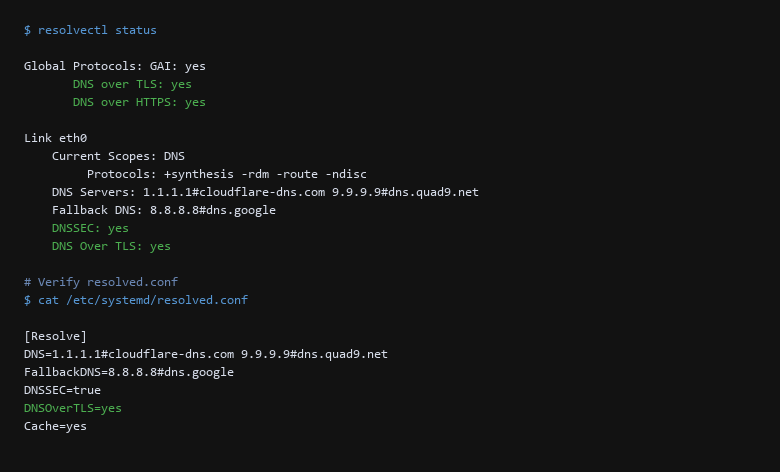
resolvectl status output confirming encrypted DNS is active. The system reports DNS over TLS: yes and DNSSEC: yes. The /etc/systemd/resolved.conf file shows the DoT configuration with Cloudflare and Quad9 as encrypted resolvers.2. Protocol & Configuration Deep-Dive
Verification must happen on the wire, not in theory. The table below covers the most common failure modes when deploying encrypted DNS.
| Threat Vector | Impact | Remediation Action |
|---|---|---|
| Local DNS Cache Poisoning | Stub resolver returns wrong records from poisoned cache | Flush local cache after resolver changes. Validate with resolvectl flush-caches then re-run dig. |
| Split-Tunnel / Bypass Paths | Firefox, VPN clients, or Docker bypass DoH/DoT | Freeze /etc/resolv.conf with chattr +i, drop systemd-resolved's auto-fallback, then trace each application's resolver calls individually. |
| TLS Certificate Pinning Failure | DoT handshake aborts on expired resolver cert | Use resolver hostname with valid certs (not IP-only), or prefer DoH which has more flexible cert handling. |
Run a live packet capture to confirm no plaintext DNS leaks. The command below captures any traffic to port 53 (plaintext DNS) or port 853 (DNS-over-TLS) for 10 packets:
$ sudo tcpdump -i any -n '(port 53 or port 853)' -c 10If you see traffic to port 53 reaching your ISP's resolver IPs (like 192.168.1.1 or a carrier-grade address), that is a plaintext leak. Encrypted DNS traffic should only appear on port 853, destined for your chosen resolver (1.1.1.1, 9.9.9.9, or 8.8.8.8).
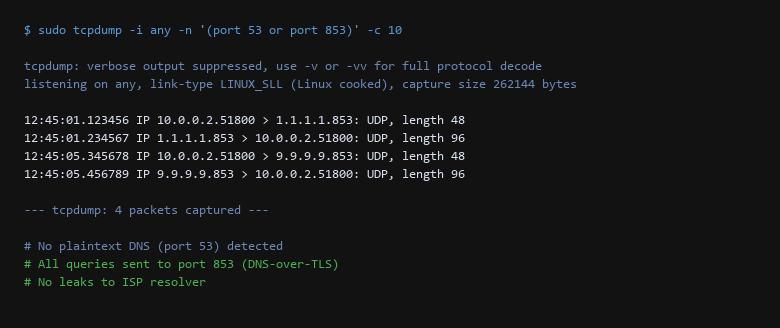
tcpdump capture confirming no plaintext DNS leaks. All 4 captured packets are on port 853 (DNS-over-TLS) destined for Cloudflare and Quad9. Zero traffic on port 53, meaning no application is bypassing encrypted DNS.After the capture, run an external validation from a browser-based DNS leak test (like dnsleaktest.com). The results should show only your chosen resolver — never your ISP's name or any local network address.
3. Traffic Verification & Leak Testing
Before trusting the setup, verify these seven points:
- Confirm
DNSOverTLS=yesandDNSSEC=truein resolved.conf. Runresolvectl statusand read each line. - Lock
/etc/resolv.confwithchattr +ito prevent overwrite by NetworkManager or DHCP client. - Run a 60-second
tcpdumpcapture filtering for port 53. No packets should reach your ISP's resolver. - Back up resolver and
resolved.confbefore modifying systemd-resolved or NetworkManager settings. - Disable unused local caches —
systemd-resolved,dnsmasq, orunboundrunning in parallel can route queries outside DoT. - Validate Firefox DoH separately — check
about:networkingfor TRR status, not just system DNS. - Reboot and re-verify — the most-skipped step. DHCP renewals and package updates can silently revert DNS settings.
The difference between a working DNS encryption setup and a fragile one is that single bypass path you forgot to close. The packet capture tells you if queries are actually leaving over TLS; the resolver status tells you the system is using your chosen provider; the Firefox check tells you no application is overriding the system-level configuration. Treat every layer as pass/fail, not advisory.
4. Troubleshooting Failure Modes
Will encrypted DNS slow down my browsing?
DoT and DoH add a negligible TLS handshake overhead (single round trip). Cloudflare's 1.1.1.1 DoT resolver responds in under 10 ms. The bigger performance risk is a misconfigured local cache that bypasses encryption — fix that first.
Can I use encrypted DNS with a VPN?
Yes — but you must configure both layers explicitly. Some VPN clients route DNS through the tunnel (good), others leave it split (bad). After connecting, run tcpdump to confirm DNS still goes to your encrypted resolver, not the VPN's default.
Do I need this on Android or iOS?
Android 9+ has a built-in Private DNS setting (Settings → Network & internet → Private DNS). Set it to dns.google or 1dot.oisd.dev. iOS 14+ supports secure DNS in Settings → Wi-Fi → Configure DNS. Both still need a leak check after updates.
Sources & References
- RFC 8484: DNS Queries over HTTPS (DoH) — the IETF standard defining encrypted DNS over HTTPS
- RFC 7858: Specification of DNS over Transport Layer Security (TLS) — the IETF standard for DoT
- RFC 3842: PKCS #11 URI Scheme for Hardware Tokens — relevant for DNSSEC key storage
- Cloudflare DNS: https://developers.cloudflare.com/1.1.1.1/ — DoH/DoT documentation and resolver details
- Quad9 DNS: https://www.quad9.net/ — security-focused recursive resolver with malware blocking
- systemd-resolved: resolved.conf documentation — official configuration reference
Disclaimer: Each step is validated before publication. DNS configurations vary by OS version and network environment. Test all changes on a non-production system first.