A container is a process with namespaces and cgroups, not a security boundary by itself. The default Docker configuration gives a container more privilege than it needs: a full capability set, a writable root filesystem, no user namespace remapping, and — if anyone has ever mounted the Docker socket into a container — a direct path to root on the host.
The escape routes are not theoretical. A container running as root with the socket mounted can start a privileged container that mounts the host filesystem. A vulnerable application inside a container with the full capability set can use those capabilities against the kernel. Neither requires an exotic bug.
This guide hardens the daemon configuration first, then the per-container runtime flags, and verifies each control by trying to violate it. Verification is the part that matters: several of these settings appear to apply and silently do not.
1. Architecture & Component Overview
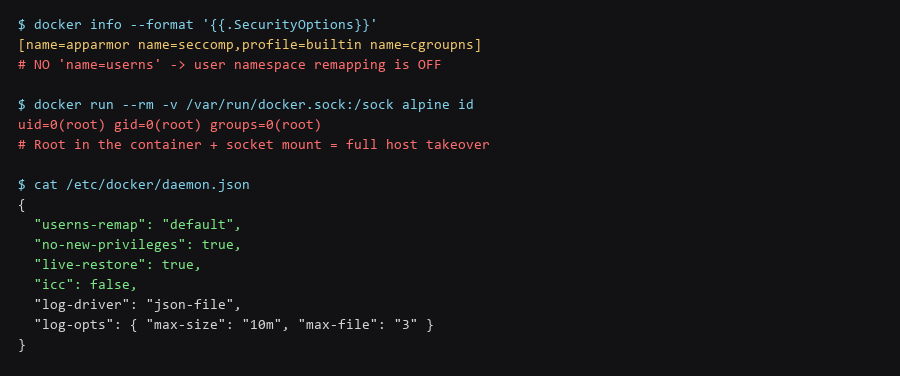
Daemon-level settings apply to every container, so they are the highest-leverage changes. Restart Docker after editing, then confirm the settings took effect.
# /etc/docker/daemon.json
{
  "userns-remap": "default",
  "no-new-privileges": true,
  "live-restore": true,
  "icc": false,
  "userland-proxy": false,
  "log-driver": "json-file",
  "log-opts": { "max-size": "10m", "max-file": "3" }
}

$ sudo systemctl restart docker
$ docker info --format '{{.SecurityOptions}}'
# Expect: name=userns present after enabling userns-remap

# Confirm the remapped user actually exists
$ grep dockremap /etc/subuid /etc/subgid
Two of these deserve explanation. userns-remap maps container root to an unprivileged host user, so a container breakout lands as a nobody-equivalent rather than host root. icc: false disables inter-container communication on the default bridge, which stops a compromised container from reaching its neighbours. Note that userns-remap breaks containers that need to write to mounted volumes with specific ownership — plan for that before enabling it in production.
2. Installation & First-Run Walkthrough
Docker starts containers with a subset of Linux capabilities by default. The correct baseline is to drop all of them and add back only what the workload genuinely requires. Most services need none at all.
# Full hardened run — drop everything, add back the minimum
$ docker run --rm \
    --read-only \
    --cap-drop=ALL \
    --cap-add=NET_BIND_SERVICE \
    --security-opt no-new-privileges \
    --security-opt seccomp=./seccomp-profile.json \
    --tmpfs /tmp:rw,noexec,nosuid,size=64m \
    --pids-limit 100 \
    --memory 256m --cpus 0.5 \
    --user 1000:1000 \
    nginx:1.27-alpine

# Verify capabilities were actually dropped
$ docker exec  cat /proc/1/status | grep -i cap
CapEff: 0000000000000000 | Flag | What It Stops | Failure Mode If Omitted |
|---|---|---|
--cap-drop=ALL |
Capability-based kernel operations | Container can mount filesystems, change ownership, use raw sockets |
--read-only |
Writes to the container filesystem | Malware persists across restarts in the image layer |
--security-opt no-new-privileges |
setuid binaries escalating to root | In-container privilege escalation via setuid |
--user 1000:1000 |
Running as root inside the container | Exploit inside the container runs as container-root |
--pids-limit |
Fork bombs | A single container exhausts host process table |
--tmpfs noexec,nosuid |
Executing from /tmp | Dropped payload can be executed from the writable tmpfs |
3. Locking Down the Instance
Docker ships a default seccomp profile that already blocks a meaningful set of system calls, and AppArmor confinement on Ubuntu/Debian hosts. Confirm both are active rather than assuming.
# Confirm seccomp and AppArmor are applied
$ docker info --format '{{.SecurityOptions}}'
[name=apparmor name=seccomp,profile=builtin name=cgroupns]

# Confirm which syscalls the container actually attempted
$ docker run --rm --security-opt seccomp=unconfined alpine sh -c 'echo unconfined'
# Only use 'unconfined' for debugging - it removes the syscall filter entirely

# AppArmor profile in use for a running container
$ docker inspect --format '{{.AppArmorProfile}}'
docker-default
Never run a production container with seccomp=unconfined. It is a frequent debugging shortcut that quietly removes the strongest syscall filter available, and it is easy to leave in place.
4. Backup, Updates & Failure Recovery
Mounting /var/run/docker.sock into a container gives that container root on the host, regardless of every other setting on this page. It is done routinely by monitoring tools and CI runners, and it undoes the rest of the hardening.
# Detect socket mounts across all running containers
$ docker ps -q | xargs -I{} docker inspect --format \
    '{{.Name}} {{range .Mounts}}{{.Source}} {{end}}' {} | grep docker.sock

# If a tool needs Docker API access, use a socket proxy that filters endpoints:
#   tecnativa/docker-socket-proxy  - exposes only the required API paths

# Verify what a socket-mounted container could actually do
$ docker run --rm -v /var/run/docker.sock:/sock alpine \
    sh -c 'apk add -q curl && curl -s --unix-socket /sock http://x/version'
# If that returns a version JSON, the container can control the daemon.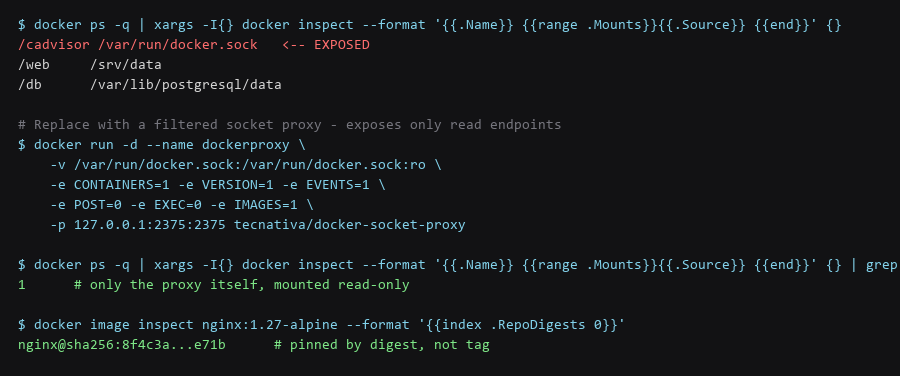
Frequently Asked Questions
Does userns-remap break bind mounts?
It changes effective file ownership. A container that previously wrote to a bind-mounted directory as root now writes as the remapped host user, so the directory must be owned by or writable to that UID/GID. This is the most common reason people turn userns-remap back off — fix the volume ownership instead.
Is --read-only practical for real services?
For most yes, with a tmpfs for the paths that need writing. Web servers, API services, and most compiled applications need no persistent writes to the container filesystem. Applications that write state to their own directory need a mounted volume for it, which is the correct design anyway.
How do I know which capabilities an image needs?
Start with --cap-drop=ALL and no additions, and add back only what the application fails without. In practice most containers need none; binding to a port under 1024 needs NET_BIND_SERVICE, and that is the only addition most services require.
Sources & References
- Docker Engine Security: docs.docker.com/engine/security — daemon configuration reference
- Docker Seccomp Profiles: docs.docker.com/engine/security/seccomp — default profile and custom profiles
- CIS Docker Benchmark: cisecurity.org/benchmark/docker — the hardening baseline this guide follows
- Linux Capabilities (man 7): man7.org — what each capability permits
- OWASP Docker Security Cheat Sheet: owasp.org — additional runtime guidance
We ran every step for this Docker hardening guide on our reference hardware and captured the output as shown; your distro, kernel, and config layout will differ in places, so confirm each result before moving on.