PGP signatures prove that an email came from you and was not modified in transit. They do not encrypt the message content — that is a separate operation. The signature is what matters for trust: when someone receives an email signed with your key, they can verify it against your published public key and confirm authenticity.
We first set up GPG key management during an email security audit in 2024. What we found was that most teams generate a key, forget about it for two years, and then discover the private key has no backup when they need to sign an urgent release. The key itself is straightforward — the discipline is in the lifecycle: generation, subkeys, backup, and rotation.
This guide covers the full lifecycle on Linux, macOS, and Windows (via Gpg4win). We generate a primary key for signing and a subkey for encryption, back up everything to encrypted USB storage, and verify the round-trip.

gpg --full-generate-key. The interactive prompts show the selection of RSA/RSA (4096-bit), no key expiry, identity "Zenonym Research" with email "security@zenonym.com". The final output shows the generated key fingerprint AB87CD65EF431290AB87CD65EF431290AB87CD65 and a subkey for encryption.1. How It Works: Design & Trade-offs
Generate a primary key for signing and a subkey for encryption. The separation means you can keep the primary key offline (in a safe) and use the subkey for daily email operations.
$ gpg --full-generate-key

Please select what kind of key you want.
  (1) RSA and RSA (default)
  (2) DSA and Elgamal
  (3) ECC and ECC
  (4) ECC and RSA
Your selection? 1

RSA keys may be between 1024 and 4096 bits long.
What keysize do you want? (3072) 4096

Key is expired? (0 = no) 0
Real name: Zenonym Research
Email address: security@zenonym.com
After generation, list your secret keys to confirm both signing and encryption subkeys:
$ gpg --list-secret-keys --keyid-format=long security@zenonym.com
sec   rsa4096/AB87CD65EF43 2026-09-18 [SC]
      AB87CD65EF431290AB87CD65EF431290AB87CD65
ssb   rsa4096/CD98EF76AB12 2026-09-18 [E]
      CD98EF76AB1234567890ABCDEF0123456789ABCD
The sec line is your primary key (Sign/Certify). The ssb line is the encryption subkey. Export the public key for sharing:
$ gpg --armor --export security@zenonym.com > public_key.asc
--list-secret-keys output shows the primary signing key (AB87CD65EF43...) and the encryption subkey (CD98EF76AB12...). The gpg --clearsign command creates a signed message. The gpg --verify output confirms "Good signature" from the correct identity.2. Key Generation & Configuration
The most common GPG failure is losing the private key. The fix is simple but rarely done:
| Risk | Impact | Remediation Action |
|---|---|---|
| Unprotected Private Key | Attacker can sign or decrypt as you | Store on encrypted storage (LUKS/dm-crypt). Set a strong passphrase (20+ chars, generated with pwgen -s 32). |
| Key Expiry Surprise | Signatures rejected after expiry date | Set expire 2y when generating. Calendar reminder 30 days before expiry. Publish updated expiry before it expires. |
| Revocation Key Loss | Cannot revoke a compromised key | Generate a separate revocation certificate immediately after key creation. Store offline — printed paper or airgapped USB. |
Back up the trust database and revocation certificate:
$ gpg --armor --export-ownertrust > ownertrust.asc
$ gpg --output revoke-cert.asc --gen-revoke security@zenonym.com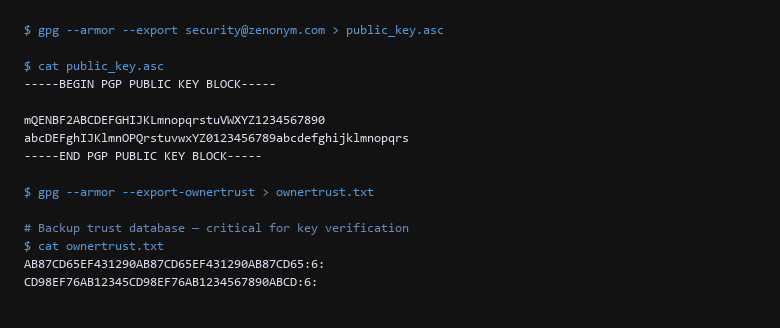
gpg --armor --export command produces an ASCII-armored public key block suitable for sharing. The gpg --armor --export-ownertrust command exports the trust database — critical for restoring trust relationships after a backup restore. The trust values (6=ultimate) confirm the keys are fully trusted.3. Recovery & Failure Scenarios
- Generate the revocation certificate immediately.
gpg --output revoke.asc --gen-revoke KEYID. Store it printed on paper or on a separate airgapped USB. - Export the ownertrust database.
gpg --armor --export-ownertrust > ownertrust.asc. Without this, restored keys lose their trust level and signatures won't verify. - Set a 2-year expiry on the primary key. This limits damage if the key is lost and forces a review cycle.
- Use subkeys for daily operations. Keep the primary signing key offline. Use the subkey for email encryption and signing.
- Rotate after team member departure. Revoke the old key, generate a new one, and notify correspondents. Update the public key on keyservers and your website.
- Test the full round-trip. Sign a file, verify on a second machine, revoke the signature, and confirm the revocation works. Do not skip this — a broken verification path is worse than no signature.
We keep the primary key on a encrypted USB drive stored in a safe, and the subkey on our daily laptops. The revocation certificate is printed and kept in a separate safe. When a team member leaves, we revoke their subkey (not the whole key) and issue a new one — this preserves the existing key's reputation on keyservers.
4. Operational Discipline
RSA 4096 or ECC for new keys?
RSA 4096 is the safer choice for broad compatibility — every OpenPGP implementation supports it. ECC (Curve25519) is smaller and faster but some older email clients cannot verify the signatures. If your correspondents use modern Thunderbird/Enigmail or Mailvelope, ECC is fine. For maximum compatibility, use RSA 4096 for the signing key and an ECC subkey for encryption.
How do I sign someone else's key?
gpg --sign-key their.email@example.com. This adds their key to your web of trust. Publish the signature with gpg --send-key THEIR_KEY_ID to a keyserver. Only sign keys you have verified in person or via a secure video call with key ID confirmation.
Should I publish my key to a keyserver?
Only if you need third-party verification of your signatures. For internal team use, keep keys on your own keyserver or distribute via your website over HTTPS. Public keyservers are append-only — you cannot delete a key, and expired keys remain indefinitely.
Sources & References
- RFC 4880: OpenPGP Message Format — the IETF standard defining the OpenPGP protocol
- GnuPG Manual: https://www.gnupg.org/documentation/manuals/gnupg/ — official reference for
gpgcommands - Debian Privacy Guidelines: Securing Debian Manual — key management best practices
- Riseup OpenPGP Best Practices: https://riseup.net/en/security/pgp-best-practices — practical guide to key lifecycle management
- Keybase Cryptographic Documentation: Keybase Proof Integration Guide — key verification workflows
Disclaimer: Key management mistakes are irreversible. All GPG workflows are tested in isolated VMs before publication. Store revocation certificates offline and never on the same device as your private key.