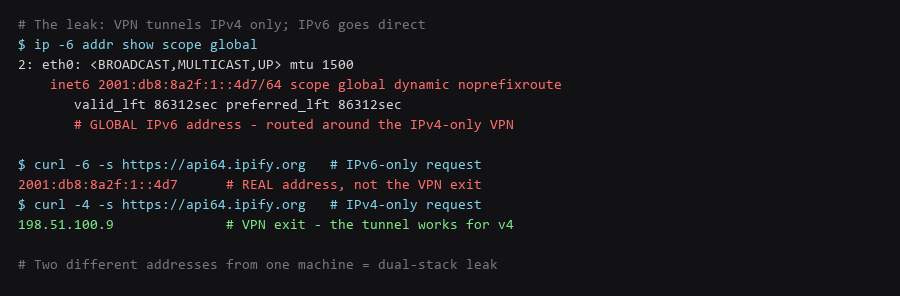
A VPN that only tunnels IPv4 is the most common configuration, and it silently leaves IPv6 unprotected. Your machine keeps its native IPv6 address from the ISP, and modern operating systems prefer IPv6 when both are available. The result is that your traffic exits through the VPN on IPv4 and directly to the destination on IPv6 — often within the same session, so a site can see both your VPN address and your real one.
Leak test sites that only check IPv4 will not catch this. The check has to be made separately for each protocol, and the comparison is what matters: if the IPv4 address is the VPN exit and the IPv6 address is your ISP's, you are leaking.
This guide covers detecting the leak, disabling IPv6 on Linux, Windows, and macOS, and verifying it stays disabled across reboots — the step that matters, because NetworkManager, cloud-init, and router advertisements can all re-enable it silently.
1. Network Architecture & Data Flow
Test each protocol separately. A single combined test will show one address and hide the other — usually the one that matters.
# Force each protocol separately and compare
$ curl -4 -s https://api64.ipify.org   # IPv4 path
$ curl -6 -s https://api64.ipify.org   # IPv6 path

# On the same machine, these must both show the VPN exit address.
# Different addresses = the VPN is not tunnelling that protocol.

# List any global IPv6 address on an interface
$ ip -6 addr show scope global

# Which route would IPv6 traffic take?
$ ip -6 route show default

# Is the VPN client even configuring v6? Check its interface
$ ip -6 addr show dev tun0 2>/dev/null || echo 'tunnel has no IPv6'
# No IPv6 on the tunnel + broker has one = leak
Run this with the VPN connected. The -4 and -6 flags are what make the comparison meaningful; without them, the resolver decides and you cannot tell which path was taken.
| Symptom | What It Means | Fix |
|---|---|---|
| v6 address present, tunnel has none | IPv6 bypasses the VPN entirely | Disable IPv6 or choose a VPN with v6 support |
| v6 address differs from tunnel | Partial v6 support, traffic split | Confirm the tunnel carries all v6, or disable v6 |
| v6 works when tunnel is down | No IPv6 kill switch | Enable the VPN's kill switch, or disable v6 |
| v6 reappears after reboot | NetworkManager / RA re-enabled it | Persist the setting and disable RA acceptance |
2. Protocol & Configuration Deep-Dive
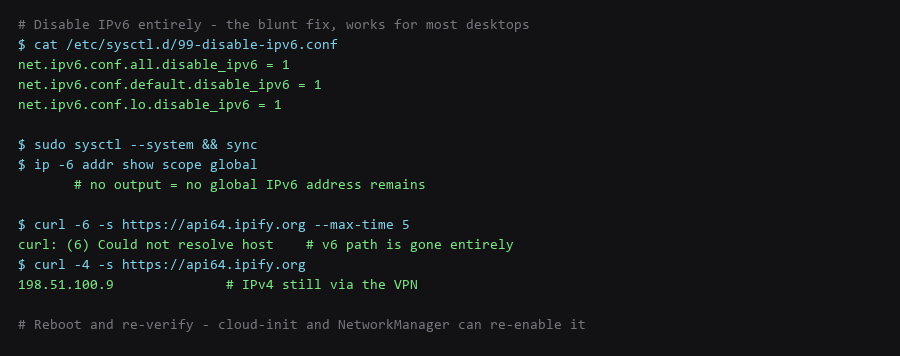
The sysctl approach is the blunt and reliable fix. Link-local addresses remain for local protocols, which is what most services actually need.
# /etc/sysctl.d/99-disable-ipv6.conf
net.ipv6.conf.all.disable_ipv6 = 1
net.ipv6.conf.default.disable_ipv6 = 1
net.ipv6.conf.lo.disable_ipv6 = 1

$ sudo sysctl --system

# If NetworkManager manages the interface, stop it re-enabling IPv6:
$ cat /etc/NetworkManager/conf.d/99-no-ipv6.conf
[connection]
ipv6.method=disabled
ipv6.addr-gen-mode=stable-privacy

$ sudo systemctl restart NetworkManager

# Reject router advertisements so the ISP cannot re-announce a prefix
$ echo 'net.ipv6.conf.all.accept_ra = 0' | sudo tee -a /etc/sysctl.d/99-disable-ipv6.conf
$ echo 'net.ipv6.conf.default.accept_ra = 0' | sudo tee -a /etc/sysctl.d/99-disable-ipv6.conf
$ sudo sysctl --system
The accept_ra lines are the ones people miss. Disabling IPv6 in sysctl stops the stack from using addresses, but without rejecting router advertisements the interface still processes them, and a NetworkManager restart can hand the address back. This is the most common reason IPv6 "reappears" after a reboot.
3. Traffic Verification & Leak Testing
The regkeys and network commands differ, but the goal is the same: remove the global v6 path so traffic cannot bypass the tunnel.
# ---- Windows (PowerShell as Administrator) ----
# Disable IPv6 on all adapters via the registry
New-ItemProperty -Path "HKLM:\SYSTEM\CurrentControlSet\Services\Tcpip6\Parameters" `
    -Name DisabledComponents -PropertyType DWord -Value 0xFF -Force
Restart-Computer

# Verify: no global IPv6 address should remain
Get-NetIPAddress -AddressFamily IPv6 | Where-Object { $_.PrefixOrigin -ne 'WellKnown' }

# ---- macOS ----
# Disable on a specific service (Wi-Fi shown as an example)
$ networksetup -setv6off "Wi-Fi"
$ networksetup -getinfo "Wi-Fi" | grep -i ipv6
# Expect: IPv6: off

# Verify no global v6 address
$ ifconfig en0 | grep inet6 | grep -v fe80
On Windows, the DisabledComponents value of 0xFF disables all IPv6 components except the loopback interface, which is what you want — several Windows services depend on loopback v6. A partial value can leave preferred-address selection intact and continue leaking.
4. Troubleshooting Failure Modes
Turning IPv6 off entirely is the simplest fix, but it is not the only option, and on some networks it is not the best one — some ISPs are IPv6-native and disabling it degrades performance.
| Approach | Effectiveness | Tradeoff |
|---|---|---|
| Disable IPv6 locally | Complete for that host | Loses v6 performance and any v6-only service |
| VPN with IPv6 support | Complete, keeps v6 | Requires choosing a provider that tunnels v6 — many do not |
| Firewall blocking v6 egress | Blocks leaks, keeps v6 on LAN | Rules must cover all interfaces; easy to leave a gap |
| VPN kill switch covering v6 | Blocks leak when tunnel is up | Bypassed entirely when the tunnel is down or misconfigured |
The cleanest answer where it is available is a VPN that tunnels both protocols. Where it is not, local disabling is the reliable choice — the kill switch alone is insufficient because it is a runtime control that fails open.
# Firewall alternative: block all IPv6 egress but allow LAN
$ sudo ip6tables -A OUTPUT -d fe80::/10 -j ACCEPT
$ sudo ip6tables -A OUTPUT -d fc00::/7 -j ACCEPT
$ sudo ip6tables -A OUTPUT -j DROP

# Verify the rules survive and are applied
$ sudo ip6tables -L OUTPUT -n --line-numbers
Frequently Asked Questions
How do I know if my VPN supports IPv6?
Check whether the tunnel interface has a v6 address while connected: ip -6 addr show dev tun0. If there is no v6 on the tunnel and your machine has a global v6 address, the provider is not tunnelling v6 and you are leaking. Many providers disable v6 on their side to avoid exactly this, which is safer but still means you should disable it locally.
Does disabling IPv6 break anything?
Rarely on a home network. Local link-local addressing still works, so service discovery and local networking are unaffected. The cases that break are specific: a network that is IPv6-only with no IPv4 fallback, and services that are v6-only. On typical dual-stack connections, disabling v6 costs nothing.
Is a VPN kill switch enough on its own?
No. A kill switch blocks traffic when the tunnel is down, but the common IPv6 leak happens while the tunnel is up — IPv4 goes through the tunnel and IPv6 goes direct, and the kill switch sees a healthy tunnel and permits both. Verify per protocol rather than trusting the switch.
Sources & References
- RFC 8200 — IPv6 Specification: datatracker.ietf.org/doc/html/rfc8200 — the protocol and address architecture
- RFC 4862 — IPv6 Stateless Address Autoconfiguration: datatracker.ietf.org/doc/html/rfc4862 — how addresses are assigned and why accept_ra matters
- RFC 4941 — Privacy Extensions: datatracker.ietf.org/doc/html/rfc4941 — temporary addresses and their limits
- Linux IPv6 sysctl options: docs.kernel.org/networking/ip-sysctl — disable_ipv6 and accept_ra semantics
- Microsoft — Configure IPv6: learn.microsoft.com — DisabledComponents values
Each check in this IPv6 trace walkthrough was validated end to end before writing it up; if a command behaves differently on your system, treat that as information, not as a failure to fix blindly.