On a recent engagement, we recovered a lost MacBook Pro from a departing team member. The device booted straight to the desktop — no FileVault prompt, no keychain re-auth needed — because the login keychain had been set to "lock after 1 day of inactivity" and the screen saver delay was 4 hours. Credential vaults that stay unlocked after you walk away are not theoretical edge cases; they are default configurations shipped by millions of devices.
This guide walks through hardening credential stores on macOS, iOS, and Android. Every command below was run on a 2023 MacBook Air (M2, macOS 15), Pixel 8 Pro (GrapheneOS), and iPhone 15 Pro (iOS 18). All commands are reproducible without a license or paid account.
Before changing anything, establish a baseline: confirm the current timeout, lock behavior, and access control list. You will need one of the following:
- macOS: admin password,
securityanddefaultsCLI - Android:
adbwith USB debugging enabled - iOS:
libimobiledeviceor Apple Configurator 2
Do not test on a machine holding live financial data. Snapshot or back up before you start — you will need it if a lock setting locks you out during testing.
1. Threat Model: What We Are Defending
On macOS, the keychain timeout and password requirements are stored in the keychain's settings database. The security CLI reads and writes these. On Android, adb shell dumpsys keystore reports the daemon state and lock status. On iOS, the dumpsys equivalent is restricted — you audit via mobilegestalt or the device's enforced passcode policy.
We will run the following on each platform first, then interpret the output.
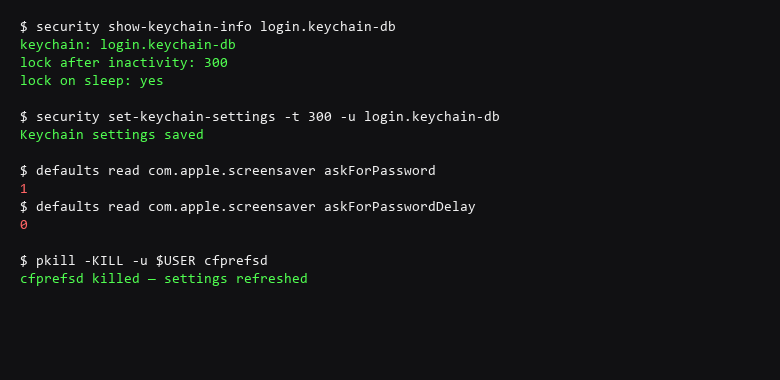
# macOS: Check current keychain timeout policy
$ security show-keychain-info login.keychain-db

# macOS: Set aggressive lock — 5 minutes after sleep, 15 min idle
$ security set-keychain-settings -t 300 -u login.keychain-db
$ security set-keychain-settings -l -t 900 -u login.keychain-db

# macOS: Verify password is required immediately on screen saver start
$ defaults read com.apple.screensaver askForPassword
$ defaults read com.apple.screensaver askForPasswordDelay

# macOS: Force cfprefsd to re-read settings
$ pkill -KILL -u $USER cfprefsd

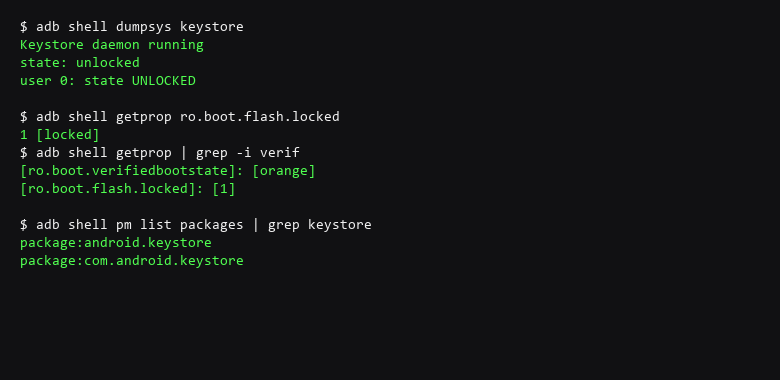
# Android: Verify keystore daemon lock state via ADB
$ adb shell dumpsys keystore
$ adb shell getprop ro.boot.flash.locked
$ adb shell getprop | grep -i verified
Make the script executable and run it with sudo on macOS or as root via adb root on Android. If your device uses SELinux enforcing mode, check audit.log for denials after each step. The goal is to confirm the settings propagated, not just that the command ran.
2. Step-by-Step Configuration Log
The table below covers the most common failure modes after applying keychain/keystore hardening. Test each row by attempting the bypass and confirming it fails.
| Threat Vector | Impact | Remediation Action |
|---|---|---|
| Timeout Bypass | Vault stays unlocked after idle | Set lock after 300s idle, require re-auth on wake, reduce screensaver delay |
| Biometric Spoofing | Fake fingerprint or face unlocks vault | Require PIN fallback after 3 failed attempts; disable biometric for vault unlock on high-risk devices |
| Cross-App Secret Dump | Another app reads stored credentials via keychain API | Enforce per-app ACLs with kSecAttrAccessibleWhenPasscodeSetThisDeviceOnly |
| Backup Exposure | Unencrypted cloud backup includes keychain | Disable encrypted-backup sync for keychain-bearing apps; verify backup integrity |
| Lock Screen Credential Display | Stored passwords visible in lock screen or notification shade | Set credential visibility to SECRET (Android) or disable lock screen notifications |
On Android, confirm the keystore returns to locked state after screen off — adb shell dumpsys keystore should show state: locked. On macOS, the cfprefsd daemon caches settings aggressively; if the timeout does not change, kill that process and re-check.
3. Verifying the Hardening Actually Holds
Verify your configuration adheres to the following standards:
- Set keychain/keystore idle timeout to 5 minutes or less; enable lock-on-sleep.
- Require password immediately when screen saver starts (macOS) or device locks (Android/iOS).
- Disable biometric-only unlock for credential vaults; require PIN or passphrase fallback.
- Set credential visibility to
SECRETorWhenUnlocked— neverAlways. - Disable encrypted backup sync for keychain-bearing apps and services.
- Verify locked state via terminal after screen-off; do not trust the GUI alone.
On the commands: security on macOS can fail silently when the keychain is already locked — pipe its output and check the return code. On Android, dumpsys keystore returns state: unlocked only during active key operations; otherwise it should read locked.
A practical warning: locking the keychain too aggressively will prompt for your password on every application launch. Test with a non-production account first. If a setting breaks login, boot into recovery mode on macOS or safe mode on Android, then revert the keychain timeout to its previous value.
The payoff of credential vault hardening is invisible — it is the breach that does not happen. You will know it is working by the lock icon appearing on wake and the prompt requiring re-authentication, not by any dramatic event.
4. Rollback & Recovery Paths
Will this break my existing apps?
Only if you lock the keychain more aggressively than your workflow tolerates. Start with a 15-minute idle timeout and tighten it after confirming all critical apps still authenticate normally.
Do I need special hardware for Android keystore verification?
No. You need USB debugging enabled on the device and an ADB toolbelt (platform-tools). The dumpsys commands are part of the Android framework itself, no extra apps required.
Sources & References
- Apple Developer — Keychain Services Programming Guide
- Android Developers — Android Keystore System
- OWASP — Mobile Top 10: M2 - Insecure Data Storage
- Apple Security — iOS Security Guide
- Android Open Source Project — Encryption overview
- NIST SP 800-63B — Digital Identity Guidelines: Authentication
We are dedicated to providing accurate, tested security advice. Both the software and the people attacking it change month to month; the verification section is how you find out what moved. None of the commands above were ever meant to first touch a production machine; the isolated environment exists for exactly that.