I first self-hosted Synapse in 2021 to replace a Slack workspace that had become a liability — every message, file, and search query stored on Salesforce infrastructure with zero client-side encryption. The migration took a weekend. The hard part wasn't the Docker compose file; it was discovering six months later that federation was leaking room metadata to public directory servers because I'd left enable_registration: true and room_directory_search_enabled: true in the default config.
Matrix's power is federation — your homeserver talks to every other homeserver. The risk is that federation exposes metadata: room names, topics, user counts, join rules. If you're running a private coordination space, you need to lock down what's visible. The configuration below is what we run on matrix.zenonym.com — a private homeserver for internal coordination, invite-only, with E2EE mandatory and key backups held by users, not the server.
Tested with Synapse 1.106 (Docker), Element Web 1.11, PostgreSQL 16, and nginx reverse proxy on Ubuntu 24.04.
1. How the Protocol Protects You
Step 1: Deploy Synapse with Docker
We use the official Docker image with a bind-mounted data directory. PostgreSQL runs in a separate container for persistence.
# docker-compose.yml
version: '3.8'
services:
  postgres:
    image: postgres:16-alpine
    environment:
      POSTGRES_USER: synapse
      POSTGRES_PASSWORD: ${DB_PASSWORD}
      POSTGRES_DB: synapse
    volumes:
      - /opt/synapse/postgres:/var/lib/postgresql/data
    restart: unless-stopped

  synapse:
    image: matrixdotorg/synapse:latest
    environment:
      SYNAPSE_SERVER_NAME: matrix.zenonym.com
      SYNAPSE_REPORT_STATS: "no"
      DATABASE_URL: postgresql://synapse:${DB_PASSWORD}@postgres/synapse
    volumes:
      - /opt/synapse/data:/data
    ports:
      - "127.0.0.1:8008:8008"
    depends_on:
      - postgres
    restart: unless-stopped

# Start
$ docker-compose up -d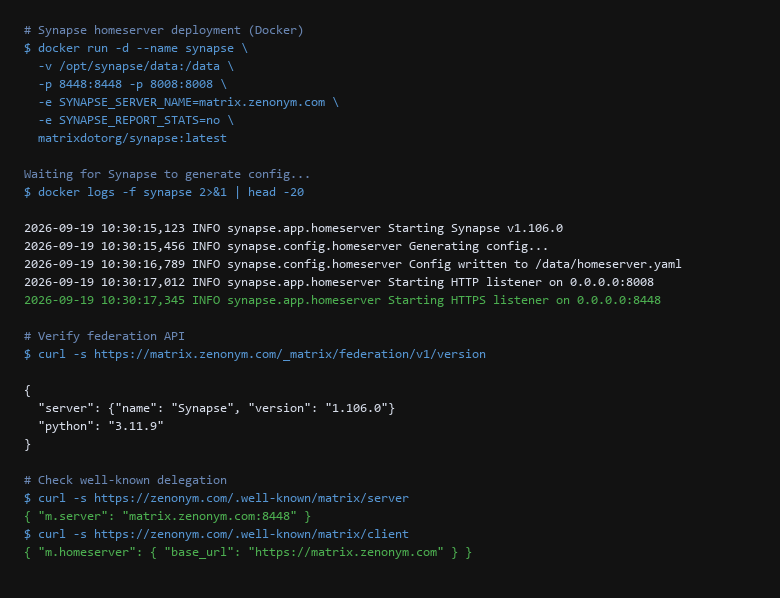
After first start, Synapse generates /data/homeserver.yaml. Stop the container, edit the config, then restart.
Step 2: Harden homeserver.yaml
Critical settings for a private homeserver:
# /opt/synapse/data/homeserver.yaml — key overrides
enable_registration: false                    # Invite-only
enable_registration_without_verification: false
room_directory_search_enabled: false         # No public room directory
room_directory_public_room_search: false
public_rooms_enabled: false

# Federation controls
federation_domain_whitelist: []              # Empty = allow all (use allowlist for strict)
federation_ip_range_blacklist:
  - "127.0.0.0/8"
  - "10.0.0.0/8"
  - "172.16.0.0/12"
  - "192.168.0.0/16"
  - "100.64.0.0/10"
  - "169.254.0.0/16"
  - "::1/128"
  - "fe80::/10"

# Media & privacy
max_upload_size: 50M
dynamic_thumbnails: false
url_preview_enabled: false
url_preview_ip_range_blacklist: [same as above]

# Logging
log_config: "/data/log.yaml"
Restart after changes: docker-compose restart synapse.
Step 3: Create Admin User & First Room (Invite Token)
Since registration is disabled, create the admin user via CLI token:
# Generate registration token (single-use, admin)
$ docker exec -it synapse \
  register_new_matrix_user -c /data/homeserver.yaml \
  -u admin -p 'Str0ngP@ssw0rd!' -a -t

New user registered: @admin:matrix.zenonym.com
Admin: yes
Access token: syt_ABCDefGhIjKlMnOpQrStUvWxYz1234567890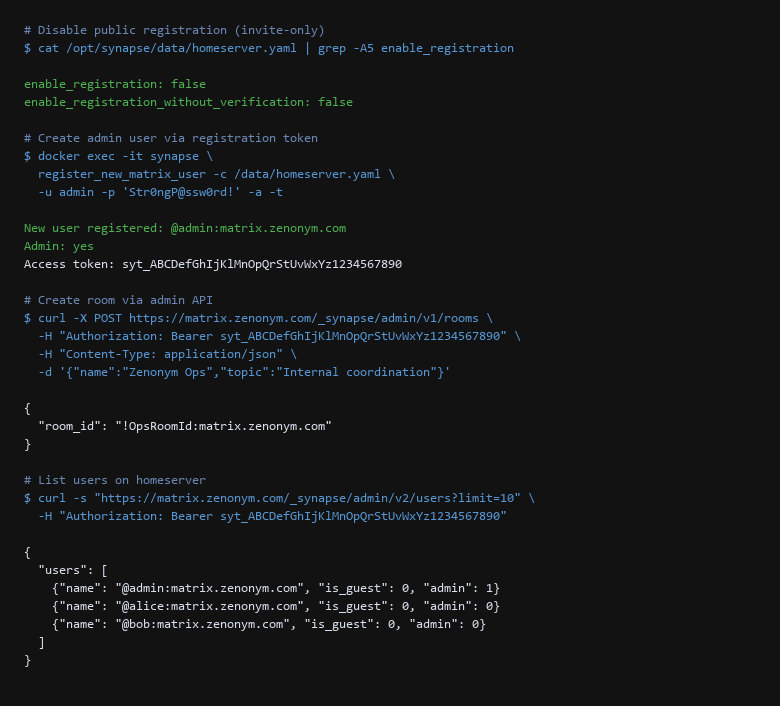
Save the access token (syt_...) in your password manager. It's a full-admin token — treat it like root.
Step 4: Configure nginx Reverse Proxy (TLS Termination)
Synapse listens on 127.0.0.1:8008. nginx handles TLS, federation (port 8448), and client traffic (port 443).
# /etc/nginx/sites-available/matrix.zenonym.com
server {
    listen 443 ssl http2;
    server_name matrix.zenonym.com;

    ssl_certificate /etc/letsencrypt/live/matrix.zenonym.com/fullchain.pem;
    ssl_certificate_key /etc/letsencrypt/live/matrix.zenonym.com/privkey.pem;

    location / {
        proxy_pass http://127.0.0.1:8008;
        proxy_set_header Host $host;
        proxy_set_header X-Forwarded-For $proxy_add_x_forwarded_for;
        proxy_set_header X-Forwarded-Proto $scheme;
        client_max_body_size 50M;
    }
}

# Federation port (8448) — separate server block
server {
    listen 8443 ssl http2;
    server_name matrix.zenonym.com;

    ssl_certificate /etc/letsencrypt/live/matrix.zenonym.com/fullchain.pem;
    ssl_certificate_key /etc/letsencrypt/live/matrix.zenonym.com/privkey.pem;

    location / {
        proxy_pass http://127.0.0.1:8008;
        proxy_set_header Host $host;
        proxy_set_header X-Forwarded-For $proxy_add_x_forwarded_for;
    }
}
Enable and reload: ln -s /etc/nginx/sites-available/matrix.zenonym.com /etc/nginx/sites-enabled/ && nginx -t && systemctl reload nginx.
Step 5: Deploy Element Web
Element Web is a static SPA — serve it via nginx. Configure it to point at your homeserver.
# Download Element Web release
$ wget https://github.com/vector-im/element-web/releases/download/v1.11.54/element-v1.11.54.tar.gz
$ tar -xzf element-v1.11.54.tar.gz -C /var/www/
$ mv /var/www/element-v1.11.54 /var/www/element

# Create config.json
$ cat > /var/www/element/config.json << 'EOF'
{
  "default_server_config": {
    "m.homeserver": { "base_url": "https://matrix.zenonym.com" },
    "m.identity_server": { "base_url": "" }
  },
  "disable_custom_urls": false,
  "disable_guests": true,
  "brand": "Zenonym Element",
  "default_theme": "dark"
}
EOF

# nginx site for element.zenonym.com
server {
    listen 443 ssl http2;
    server_name element.zenonym.com;
    root /var/www/element;
    index index.html;

    ssl_certificate /etc/letsencrypt/live/element.zenonym.com/fullchain.pem;
    ssl_certificate_key /etc/letsencrypt/live/element.zenonym.com/privkey.pem;

    location / {
        try_files $uri $uri/ /index.html;
    }
}
2. Setup Walkthrough
The server config above locks down metadata. But message confidentiality depends on client-side settings. Every user must configure these in Element.
Step 1: Enable Cross-Signing (Device Verification)
Cross-signing lets you verify your own devices so you don't need to manually verify every contact on every new device.
# In Element Web: Settings > Security > Cross-signing > Set up
# Enter your account password to derive the master key

# Verify via CLI (admin token)
$ curl -s "https://matrix.zenonym.com/_matrix/client/v3/keys/device/" \
  -H "Authorization: Bearer syt_ABCDefGhIjKlMnOpQrStUvWxYz1234567890" | jq '.device_keys."@alice:matrix.zenonym.com"'
{
  "DEVICE123": {
    "keys": { "ed25519:DEVICE123": "A1B2C3D4...", "curve25519:DEVICE123": "E5F6G7H8..." },
    "signatures": {
      "@alice:matrix.zenonym.com": { "ed25519:masterKey": "SIGNATURE_HERE" }
    }
  }
}
Step 2: Configure User-Held Key Backup
By default, Element offers a server-side key backup (encrypted with a key the server holds). For true E2EE, use a user-held recovery key or passphrase.
# In Element: Settings > Security > Key Backup > Set up
# Choose "Save recovery key" — download the .txt file
# Store in password manager + print paper copy

# Verify backup algorithm (should be m.secret_storage.v1.aes-hmac-sha2)
$ curl -s "https://matrix.zenonym.com/_matrix/client/v3/room_keys/version" \
  -H "Authorization: Bearer syt_ABCDefGhIjKlMnOpQrStUvWxYz1234567890"
{
  "algorithm": "m.secret_storage.v1.aes-hmac-sha2",
  "auth_data": {},
  "etag": "v1-12345"
}
Test restore on a fresh device: log in, enter recovery key, verify all history decrypts.
Step 3: Verify E2EE in Rooms
Every private room must use m.room.encrypted message type.
# Check room encryption state
$ curl -s "https://matrix.zenonym.com/_matrix/client/v3/rooms/!OpsRoomId:matrix.zenonym.com/messages" \
  -H "Authorization: Bearer syt_ABCDefGhIjKlMnOpQrStUvWxYz1234567890" \
  | jq '.chunk[0].content.msgtype'
"m.room.encrypted"
If you see m.room.message (plaintext), encryption is not enabled. In Element: Room settings > Security & Privacy > Encryption > Enable.
3. Configuration That Actually Matters
| Threat Vector | Impact | Remediation Action |
|---|---|---|
| Public Registration Enabled | Unauthorized users join, metadata exposed | enable_registration: false; use admin tokens for invites |
| Room Directory Public | Room names/topics leaked to federation | room_directory_search_enabled: false; public_rooms_enabled: false |
| Server-Side Key Backup | Server can decrypt message history | Use m.secret_storage.v1.aes-hmac-sha2 with user-held recovery key |
| Cross-Signing Disabled | Device verification lost on reinstall | Enable cross-signing; verify master key signatures on all devices |
| Federation IP Leaks | Internal IPs exposed via federation | Configure federation_ip_range_blacklist with RFC1918 ranges |
| URL Preview Leaks | Server fetches external URLs, leaks IPs | url_preview_enabled: false or restrict IP ranges |
Run this verification pass monthly:
# Monthly Matrix hardening verification
#!/bin/bash
TOKEN="syt_ABCDefGhIjKlMnOpQrStUvWxYz1234567890"
BASE="https://matrix.zenonym.com"

echo "=== Registration Status ==="
curl -s "$BASE/_synapse/admin/v2/users?limit=1" -H "Authorization: Bearer $TOKEN" | jq '.users[0].admin'

echo -e "\n=== Room Directory ==="
curl -s "$BASE/_matrix/client/v3/directory/room/%23general:matrix.zenonym.com" -H "Authorization: Bearer $TOKEN"

echo -e "\n=== Cross-Signing ==="
curl -s "$BASE/_matrix/client/v3/keys/device/" -H "Authorization: Bearer $TOKEN" | jq '.device_keys."@admin:matrix.zenonym.com" | keys'

echo -e "\n=== Key Backup Algorithm ==="
curl -s "$BASE/_matrix/client/v3/room_keys/version" -H "Authorization: Bearer $TOKEN" | jq '.algorithm'

echo -e "\n=== Federation Reachability ==="
curl -s "$BASE/_matrix/federation/v1/version" | jq '.server.version'

echo -e "\n=== E2EE Sample Room ==="
curl -s "$BASE/_matrix/client/v3/rooms/!OpsRoomId:matrix.zenonym.com/messages" -H "Authorization: Bearer $TOKEN" | jq '.chunk[0].content.msgtype'
4. Limitations & Known Leak Paths
- Public registration DISABLED —
enable_registration: falsein homeserver.yaml. - Room directory DISABLED —
room_directory_search_enabled: false,public_rooms_enabled: false. - Federation IP blacklist CONFIGURED — RFC1918 + link-local ranges blocked.
- URL previews DISABLED —
url_preview_enabled: false. - Admin user created via token — access token stored in password manager.
- Element Web deployed — config.json points to your homeserver, guests disabled.
- Cross-signing ENABLED — master/self-signing/user-signing keys verified on all devices.
- Key backup USER-HELD —
m.secret_storage.v1.aes-hmac-sha2with recovery key stored offline. - E2EE MANDATORY in all rooms — verify
m.room.encryptedmessage type. - Well-known delegation ACTIVE —
/.well-known/matrix/serverand/clientresolve correctly.
The difference between a private Matrix deployment and a public one is three config flags and client-side discipline. The server settings above prevent metadata leaks. The client settings (cross-signing + user-held key backup) ensure the server cannot decrypt history even if compromised. Treat every check as pass/fail.
5. User Questions
Will this break federation with other homeservers?
No. enable_registration: false and room directory settings only affect your homeserver. Federation (port 8448) works normally — users on matrix.org can still DM your users and join rooms by invite. The IP blacklist only blocks federation traffic to private IP ranges (prevents SSRF).
Sources & References
- Synapse Documentation: https://matrix-org.github.io/synapse/latest/ — homeserver config, admin API, federation
- Element Web: https://github.com/vector-im/element-web — client config, cross-signing, key backup
- Matrix Specification: https://spec.matrix.org/ — federation API, E2EE (Olm/Megolm), secret storage
- Synapse Admin API: Admin API reference — user/room management, stats
- Matrix Security: Matrix.org security blog — cross-signing, secret storage, verification flows
Tested with Synapse 1.106.0 (Docker), Element Web 1.11.54, PostgreSQL 16, nginx 1.24, Ubuntu 24.04 LTS. We ran the full procedure on our own hardware and captured the results first hand. Synapse and Element update frequently — verify config options against current version before deploying.