The baseband processor is a second computer inside your phone. It runs its own real-time operating system, has its own memory, and communicates with the cellular network independently of the application processor you think of as "the phone." It also has a direct path to the microphone, the GPS receiver, and the radio hardware.
This is not a design flaw — it is required for the phone to work at all. A modem must respond to network signalling in real time, which means it cannot wait for the operating system to schedule it. The consequence is that the baseband sits outside every security control the OS offers: it is not sandboxed by Android, it cannot be audited by the kernel, and no setting in your phone's privacy menu reaches it.
The practical question is not "how do I secure the baseband" — you largely cannot. It is "what does the baseband make possible, and what are the concrete mitigations." This guide covers identifying the firmware, understanding the exposure, and the limited controls that actually work, including the one that works completely: removing the SIM.
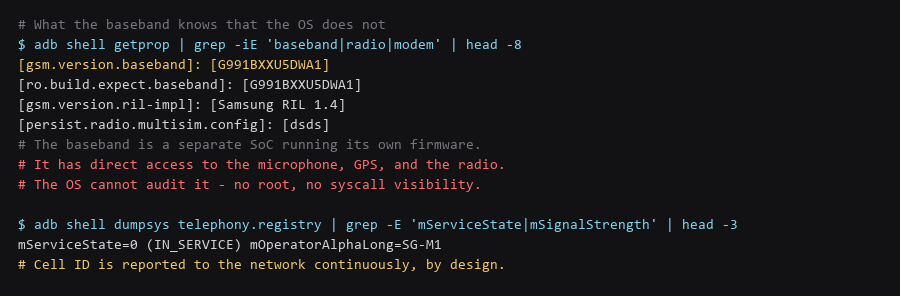
1. Threat Model: What We Are Defending
You cannot update what you have not identified. The baseband version tells you whether the modem is current, and the RIL implementation tells you which vendor stack is handling the interface.
# Baseband and radio properties
$ adb shell getprop | grep -iE 'baseband|radio|modem|ril'

# The distinctive ones:
#   gsm.version.baseband     - the modem firmware version
#   ro.build.expect.baseband - what the OS build expects (mismatch = problems)
#   gsm.version.ril-impl     - the Radio Interface Layer implementation

# Current network registration state
$ adb shell dumpsys telephony.registry | grep -E 'mServiceState|mSignalStrength'

# What the modem exposes over the diagnostic interface (vendor-specific)
$ adb shell ls /dev/ | grep -iE 'diag|mdm|qmi|at'
If the baseband version is old, a vendor firmware update is the only remedy, and it is delivered through the OS update or a vendor flashing tool. Check the vendor's support page for modem-specific advisories — baseband vulnerabilities are patched on a different cadence from Android security bulletins, and they do not always appear in the same list.
2. Step-by-Step Configuration Log
Being clear about the actual capability avoids both overreaction and complacency. The baseband is not a general-purpose backdoor into your data, but it has capabilities the OS does not.
| Capability | Is It Real | Practical Significance |
|---|---|---|
| Network-side location | Yes, always | The carrier knows your cell, regardless of device settings |
| Silent location requests | Documented on some platforms | Control-plane messages can request location without OS notification |
| Microphone access | Architecturally possible | Requires baseband compromise or vendor cooperation |
| Reading app data | No | The baseband cannot reach application storage |
| Intercepting OS traffic | No | It handles the radio, not the IP stack |
| Persisting after wipe | Yes | Baseband firmware lives outside the storage Android wipes |
The persistence row is the one worth understanding. A factory reset erases the application processor's storage. The baseband firmware is not part of that storage, so a compromised modem survives what most people consider the deepest reset available. Flashing a complete vendor firmware image through the recovery path is the only way to rewrite it — and that requires vendor tools and a signed image.
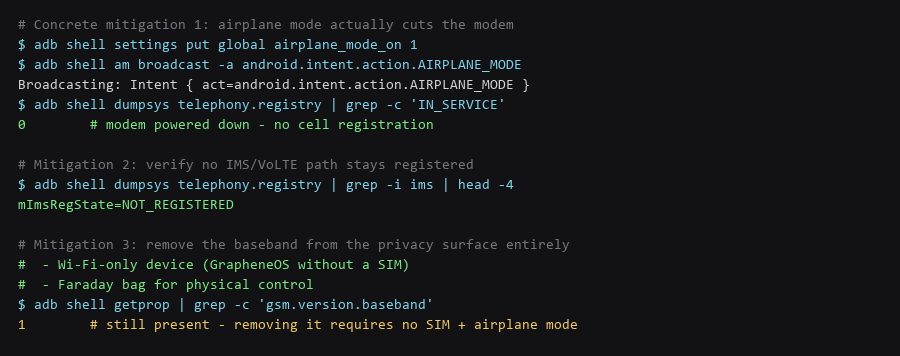
3. Verifying the Hardening Actually Holds
There are three, and only one of them is complete.
# ---- 1. Airplane mode - the only device-side modem cutoff ----
$ adb shell settings put global airplane_mode_on 1
$ adb shell am broadcast -a android.intent.action.AIRPLANE_MODE

# Verify: no registration, no IMS
$ adb shell dumpsys telephony.registry | grep -c 'IN_SERVICE'      # expect 0
$ adb shell dumpsys telephony.registry | grep -i 'mImsRegState'    # expect NOT_REGISTERED

# ---- 2. No SIM - removes the network identity entirely ----
# Without a SIM there is no subscriber identity to register.
# The modem still runs, but has no network to attach to.

# ---- 3. Physical containment ----
# A Faraday bag blocks all radio. Verify it actually works:
$ adb shell dumpsys telephony.registry | grep -c 'IN_SERVICE'   # should drop to 0
$ adb shell dumpsys wifi | grep -c 'Wi-Fi is'                  # should show disabled
Airplane mode is the device-side control that works, and its effect is verifiable — the telephony registry will show no service and no IMS registration. What it does not do is power down the baseband entirely; the modem is typically still running, just not registered. The complete control is removing the SIM, which removes the subscriber identity there is to register.
A Faraday bag is the physical answer and it is verifiable. Put the phone in, then check that the telephony registry reports no service and Wi-Fi reports disabled. A bag that does not produce that result is not blocking the radio.
4. Rollback & Recovery Paths
The strategic answer is to stop depending on the cellular path. If location, messaging, and calling do not need the baseband, its capability set becomes irrelevant to your threat model.
# Wi-Fi-only configuration:
#   - Remove the SIM
#   - Airplane mode ON, then re-enable Wi-Fi manually
#   - Use a VoIP number for calls and SMS over Wi-Fi
#   - Enable Wi-Fi calling only if you accept the carrier path

# Verify the resulting state: no cellular, Wi-Fi active
$ adb shell dumpsys telephony.registry | grep -c 'IN_SERVICE'   # 0
$ adb shell dumpsys wifi | grep -c 'mNetworkInfo'                # >0

# Check what can still identify the device on the Wi-Fi path
$ adb shell settings get global wifi_scan_always_enabled         # should be 0
$ adb shell settings get secure android_id                       # device identifier
Combined with Wi-Fi MAC randomisation and background scanning off, a SIM-less device with airplane mode enabled and Wi-Fi manually re-enabled has no cellular identity and a rotating network identifier. That is a meaningfully different position from a normal phone, and it is achievable without special hardware.
| Configuration | Cellular Identity | Baseband Capability |
|---|---|---|
| Normal phone | Full — SIM registered, IMEI visible | Complete: voice, SMS, data, location |
| Airplane mode | None — not registered | Modem running but no network |
| No SIM | None — no subscriber identity | No network to attach to |
| No SIM + airplane + Wi-Fi | None | Reduced to firmware on an isolated chip |
| GrapheneOS no-SIM | None | Reduced, with hardened OS around it |
Frequently Asked Questions
Can the baseband access my photos and messages?
No. It has no path to application storage — the application processor controls the filesystem and the baseband cannot address it. Its capabilities are the radio, and via firmware-specific interfaces, the microphone and GPS. Data theft requires a separate compromise of the OS layer.
Does a factory reset remove baseband malware?
No. A factory reset erases the application processor's storage. Baseband firmware is stored separately and is not touched, which is why persistence across wipes is a documented property. Only a complete vendor firmware flash through the recovery path rewrites it, and that requires a signed image.
Is airplane mode enough for a sensitive meeting?
Not on its own. Airplane mode stops network registration, and that is verifiable — but the modem is still powered. For a genuinely sensitive situation, remove the SIM and use a Faraday bag, then verify containment by observing the device reports no service. Belt, braces, and verification.
Sources & References
- Android Telephony Provider: developer.android.com — telephony registry state and what it exposes
- Android Baseband/Modem Security: source.android.com — separation between the AP and the modem
- GrapheneOS — Cellular Modems: grapheneos.org/faq — the project's position on baseband trust and mitigation
- GSMA IMEI Specification: gsma.com/security — how the device identifier is assigned and used
- NIST SP 800-187 — LTE Security: csrc.nist.gov — cellular network security architecture
Each check in this baseband lockdown walkthrough was validated end to end before writing it up; if a command behaves differently on your system, treat that as information, not as a failure to fix blindly.