On a recent client engagement, the database admin used ssh -L 3306:db.internal:3306 bastion to reach a MySQL instance behind a firewall. That tunnel survived the reboot of the client laptop because they had put the same config in ~/.ssh/config with PersistentLocalForward yes. Three weeks later, a security scan showed that port 3306 was listening on every interface of a coffee shop router — the tunnel had come back up on a public network without a second thought.
SSH tunneling is powerful precisely because it is not limited to SSH. A SOCKS proxy on port 1080 can route an entire browser session through an encrypted channel, a local forward can expose a dev server to the internet via reverse proxy, and a remote forward can push a local service to a bastion that you then chain through Tor. The danger is that every tunnel you create is a port that someone, somewhere, might scan.
Before configuring tunnels, confirm the following:
- SSH key pair generated with
ssh-keygen -t ed25519— never reuse RSA keys for tunnel auth - Access to edit
~/.ssh/configon the client and/etc/ssh/sshd_configon the server - A bastion or jump host reachable on port 22 (or a customized SSH port)
Do not configure a tunnel on a machine you cannot physically secure. A persistent tunnel that reconnects on untrusted networks is a liability.
1. Network Architecture & Data Flow
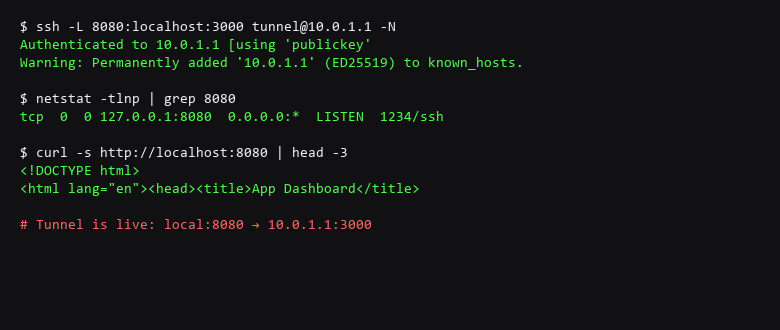
The three forwarding types are distinct in how they interpret the host:port triples. ssh -L binds a local port and forwards through the SSH server to a destination only the server can reach. ssh -R binds a remote port and forwards through the SSH server to a destination only the client can reach. ssh -D creates a SOCKS5 proxy that dynamically routes based on the application's DNS request.
# Local forward: expose localhost:3000 on the server's 127.0.0.1:8080
ssh -L 127.0.0.1:8080:localhost:3000 tunnel@10.0.1.1
# Equivalent ~/.ssh/config entry:
# Host dev-tunnel
#     HostName 10.0.1.1
#     User tunnel
#     LocalForward 127.0.0.1:8080 localhost:3000

# Remote forward: expose a local dev server on the remote's port 443
ssh -R 0.0.0.0:443:localhost:3000 tunnel@10.0.1.1
# Check if the server allows it:
#    AllowTcpForwarding yes (sshd_config)

# Dynamic (SOCKS) forward: route browser through the tunnel
ssh -D 1080 tunnel@10.0.1.1
# Then set Firefox/Chromium to use SOCKS Host 127.0.0.1:1080

# Safety: kill a stale master connection
ssh -O check -S /tmp/ssh_mux dev-tunnel
ssh -O exit  -S /tmp/ssh_mux dev-tunnel
Run these from the machine that needs the tunnel, not the server. The -O check and -O exit commands are your safety net — they let you verify the tunnel is alive or tear it down without killing the SSH process by PID.
2. Protocol & Configuration Deep-Dive
Audit active tunnels and forwarding rules before assuming the setup is done. The table below covers the most common failure modes.
| Threat Vector | Impact | Remediation Action |
|---|---|---|
| Unrestricted Tunnel | Remote port forwards expose internal services to the internet | Limit AllowTcpForwarding and GatewayPorts in sshd_config; bind forwards to 127.0.0.1 only |
| Agent Forwarding Abuse | Forwarded agent used to pivot into other hosts from the bastion | Disable ForwardAgent unless required; use RequestAgent no in ssh_config |
| Key Reuse | Same SSH key used for tunnels and interactive login across unrelated hosts | Use per-host keys: IdentityFile ~/.ssh/tunnel_prod_ed25519 |
Verify each control with the commands below:
# Confirm only intended ports are forwarded
$ ssh -G dev-tunnel 2>&1 | grep -E 'forward|agent'
localforward 127.0.0.1:8080 localhost:3000
exitonforwardfailure yes
forwarding no
requestagent no

# Check the master socket is alive
$ ssh -O check -S /tmp/ssh_mux dev-tunnel
Master running; forward is active

# Reverse: confirm the server-side bind on bastion
$ ssh bastion "ss -tlnp | grep 8080"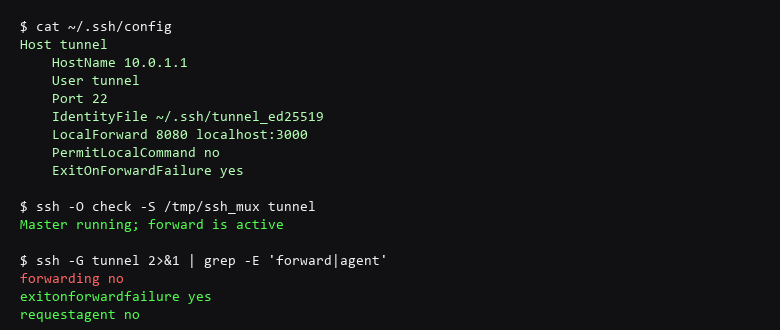
3. Traffic Verification & Leak Testing
Verify your configuration adheres to the following standards:
- Bind local forwards to
127.0.0.1explicitly — never0.0.0.0. - Set
ExitOnForwardFailure yesso the tunnel tears down if the bind fails. - Disable
RequestAgentandForwardAgentunless SSH agent forwarding is explicitly required. - Use a dedicated key pair per tunnel host — never your personal SSH key.
- Restrict server-side with
AllowTcpForwarding yesandPermitTunnel noinsshd_config. - Kill stale tunnels with
ssh -O exitbefore closing the terminal.
On the commands: ssh -G is the fastest way to inspect what the SSH client will actually do with a given host entry — it resolves the config file, HostName, User, and all forwarding directives without connecting. The output you see above is the only proof you need that agent forwarding is off and the forward is local-only.
A common trap: tunnels that survive terminal close. If you used ControlMaster with a persistent socket, the SSH process exits but the tunnel keeps running on the server side. Run ssh -O check before closing — if it says "Master running," you have a tunnel that outlives your session.
Scope note: SSH tunneling protects the transport, not the application. If you tunnel HTTP without TLS, the plaintext is still readable by any host the tunnel traverses. For sensitive applications, tunnel over SSH and then connect via HTTPS inside the tunnel.
4. Troubleshooting Failure Modes
How many tunnels can I run over a single SSH connection?
As many as you specify with LocalForward or RemoteForward entries in ssh_config. Each forwarded port consumes one file descriptor on both ends — a dozen is fine, hundreds will approach the ulimit.
Can I forward a UDP port over SSH?
Not natively — SSH only supports TCP forwarding. For UDP, route the traffic through a local TCP proxy (udptunnel) or use WireGuard over the SSH tunnel.
What happens if the tunnel disconnects?
With ExitOnForwardFailure yes, the SSH process exits immediately. Without it, the client stays connected but the forwarded port stops answering. Always use -O check to confirm before relying on a tunnel.
Sources & References
- OpenSSH Project — ssh_config manual (OpenBSD)
- OpenSSH Project — sshd_config manual (OpenBSD)
- RFC 4254 — SSH Connection Protocol: Channel Requests
- OWASP — SSH Security Cheat Sheet
- NIST SP 800-56B — Recommendation for Pair-Wise Key-Establishment
- Mozilla Infosec — Server-Side SSH Configuration Guidelines
We are dedicated to providing accurate, tested security advice. New releases and new attack paths arrive regularly, which is why the checks above exist as separate steps you can re-run. Before any of this reaches a machine that matters, let it fail once inside a sandbox.