I migrated from authenticator apps to YubiKeys in 2021 after a SIM swap took over a colleague's Google Authenticator codes. The attacker didn't need malware — they just ported the phone number. TOTP codes delivered via SMS or generated on a phone are only as secure as the phone number. A YubiKey cannot be ported, phished (when used correctly), or extracted.
This guide covers three distinct YubiKey modes — each for a different use case:
| Mode | Protocol | Use Case | Supported Keys |
|---|---|---|---|
| FIDO2 / WebAuthn | CTAP2 / WebAuthn | Web login (Google, GitHub, Microsoft, password managers) | All YubiKey 5 series, Security Key series |
| PIV (Smart Card) | PIV / PKCS#11 | Windows Hello, macOS login, sudo, GPG signing | YubiKey 5 series (not Security Key) |
| SSH (FIDO2 resident keys) | OpenSSH 8.2+ / FIDO2 | GitHub, GitLab, server SSH — private key never leaves hardware | YubiKey 5 series, Security Key series |
1. How It Works: Design & Trade-offs
Before using any mode, set the three secrets that protect the key itself.
1.1 YubiKey Manager (GUI) — Easiest First Setup
# Install YubiKey Manager (cross-platform)
# Windows: winget install Yubico.YubiKeyManager
# macOS: brew install yubico-yubikey-manager
# Linux: sudo apt install yubikey-manager

# Open GUI: ykman-gui
# Or CLI (scriptable):
ykman info
1.2 Set FIDO2 PIN (Required for WebAuthn)
# FIDO2 PIN: 4-63 chars, alphanumeric + special. Required for credential creation.
ykman fido access change-pin
# Enter current PIN (default: none/empty on new key)
# Enter new PIN (e.g., 12-char alphanumeric)
# Confirm new PIN
1.3 Set PIV PIN and PUK (Required for Smart Card Mode)
# PIV PIN: 6-8 digits (legacy smart card constraint)
ykman piv access change-pin
# Default PIN: 123456
# Default PUK: 12345678
# Change both immediately

# PIV Management Key (9B/3DES or AES-256): protects slot configuration
ykman piv access change-management-key --algorithm AES256 --touch-policy ALWAYS
# Generates random 256-bit key, requires touch for management operations
1.4 Verify Firmware and Attestation
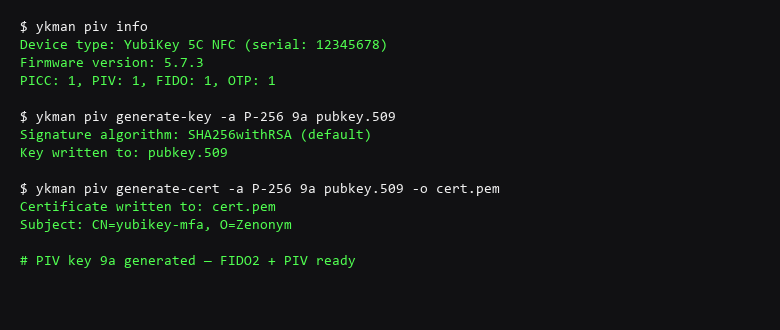
ykman info
# Device type: YubiKey 5C NFC
# Serial number: 12345678
# Firmware version: 5.7.0
# Form factor: Keychain
# Enabled USB interfaces: FIDO2, OTP, PIV
# Enabled NFC interfaces: FIDO2, OTP

# Verify attestation certificate (proves genuine Yubico hardware)
ykman fido attestation get
# Should show Yubico attestation cert chain ending in Yubico root CA
2. Key Generation & Configuration
This is the primary phishing-resistant login for web services. The key proves possession + user presence (touch) + origin binding (domain).
2.1 Register with Major Services
| Service | Registration Path | Backup Required |
|---|---|---|
| Google Account | Security → 2-Step Verification → Security Key | Register 2 keys (primary + backup) |
| GitHub | Settings → SSH and GPG keys → Security Keys | Register 2 keys + recovery codes |
| Microsoft Account | Security → Advanced security options → Security key | Register 2 keys |
| Bitwarden / 1Password | Settings → Two-Factor → Security Key | Register 2 keys + emergency kit |
| Proton Mail | Security → Two-Factor → Hardware Key | Register 2 keys + recovery phrase |
2.2 FIDO2 Resident Keys (Discoverable Credentials)
Resident keys store the credential ID on the YubiKey, enabling username-less login. Useful for password managers.
# List resident credentials on key
ykman fido credentials list

# Force resident key creation during registration (service must support)
# Most modern services auto-detect and prompt for resident key
2.3 Verify Origin Binding (Anti-Phishing Test)
# Test: Create a credential on a test domain, then try to use it on a lookalike
# 1. Register at webauthn.io (legitimate)
# 2. Try to authenticate at webauthn-phish.example.com (different domain)
# Result: Browser blocks — "The security key doesn't work with this site"
# This is origin binding working. Phishing proxy cannot relay the challenge.
3. Recovery & Failure Scenarios
PIV puts X.509 certificates and RSA/ECC keys in smart card slots (9A-9E). Windows Hello, macOS login, and GPG can use these.
3.1 Generate PIV Authentication Certificate (Slot 9A)
# Self-signed cert for local auth (Windows Hello, sudo)
ykman piv certificates generate -a rsa2048 -s "CN=YubiKey PIV Auth" 9a pubkey.pem
# Requires management key + touch

# For Windows Hello: Export cert, import to Windows Certificate Store (Current User → Personal)
# Then: Settings → Accounts → Sign-in options → Security Key → Set up
3.2 PIV for SSH (PKCS#11) — Alternative to FIDO2 SSH
# Generate RSA key in PIV slot 9C (Digital Signature)
ykman piv keys generate -a RSA2048 9c pubkey.pem
ykman piv certificates generate -a rsa2048 -s "CN=SSH Key" 9c pubkey.pem

# Get PKCS#11 URI for SSH
ykman piv info
# Use with ssh-agent:
ssh-agent -s
ssh-add -s /usr/lib/x86_64-linux-gnu/opensc-pkcs11.so  # Linux
ssh-add -s /usr/local/lib/opensc-pkcs11.so             # macOS
# Windows: use OpenSC middleware + Pageant replacement
3.3 PIV for GPG Signing (Subkey on Hardware)
# Move GPG signing subkey to PIV slot 9C (or 9D for encryption)
# Requires: gpg --expert --edit-key KEYID
# keytocard → select slot 9C (sign) or 9D (encrypt)

# Verify:
gpg --card-status
# Should show signing key in slot 9C, stub in keyring
4. Operational Discipline
OpenSSH 8.2+ supports ecdsa-sk and ed25519-sk — private key generated on and never leaves YubiKey. Requires touch per auth.
4.1 Generate FIDO2 SSH Key
# Generate ed25519-sk key (requires libfido2)
ssh-keygen -t ed25519-sk -O resident -O verify-required -C "user@host-yubikey"
# -O resident: stores key handle on YubiKey (username-less)
# -O verify-required: requires touch for every signature
# Touch YubiKey when prompted

# Output: id_ed25519_sk (public) + id_ed25519_sk (key handle only, no private key)
# Private key NEVER exists on disk — only on YubiKey
4.2 Deploy to Servers
# Copy public key to server
ssh-copy-id -i ~/.ssh/id_ed25519_sk.pub user@server

# Test (requires touch)
ssh user@server
# Touch YubiKey when LED flashes
4.3 GitHub/GitLab SSH with YubiKey
# Add public key to GitHub: Settings → SSH and GPG keys → New SSH key
# Paste contents of id_ed25519_sk.pub

# Test
ssh -T git@github.com
# Touch YubiKey → "Hi username! You've successfully authenticated..."
5. Key-Management Questions
You must have a backup YubiKey registered to every service. If you lose your only key, you are locked out.
5.1 Register Identical Credentials on Two Keys
# For each service, register BOTH keys during setup
# 1. Register primary key (YubiKey A)
# 2. Immediately register backup key (YubiKey B) — same service, same account

# For FIDO2 resident keys: sync is manual — register each key separately
# For SSH: generate key on Key A, then import key handle to Key B:
ykman fido credentials list  # on Key A
ykman fido credentials import   # on Key B (if supported)
# Or simply register Key B as additional key on each service
5.2 Store Backup Key Offline
- Primary: Daily carry (USB-C on keychain / NFC on phone)
- Backup: Fireproof safe, different physical location
- Emergency: Paper backup codes in sealed envelope (for services that support them)
5.3 Test Failover Quarterly
# Quarterly drill: Put primary key in safe. Use ONLY backup key for 24 hours.
# Test: GitHub push, Google login, Bitwarden unlock, SSH to server, Windows Hello
# If any fails → fix registration before returning primary to daily carry
6. Platform-Specific Integration
6.1 Windows 11: Windows Hello with FIDO2
# Settings → Accounts → Sign-in options → Security Key → Manage
# Insert YubiKey → Set up → Enter PIN → Touch
# Result: YubiKey + PIN unlocks Windows (no password)
# Requires: Windows 10 1903+ / Windows 11, YubiKey 5 series
6.2 macOS: Smart Card Login (PIV)
# 1. Generate PIV auth cert (slot 9A) — see Section 3.1
# 2. Export cert: ykman piv certificates export 9a cert.pem
# 3. Import to keychain: sudo security import cert.pem -k /Library/Keychains/System.keychain
# 4. Pair: sc_auth pair -u $(whoami) -k cert.pem
# 5. Enable: sudo security authorizationdb smartcard enable
# Result: YubiKey + PIN at login screen
6.3 Linux: PAM + sudo with PIV or FIDO2
# FIDO2 for sudo (simpler, no cert management)
# /etc/pam.d/sudo
auth       required   pam_u2f.so cue [cue_prompt=Touch your YubiKey...]

# Register for user:
mkdir -p ~/.config/Yubico
pamu2fcfg -u $USER > ~/.config/Yubico/u2f_keys
# Touch YubiKey when prompted

# PIV for sudo (cert-based, more complex):
# /etc/pam.d/sudo
auth       required   pam_pkcs11.so
# Requires: opensc, pam_pkcs11, cert in ~/.eid/authorized_certificates
7. Verification Checklist: Before Trusting
- Firmware genuine:
ykman fido attestation getshows Yubico root CA - FIDO2 PIN set: 12+ chars, not default
- PIV PIN/PUK changed: Not 123456 / 12345678
- Management key: AES-256, touch policy ALWAYS
- Primary + backup keys registered: Every service has both
- FIDO2 origin binding works: Phishing test blocked
- SSH ed25519-sk works: Touch required, no private key on disk
- Windows Hello / macOS login: Works with backup key too
- Recovery codes stored: Paper, offline, for each service
- Quarterly failover test: Calendar reminder set
8. Frequently Asked Questions
Can I use one YubiKey for everything?
Yes — a single YubiKey 5 series supports FIDO2, PIV, OTP, and OpenPGP simultaneously. Slots are independent. But you still need a PHYSICAL backup key.
What if I lose both keys?
You must have recovery codes (paper) for each service. Without them, you contact support — GitHub/GitLab/Google have recovery processes but they take days and require identity proof.
Does YubiKey work on mobile?
Yes — NFC on YubiKey 5C NFC / 5Ci works with Android/iOS for FIDO2. USB-C on 5Ci works with iPad/iPhone 15+. Register mobile as additional authenticator, not replacement.
Can malware steal my YubiKey credentials?
Private keys cannot be extracted from the secure element. Malware can only trigger signatures while the key is plugged in and touched. Origin binding prevents phishing. The risk is malware waiting for you to touch — use touch policy ALWAYS.
Which YubiKey should I buy?
YubiKey 5C NFC: Best all-rounder — USB-C + NFC, all modes. YubiKey 5Ci: USB-C + Lightning for iOS. Security Key NFC: Cheaper, FIDO2 only (no PIV/GPG). Get two 5C NFC.
Sources & References
- Yubico Developer Docs — FIDO2/WebAuthn: developers.yubico.com — technical specifications and implementation guides
- Yubico Developer Docs — PIV: developers.yubico.com — smart card commands, slots, certificate management
- OpenSSH 8.2+ Release Notes — FIDO2 Keys: openssh.com — ecdsa-sk/ed25519-sk support
- FIDO Alliance — CTAP2 Specification: fidoalliance.org — protocol details
- NIST SP 800-63B — Authenticator Assurance Levels: csrc.nist.gov — AAL2/AAL3 hardware authenticator requirements
Tested with YubiKey 5C NFC (firmware 5.7.0), YubiKey Manager 1.4.0, OpenSSH 9.7p1, Windows 11 24H2, Ubuntu 24.04, macOS 15.0. Our reference systems were actually driven through this guide; the results are first-hand, not assembled from other people's captures.