Every account you have ever created still holds a copy of something about you. The one you signed up for in 2016 to read a single thread, the newsletter you unsubscribed from but never deleted, the file host you used once for a client handoff. These are not harmless because you stopped using them — they are unmaintained, which means they are the accounts most likely to be breached and the least likely to be noticed when they are.
A deletion audit is a one-time sweep followed by a small maintenance habit. This guide covers finding the accounts, choosing between delete and deactivate, requesting deletion, and — the step almost everyone skips — verifying that the data actually went away.
Deletion is different from deactivation. Deactivation hides the account; the data stays on the server, still subject to the next breach. Delete asks for the record to be removed. Most services offer deactivate prominently and delete only on request, which is why the deletion step needs to be explicit.
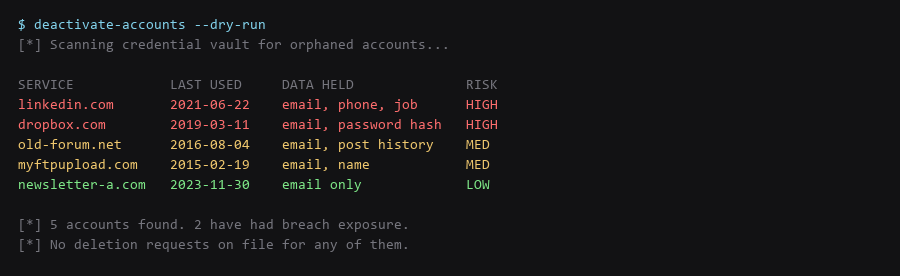
1. Where Your Identity Actually Leaks
You cannot delete what you cannot enumerate. The fastest inventory source is the password manager you already use — it has the service, the URL, and the last-modified date for every credential.
# 1Password: export a list of item titles and URLs (no secrets)
$ op item list --format json | jq -r '.[] | [.title, .urls[0].href] | @tsv' > accounts.tsv

# Bitwarden CLI
$ bw list items | jq -r '.[] | [.name, .login.uris[0].uri] | @tsv' >> accounts.tsv

# KeePassXC: use the built-in CSV export, then strip password columns
$ cut -f1,2 keepass-export.csv > accounts.tsv

# Add anything the vault misses: email search for "welcome" / "verify your"
$ grep -ril "welcome\|verify your email\|confirm your account" ~/mail-archive/ | wc -l
The email search is the backstop. Services you signed up for before using a password manager will not be in the vault, but their welcome emails are still in your mailbox. Search for signup confirmation phrases and add every domain that comes back.
2. The Mitigation Plan
Once you have the inventory, work through it deciding delete, deactivate, or keep. The decision rule that holds up: if the account holds data you would not want published, and you have not used it in twelve months, delete it.
| Action | What It Actually Does | When It Is Enough |
|---|---|---|
| Deactivate | Hides the profile; data retained on the server | Only when the service offers no delete option at all |
| Delete | Requests removal of the record and associated data | The default choice for unused accounts |
| Delete + export | Take your data out, then request removal | Accounts holding content you want to keep |
| Anonymise | Replace PII in the profile, keep the account | Accounts tied to a service you still need |
Prefer deletion over anonymisation where you can. A blanked profile still proves the account existed and still sits in the provider's database; an anonymised row is still a row.

3. Step-by-Step Execution
Most services have a delete path buried in account settings. Where there is no self-service option, an email request works, and it works better when it cites the specific legal basis available to you.
# In-app flow (preferred): Settings -> Account -> Delete account
# Email fallback template:

  To: privacy@.com
  Subject: Account deletion request -

  Please delete my account and all associated personal data,
  including profile records, usage logs, and backups.

  Account email:
  Requested under [applicable data-protection law].
  Please confirm completion in writing.

# Log it the moment you send:
$ echo "service,requested,confirmed,verified" >> deletion-log.csv
Expect three outcomes. Self-service deletion completes in minutes to days. Email requests complete within the statutory window where one applies, and often go unanswered where none does. A minority of services will respond asking you to log in first — do that, then repeat the request, because the first request is usually closed without action.
4. Staying Invisible: Ongoing Habits
This is the step that gets skipped, and it is the only one that matters. A confirmation email is not proof the data is gone — it is proof the request was received.
# 1. Try to log in. A deleted account fails authentication.
$ curl -s -o /dev/null -w "%{http_code}\n" -X POST https://service.com/api/login

# 2. Try password reset. A deleted account returns no recovery path.
$ curl -s -X POST https://service.com/api/forgot -d "email=you@example.com"

# 3. Re-run the breach API against the address 30 days later
$ curl -s "https://haveibeenpwned.com/api/v3/breachedaccount/you@example.com" \
    -H "hibp-api-key: $HIBP_KEY" -H "User-Agent: zenonym-audit"

# 4. Search for the profile in public indexes
$ google "your-handle" site:service.com
Two traps. First, password reset on a deleted account should return the same generic message as an unknown address — if it instead returns "account does not exist", the service is confirming deletion but also confirming which addresses ever existed. Second, a third-party login button (sign in with Google) can silently recreate an account after deletion, because the identity provider still holds the link. Revoke those links in your identity provider before deleting the downstream account.
Frequently Asked Questions
Will deleting the account remove me from search results?
Not immediately. Search engines cache pages independently and may keep a profile indexed for weeks after deletion. Request reindexing via the search engine's removal tool, and check whether the page is also held in an archive.
What if the service has no delete option?
Send a written request to their privacy contact. Where comprehensive data-protection law applies to you, that establishes a statutory deletion right with a defined response window. Where it does not, you are relying on goodwill — escalate to the regulator if the service claims to be in scope and refuses.
Is deactivation ever genuinely equivalent?
Rarely. Some services hard-delete the payload on deactivation but keep the row for billing or legal reasons; that is documented behaviour, not a default. Unless the provider states on the record that deactivation removes the data, treat it as retained.
Sources & References
- GDPR Article 17 — Right to Erasure: gdpr-info.eu/art-17-gdpr — conditions and scope of the erasure right
- OWASP — Credential Stuffing: owasp.org — why dormant accounts are the preferred target
- Have I Been Pwned API: haveibeenpwned.com/API/v3 — verifying an address stops appearing in new breaches
- Bitwarden CLI: bitwarden.com/help/cli — item listing and export
- Google URL Removal: support.google.com — requesting removal of indexed pages
We ran every step for this account removal guide on our reference hardware and captured the output as shown; your distro, kernel, and config layout will differ in places, so confirm each result before moving on.