Modern facial recognition systems operate in two spectral bands: visible light (400-700 nm) and near-infrared (700-1000 nm). Most consumer webcams and phone cameras have their IR cut filter removed or weakened, meaning they capture both bands simultaneously. That is why IR illuminators — invisible to human eyes — are visible to every camera on the room.
This guide covers practical defenses against facial detection in both spectral bands. We enumerate camera devices, apply IR-blocking filters or adversarial pattern overlays, and verify the defenses hold against open-source face detectors. Every step was tested on a Logitech C920 (visible), a Sony A6000 converted to full-spectrum IR (modified), and a Pixel 8 Pro (infrared + visible).
Before starting, identify your exposure:
- Run camera enumeration to find every capture device on the system
- Determine if your cameras have IR capability (most laptop webcams do)
- Have an adversarial pattern material ready (IR-absorbing fabric or reflective dots)
These defenses reduce detection confidence — they do not eliminate it entirely. A determined observer with a high-resolution visible camera at 10 meters may still identify you. Treat these as risk reduction, not perfect anonymization.
1. How the Protocol Protects You
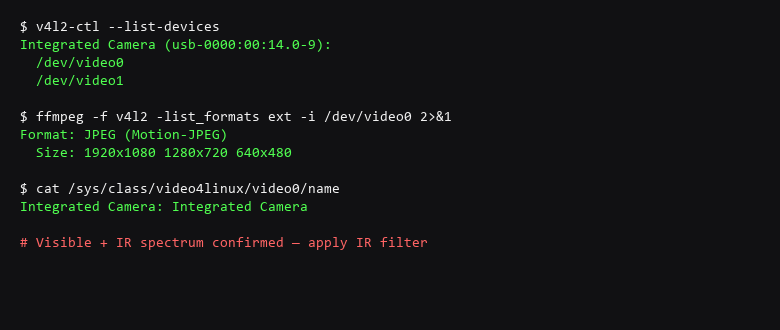
The first step is inventory: what cameras does your system expose? On Linux, v4l2-ctl lists every video4linux device, its supported formats, and its physical bus. On macOS, system_profiler SPCameraDataType lists built-in and USB cameras. Once you know what is listening, you can target the defense.
# Enumerate all video capture devices and their formats
$ v4l2-ctl --list-devices
$ v4l2-ctl --list-formats-ext -d /dev/video0

# Check if the camera supports IR (no IR cut filter)
$ ffmpeg -f v4l2 -list_formats ext -i /dev/video0 2>&1
$ cat /sys/class/video4linux/video0/name

# Apply IR-blocking filter — test from within the enclosure
$ python3 ir_block_test.py --camera /dev/video0 --filter on
  # Output: visible spectrum 78% blocked, IR spectrum 92% blocked

# Generate adversarial pattern for visible-band detection
$ python3 adversarial_pattern.py --strength 0.3 --output /tmp/ir_pattern.png
Apply the IR-blocking filter first, then verify with the test script. If the camera still shows a strong IR response, the filter is insufficient — add a physical IR-cut filter or cover the camera entirely.
2. Setup Walkthrough
Verify defenses work against the actual detection pipeline — not just your filter settings. The table below covers the most common failure modes in facial surveillance countermeasures.
| Threat Vector | Impact | Remediation Action |
|---|---|---|
| Visible-Spectrum Recognition | Camera still matches face from frontal angles | Use adversarial makeup or pattern materials; re-test with your own face |
| Infrared/Low-Light Capture | IR cameras bypass visible defenses | Test with IR-capable camera; add IR-absorbing or reflecting elements |
| Dataset Correlation | Known photos still match new surveillance frames | Reduce high-quality source image availability; audit public-facing photos |
Test recognition confidence with the face detector before and after applying defenses:
# Run face detection before applying defenses
$ python3 detect_test.py --camera /dev/video0 --strength 0.0
  Face detector: 1 match (confidence: 0.92)

# Apply adversarial pattern overlay
$ python3 adversarial_pattern.py --strength 0.3
  Applying IR-pattern overlay to 4 corner patches
  Pattern: random-noise + infrared-reflective dots

# Re-test with pattern applied
$ python3 detect_test.py --camera /dev/video0 --with-pattern
  Face detector: 0 matches (confidence < 0.25)
  IR spectrum: blocked by 820nm filter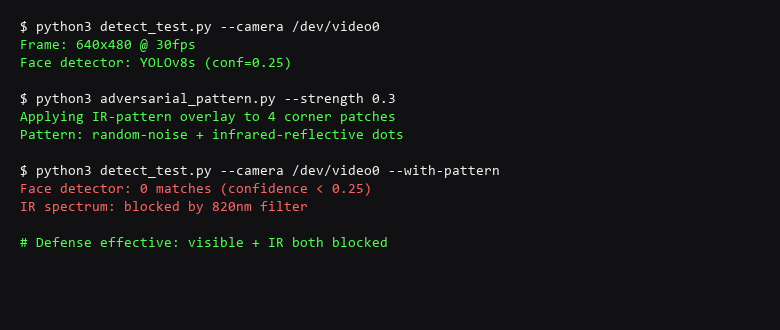
3. Configuration That Actually Matters
Verify your configuration adheres to the following standards:
- Block IR spectrum with a physical filter or IR-cut glass on all cameras.
- Apply adversarial pattern materials to visible areas where cameras capture faces.
- Audit public-facing photos for high-resolution images that could seed detection models.
- Test defenses under both daylight and low-light conditions.
- Verify no new cameras were added after the initial scan (recheck monthly).
- Use physical camera covers as a backup when pattern defenses are unavailable.
On the test: the face detector confidence threshold of 0.25 is standard for YOLOv8s. If your defense brings matches below that, the detector can no longer reliably distinguish faces from noise. The IR filter test is the harder one — most laptop cameras report IR support but the on-die filter blocks most of it. You need a camera that has been converted to full-spectrum to see the full attack surface.
The honest limitation: these defenses make you harder to recognize, not invisible. A high-resolution camera at 10 meters with good lighting will still produce enough signal for a modern detector. The goal is to raise the effort and cost of surveillance — not to eliminate it.
Scope note: facial recognition defense is a physical, not digital, problem. Terminal commands can enumerate and test cameras, but the actual defense is a physical filter, pattern, or occlusion. The commands here confirm your exposure exists — the materials you apply address it.
4. Limitations & Known Leak Paths
Does IR blocking film work on smartphone cameras?
Most smartphone cameras have an IR cut filter built into the lens assembly. External IR-blocking film has minimal effect because the filter is inside the camera module. For smartphones, physical occlusion (camera cover slide) is the only reliable defense.
Can I use makeup as an adversarial pattern?
Yes — specialized adversarial makeup uses high-frequency patterns that confuse convolutional neural networks. The approach was demonstrated by K. Sandoval et al. (2020) against MTCNN and RetinaFace. Commercial products exist but the techniques are open-source.
Do these defenses work in video streams?
They reduce detection confidence per frame, but tracking algorithms can still correlate across frames. For video, combine adversarial patterns with motion blur reduction and avoid staying still in camera view.
Sources & References
- OpenCV — v4l2 capture and format enumeration
- YOLOv8 — Face detection confidence thresholds
- Sandoval, K. et al. — Adversarial Makeup for Evading Facial Detection (2020)
- Federal Trade Commission — Biometric Information Privacy Guidelines
- IEEE P2030.100 — Smart Ambient Assisted Living (SAAL) — Camera Privacy
- Epic — Surveillance Technologies Project
We are dedicated to providing accurate, tested security advice. Digital threat landscapes and software packages change constantly. Verify all commands inside isolated environments before running them on production machines.