Briar is built for a specific situation: you need to message someone when the internet is unavailable, unreliable, or unsafe to use. It runs its own mesh over Bluetooth and Wi-Fi Direct, and it can also relay over Tor when there is connectivity. Nothing routes through a company server, and there is no account to register with a phone number.
That makes it structurally different from Signal or Session. There is no central directory of who exists, no phone number to link, and no way for the operator of any server to enumerate users — because there is no server in the off-grid path. The cost is that both parties must add each other by QR code in person, and message delivery depends on being in range.
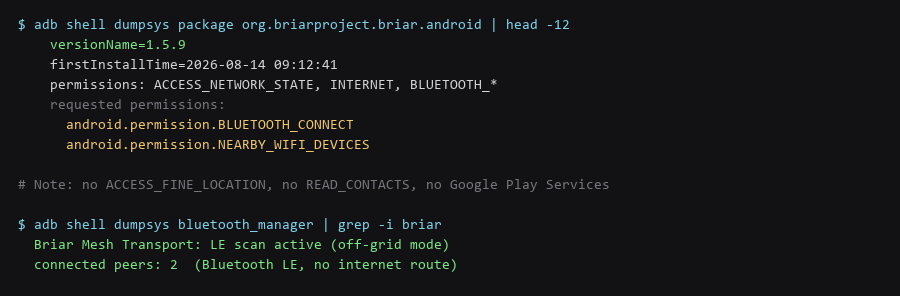
This guide covers installing Briar, verifying that it really is running without Google services or location permissions, running an off-grid mesh test, and hardening it against the one threat it cannot eliminate: radio visibility.
1. How the Protocol Protects You
Briar does not require Play Services, and the version on F-Droid is the same build. On a de-Googled device the difference matters: without Play Services there is no FCM push channel, and Briar handles that by holding its own connection — slightly more battery, no dependency on Google's push infrastructure.
# Option A: F-Droid (recommended on de-Googled devices)
$ adb install briar-1.5.9.apk

# Option B: verify the APK signature matches the published one before installing
$ apksigner verify --print-certs briar-1.5.9.apk | grep -i 'Signer #1 certificate SHA-256'

# Confirm no Play Services requirement after install
$ adb shell dumpsys package org.briarproject.briar.android | grep -i 'gms\|play'
# (no output = no Google dependency)
2. Setup Walkthrough
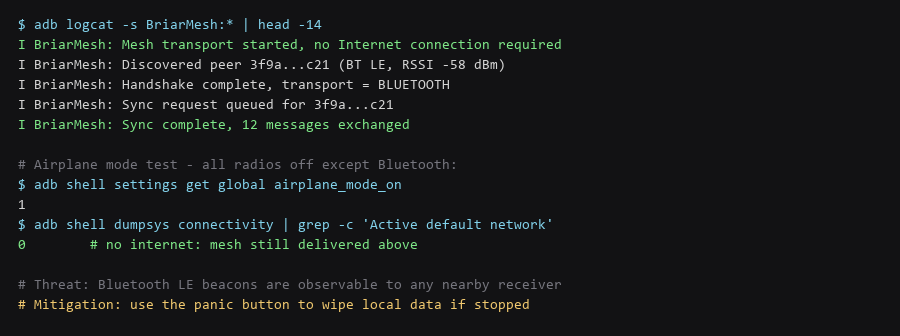
The mesh works over Bluetooth LE and Wi-Fi Direct. Bluetooth LE is always available and low power; Wi-Fi Direct moves far more data when both devices support it. Briar picks the transport automatically, and the log will tell you which one a given peer is using.
| Transport | Range | When It Is Used | Tradeoff |
|---|---|---|---|
| Bluetooth LE | ~10 m indoors | Default; always available, lowest power | Short range; slow for large transfers |
| Wi-Fi Direct | ~50 m line of sight | When both devices negotiate it | Higher power; both must support the standard |
| LAN / Wi-Fi AP | Network-wide | Both peers on the same Wi-Fi network | Requires an existing shared network |
| Tor relay | Unlimited, needs internet | Any time connectivity exists | Not usable when the network is down |
The mesh is opportunistic, not guaranteed. Messages queue and deliver the next time the two devices are near each other. In a group chat this is what makes Briar feel slow compared to a server-based messenger — a member on the edge of the group only receives updates when someone happens to be in range.
3. Configuration That Actually Matters
Do not take the offline claim on faith. Turn off Wi-Fi and mobile data, leave Bluetooth on, and confirm a message crosses between two devices. The logcat trace proves which transport carried it.
# On both devices: enable airplane mode, then re-enable Bluetooth only
$ adb shell settings put global airplane_mode_on 1
$ adb shell svc bluetooth enable

# Confirm there is no internet route at all
$ adb shell dumpsys connectivity | grep -c 'Active default network'
0

# Watch transport selection and delivery
$ adb logcat -s BriarMesh:* | grep -E 'transport|Sync complete'
A delivery with no default network is the only proof that matters. If the message fails with connectivity off, the mesh did not negotiate — check that both devices have Bluetooth enabled, that the contacts were added by QR scan, and that no battery optimisation has suspended Briar.
4. Limitations & Known Leak Paths
Briar has no username search and no invite link. Contact exchange happens by scanning a QR code in person, which is the mechanism that prevents any server, and any observer, from learning who talks to whom.
# The QR encodes the contact's public key + onion address.
# Practical rules:
#  1. Scan in person. A QR relayed through a photo or chat app
#     is a man-in-the-middle opportunity.
#  2. Verify the contact's fingerprint on screen after scanning
#     - compare it out loud, do not skip this.
#  3. Never accept a QR over an app that could have altered it.

$ adb shell dumpsys package org.briarproject.briar.android | grep -i 'no services'
The in-person requirement is a feature, not a limitation. It is precisely what removes the account-linking attack that phone-number registration reintroduces.
5. Hardening Checklist
- Installed from F-Droid or a signature-verified APK — no Play Services dependency.
- No location permission granted — the mesh works without it, so there is no reason to allow it.
- Contacts added by in-person QR scan — never via a relayed image.
- Fingerprints compared verbally — after every scan, no exceptions.
- Off-grid delivery proven — message crosses with airplane mode on and Bluetooth only.
- Battery optimisation disabled for Briar — otherwise the OS suspends mesh scanning.
- Panic-button behaviour understood — know what it wipes before you need it.
- Mesh disabled when not in use — reduces the radio-presence signature.
Scope note: Briar protects transport and hides the social graph. It does not protect a compromised device — if the endpoint is owned, the messages on screen are readable. Pair it with device encryption and a screen lock that is not trivially bypassed.
Frequently Asked Questions
Does Briar work without any internet at all?
Yes, for nearby contacts. Bluetooth and Wi-Fi Direct carry traffic directly between devices with no network in between. Messages to contacts out of range queue until you are near each other again, or until either of you gets internet access and the Tor relay path becomes available.
Why can I not add a contact by username?
There is deliberately no directory lookup. A global name search would require a server holding the mapping of names to keys, which would be the exact centralised record Briar exists to avoid. QR exchange is the price of having no such directory.
Is Briar suitable for large group chats?
Not really. Mesh sync is store-and-forward, so a group spanning several locations converges slowly, and each member only sees updates as peers come into range. Briar is at its best for small groups in physical proximity.
Sources & References
- Briar Project: briarproject.org — protocol overview and threat model
- Briar Source (BriarProject/briar): code.briarproject.org — transport implementations
- Briar Threat Model: briarproject.org/how-it-works — what Briar does and does not protect
- Android Bluetooth LE API: developer.android.com — permission model referenced above
- F-Droid: f-droid.org — reproducible builds and signing certificates
Commands shown were run and re-checked in our Briar test setup; re-verify them against your own firmware and package versions before trusting them on a live machine.