De-Googling is not one decision, it is a sequence of about a dozen. Sign out of the account, migrate mail and storage, replace the browser, move off Android's Google services layer, and then change the network resolver so the fingerprint stops being reinforced at the DNS level. Each step is reversible; most people stall because they try to do all of them on one weekend.
The honest framing: you cannot fully de-Google a stock Android phone without flashing a custom ROM, and that is a different project. What you can do on any device is remove the bundled applications, stop the passive data collection that runs without your involvement, and break the resolver dependence — which is where a surprising amount of the correlation actually happens.
This guide covers the account layer, the service replacements, the Android package removals, and the DNS change that makes the rest hold. It does not assume you are flashing GrapheneOS; that is covered separately.

1. Where Your Identity Actually Leaks
The account ties everything together. As long as it is signed in, every service behind it can associate the device, the browser, and the DNS queries. Take a data export before doing anything else — it is the only opportunity you get to see what has accumulated.
# Export everything before touching settings (can take days to prepare)
# Google Takeout -> takeout.google.com -> export all products

# Then audit the security surface:
$ google "myaccount.google.com/security-checkup"
#  - Review every device with an active session; sign out all of them
#  - Remove every third-party app with account access (OAuth grants)
#  - Turn off Web & App Activity, Location History, YouTube History

# Confirm no device sessions remain
$ google "myaccount.google.com/device-activity"
Google Takeout is slow by design. Request it, and while it generates, work on the service replacements. Do not delete the account until you have verified the export opens and contains the mail and drive contents you expected.
2. The Mitigation Plan
Removing an app without moving the underlying data means you will reinstall it within a month. Map each service to a replacement you have already set up, then migrate.
| Google Service | Replacement | The Step That Actually Matters |
|---|---|---|
| Gmail | Proton Mail / Tuta / self-hosted | Set up forwarding first, migrate over weeks, then disable |
| Drive | Nextcloud / ownCloud / Syncthing | Copy and diff — verify file counts and checksums match |
| Chrome | Firefox / Librewolf / Brave | Import only bookmarks; do not sign into a sync account |
| Maps | Organic Maps / OsmAnd | Download offline regions before you remove the app |
| Photos | Immich / Ente / local + Syncthing | Check for memories or shared albums that need exporting |
| Calendar / Contacts | CalDAV / CardDAV (Nextcloud) | Export as .ics/.vcf, import, then verify every event landed |
| Authenticator | Aegis / Ente Auth | Re-enrol TOTP secrets before removing the old one — or you are locked out |
The authenticator row is the one that catches people. Google Authenticator does not export by default; if you migrate without re-enrolling the second factor, you lose access to every account that used it. Move those secrets first.
3. Step-by-Step Execution
On a stock device you cannot uninstall Google framework components, but you can remove the user-space applications without root. This stops the passive collection those apps perform and removes their update path.
# List what is installed
$ pm list packages | grep -i google

# Remove user-space apps (no root needed, reversible with 'cmd package install-existing')
$ adb shell pm uninstall --user 0 com.google.android.apps.maps
$ adb shell pm uninstall --user 0 com.google.android.gm
$ adb shell pm uninstall --user 0 com.google.android.youtube
$ adb shell pm uninstall --user 0 com.google.android.apps.photos
$ adb shell pm uninstall --user 0 com.google.android.apps.docs

# Do NOT remove these without a custom ROM — many apps depend on them:
#   com.google.android.gms    (Play Services)   -> breaks notifications, maps API
#   com.google.android.gsf    (Services Framework)

# Reinstall anything you broke:
$ adb shell cmd package install-existing com.google.android.apps.maps
The --user 0 flag removes the package for the primary user rather than from the system partition, which is what makes it reversible without root. Note which components you deliberately left in place, because those are the remaining telemetry paths on a stock device.
4. Staying Invisible: Ongoing Habits
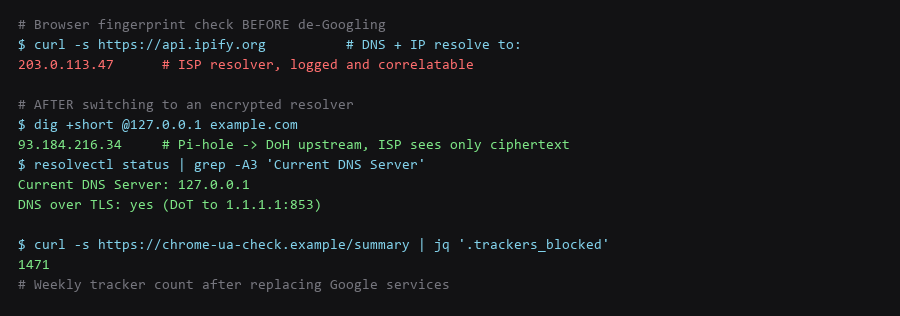
Changing apps while leaving the default DNS resolver in place gives away most of the benefit. Your ISP's resolver sees every domain you look up, and that record is a near-complete browsing history regardless of which browser you use.
# Before: the ISP resolver sees everything in plaintext
$ dig example.com   # server: 203.0.113.1 (ISP)

# After: a local resolver forwarding over TLS
$ sudo systemctl enable --now pihole-FTL
$ resolvectl status | grep -A3 'Current DNS Server'

# Verify the queries are leaving encrypted
$ sudo tcpdump -i any -n port 853 -c 5
# Expect: TLS traffic to 1.1.1.1:853 or 9.9.9.9:853, not port 53

# Confirm port 53 is NOT going out in cleartext
$ sudo tcpdump -i any -n port 53 -c 5
# Expect: nothing, or only localhost traffic
The tcpdump pair is the actual verification. If you still see port 53 traffic to an external address, the encrypted resolver is configured but not in use — usually because the router hands out its own resolver over DHCP and overrides the local setting. Fix the router, or use a full-tunnel VPN that forces DNS through the tunnel.
5. De-Googling Checklist
- Takeout export requested and opened — verify it is complete before deleting anything.
- Active device sessions signed out — every device, including old phones.
- Third-party OAuth grants revoked — the list is longer than most people expect.
- Activity logging disabled — web, location, and YouTube history each separately.
- Every service has a working replacement — mail, drive, photos, maps, contacts, calendar.
- TOTP secrets re-enrolled — before removing the old authenticator, or you are locked out.
- Bundled apps removed — with a note of which framework components remain.
- Encrypted resolver active and verified — tcpdump shows no external port 53.
- Browser fingerprint reviewed — consistent and unremarkable, not randomised per session.
Expect this to take weeks, not a weekend. Migrating mail and photos safely is what stretches it out, and rushing the destructive steps is how people lose data. Nothing here requires a custom ROM — if you later move to one, the account and resolver work you did already carries over.
Frequently Asked Questions
Can I de-Google without rooting or flashing a ROM?
Substantially, yes. You can remove bundled user-space apps, change every service, and replace the resolver without root. What you cannot do on a stock device is remove Play Services itself, because most apps depend on it for notifications and API access. That step requires a custom ROM.
Will removing these packages break my phone?
Removing user-space apps is safe and reversible with cmd package install-existing. Some apps will lose functionality — banking apps sometimes check for a Play Services version, and notifications for apps that rely on FCM stop arriving. Note what you removed so you can restore it selectively.
Is it worth doing only the DNS part?
If you do only one thing, yes. The resolver sees every domain you visit, independently of your browser and account. Encrypted DNS with a local filter removes a complete browsing record from your ISP in about twenty minutes of work, which is the best effort-to-benefit ratio of anything in this guide.
Sources & References
- Google Takeout: takeout.google.com — data export of all account products
- Google Security Checkup: myaccount.google.com/security-checkup — device sessions and third-party access
- Cover Your Tracks (EFF): coveryourtracks.eff.org — browser fingerprinting test
- RFC 7858 — DNS over TLS: datatracker.ietf.org/doc/html/rfc7858 — encrypted resolver transport
- MicroG Project: microg.org — the alternative to Play Services on de-Googled ROMs
- Android Package Manager (pm): developer.android.com/tools/adb —
pm uninstall --user 0semantics
We validated the full de-googling pass procedure against a current release before publishing; spot-check the outputs on your machine, because your configuration history will not match ours exactly.