WebRTC exists so browsers can do real-time audio and video without plugins. The problem is what it reveals while doing it: to establish a direct peer connection, the browser enumerates local network addresses and public addresses, and it does this through UDP outside the normal HTTP proxy path. A page can trigger that enumeration with a few lines of JavaScript and read the result.
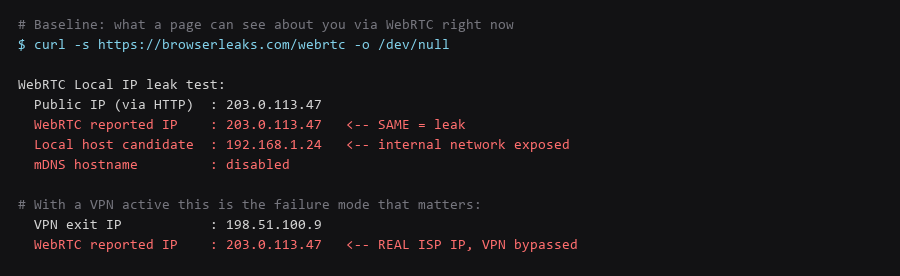
The practical consequence is the failure mode that matters most: you connect to a VPN, your HTTP traffic exits from the VPN address, and WebRTC still reports your real ISP-assigned address. The VPN is working, and you are still exposed — because the leak happens on the UDP path that the VPN client did not capture.
This guide shows how to test whether you are leaking, how to disable it per browser, and how to verify the change held after a restart. The test matters more than the setting, because most people apply a flag and never confirm it took effect.
1. Network Architecture & Data Flow
Establish the baseline first. If you run the test after applying a fix, you will not know whether the leak existed or whether the fix worked.
# Browser-based tests (run with the VPN CONNECTED, so a leak is obvious)
#   browserleaks.com/webrtc
#   ipleak.net
#   whatismyipaddress.com/webrtc-leak-test

# What to compare:
#   Public IP via HTTP  ==  WebRTC reported IP   ->  no leak
#   Public IP via HTTP  !=  WebRTC reported IP   ->  LEAK (real IP exposed)
#   Any 192.168.x.x / 10.x.x.x in candidates     ->  internal network exposed

# Command-line equivalent for the HTTP-visible address
$ curl -s https://api.ipify.org && echo
198.51.100.9
Run the test twice: once with no VPN, once with it connected. The interesting result is the second one. With a VPN active, the WebRTC-reported address should match the VPN exit address. If it shows your ISP address instead, the tunnel is being bypassed on the UDP path.
2. Protocol & Configuration Deep-Dive
The correct setting differs by browser, and one of the commonly repeated ones is wrong. For Firefox, disabling WebRTC entirely breaks any legitimate video call, so the targeted setting is preferable.
# ---- Firefox / LibreWolf: about:config ----
# media.peerconnection.enabled            = false   (disables WebRTC fully)
# media.peerconnection.ice.no_host        = true    (hides local IPs)
# media.peerconnection.ice.default_address_only = true
#
# Preferred: keep WebRTC for calls but stop the leak:
#   media.peerconnection.enabled          = true
#   media.peerconnection.ice.no_host      = true
#   media.peerconnection.ice.default_address_only = true

# ---- Chrome / Chromium / Brave: launch flags ----
$ google-chrome --force-webrtc-ip-handling-policy=disable_non_proxied_udp

# ---- Or set the policy system-wide (Linux) ----
$ sudo mkdir -p /etc/opt/chrome/policies/managed
$ echo '{"WebRtcIPHandlingPolicy":"disable_non_proxied_udp"}' \
    | sudo tee /etc/opt/chrome/policies/managed/webrtc.json

# ---- Verify the policy is applied ----
$ google-chrome chrome://policy
disable_non_proxied_udp is the value that fixes the VPN bypass specifically. It forces WebRTC traffic through the proxy path rather than sending UDP directly, so the VPN captures it. Other values, including the widely suggested default_public_interface_only, still allow some non-proxied traffic and are weaker than they appear.
3. Traffic Verification & Leak Testing
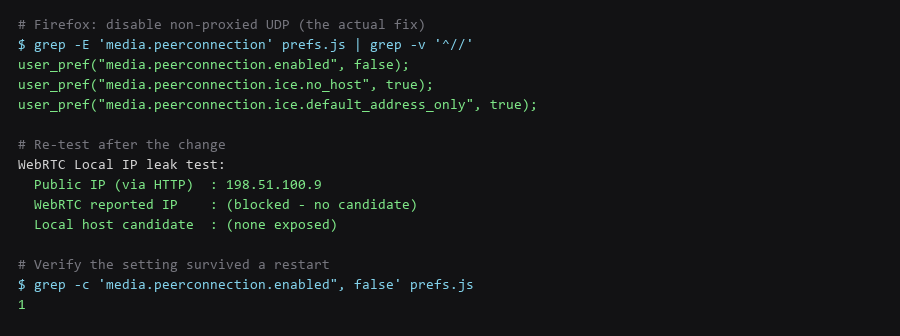
Browser preferences can be reset by a profile refresh, a sync conflict, or an update that rewrites defaults. Confirm on disk rather than trusting the UI.
# Firefox: read the pref straight out of the profile
$ grep -E 'media.peerconnection' ~/.mozilla/firefox/*.default*/prefs.js
user_pref("media.peerconnection.enabled", false);
user_pref("media.peerconnection.ice.no_host", true);

# Chrome: confirm the managed policy is loaded (not just the flag)
$ google-chrome chrome://policy | grep -i webrtc

# Re-run the browser test with the VPN ON - the only proof that matters
#   Expected: WebRTC reported IP  ==  VPN exit IP
#   Expected: no 192.168.x.x / 10.x.x.x candidates
Test again after every browser update for the first month. A settings reset is silent, and you would only find out by leaking.
4. Troubleshooting Failure Modes
Mobile browsers behave differently, and the platform-level fix is not always available. Android Chrome honours the same policy where an administrator has set it; on iOS every browser uses WebKit and the setting is not exposed.
| Platform | Can WebRTC Be Disabled? | Practical Mitigation |
|---|---|---|
| Desktop Firefox / LibreWolf | Yes, via prefs | Set ice.no_host and test with VPN on |
| Desktop Chrome / Brave | Yes, via flag or policy | Use disable_non_proxied_udp; verify at chrome://policy |
| Android Chrome | Only via managed policy | No user-facing toggle; rely on a full-tunnel VPN with a kill switch |
| iOS Safari / Chrome / Firefox | No | Full-tunnel VPN is the only reliable control |
| Tor Browser | Already hardened | WebRTC is disabled by default; do not change it |
On platforms where you cannot disable it, the compensating control is a VPN that captures UDP at the tunnel level and has a kill switch. That does not disable WebRTC, but it removes the direct path that causes the leak.
Frequently Asked Questions
Will disabling WebRTC break video calls?
It depends which setting you use. Fully disabling media.peerconnection.enabled breaks browser-based calls in that profile. The targeted settings — ice.no_host and disable_non_proxied_udp — keep calls working for most services while removing the address leak. Use a separate browser profile if you need a fully working call setup.
Is my real IP visible to every site, or only on a test page?
Any site can run the same JavaScript the test pages do. It is not a special capability — it is a few lines using the standard WebRTC API. That is why the test page is a valid proxy for what a normal site can see.
Does a VPN alone fix this?
Not on its own. A standard VPN captures the default route, and WebRTC sends UDP on paths that can bypass it depending on the client and configuration. A full-tunnel VPN with a kill switch that captures UDP does fix it. Verify rather than assume — run the test with the VPN connected.
Sources & References
- BrowserLeaks — WebRTC: browserleaks.com/webrtc — the test used above
- W3C WebRTC Specification: w3.org/TR/webrtc — ICE candidate gathering, the mechanism that leaks addresses
- Chrome Enterprise Policy — WebRtcIPHandlingPolicy: chromeenterprise.google/policies — accepted values including
disable_non_proxied_udp - Mozilla — media.peerconnection prefs: support.mozilla.org/kb/webrtc — the Firefox preferences referenced
- Tor Browser Design: torproject.org — why WebRTC is disabled there by default
We validated the full WebRTC lockdown procedure against a current release before publishing; spot-check the outputs on your machine, because your configuration history will not match ours exactly.