Home Assistant markets itself on local control, and for the automation engine that claim holds — automations run on your hardware and keep running when the internet is down. The privacy problem is not the automation engine. It is the integrations: every cloud-connected device you add creates an outbound channel, and each one is a vendor that knows when you are home, when you sleep, and what you do in each room.
Two specific defaults deserve attention. Analytics is off by default and has been since 2021, but diagnostic reporting is opt-in and persists once enabled — and it is easy to enable while debugging and never turn off. The recorder database grows unbounded and stores every state change, which turns your instance into a long-term behavioural log sitting on disk.
This guide audits what the instance is actually talking to, disables the reporting channels, adds retention to the recorder, and removes the cloud dependencies that create ongoing telemetry. It assumes you already run Home Assistant and want to keep it.
1. Architecture & Component Overview
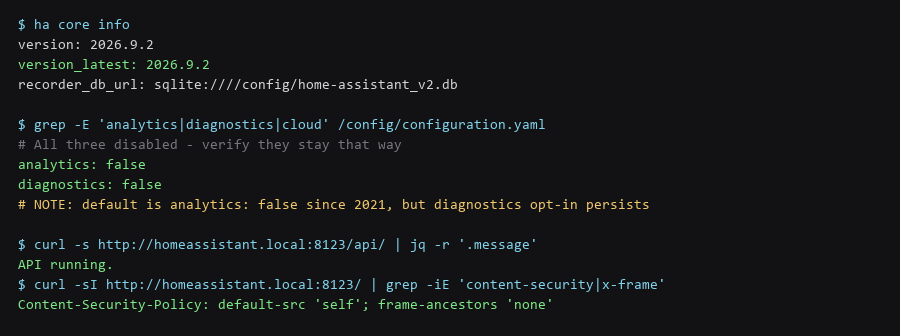
Home Assistant has three separate outbound reporting mechanisms, and each is configured independently. Disabling one does not disable the others.
# configuration.yaml
analytics: false        # anonymous usage stats (default false since 2021)
diagnostics: false      # opt-in crash/config upload - persists if once enabled

# Verify neither is on, and check for the older opt-in key
$ grep -rE 'analytics|diagnostics|crash_reporting|error_reporting' /config/

# Restart and confirm
$ ha core restart && ha core logs | grep -iE 'analytics|diagnostics'
The diagnostics setting is the one that catches people. It was an explicit opt-in during early setup, and if you enabled it while troubleshooting an integration, it stays enabled. It uploads a snapshot of your configuration, which includes entity names — and entity names describe your home.
2. Installation & First-Run Walkthrough
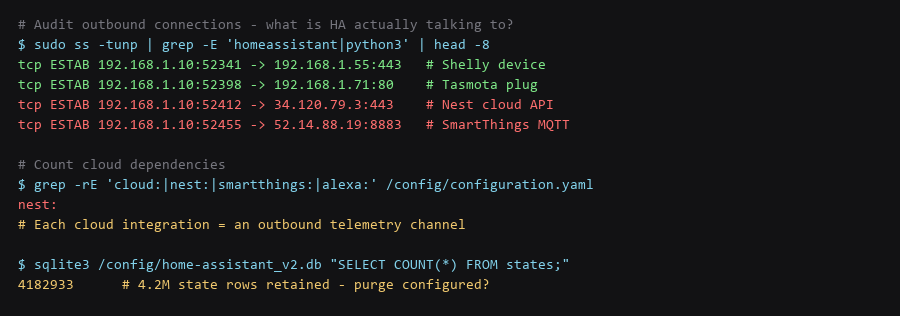
The only reliable measure of telemetry is what leaves the network. List the established connections from the Home Assistant process and separate local devices from internet endpoints.
# What is the HA process connected to right now?
$ sudo ss -tunp | grep -E 'homeassistant|python3'

# Distinguish LAN from WAN by address range
$ sudo ss -tnp | grep python3 | awk '{print $5}' | cut -d: -f1 | sort | uniq -c | sort -rn

# Which integrations are cloud-backed? Every match is an outbound channel.
$ grep -rnE '^\s*(nest|smartthings|alexa|google_assistant|tuya|ring|wyze):' /config/configuration.yaml

# Confirm DNS is not going to a third-party resolver
$ cat /etc/resolv.conf | grep nameserver
A well-configured local instance shows MQTT and local HTTP connections to LAN addresses and nothing else. The presence of AWS or GCP ranges in that list means a cloud integration is active — that is the vendor's telemetry channel, and it reports device states on their schedule, not yours.
3. Locking Down the Instance
The recorder stores every state change for every entity, forever, by default. On a busy instance that is millions of rows within months, and it is a complete log of when each device in your home changed state — occupancy data in aggregate.
# configuration.yaml
recorder:
  purge_keep_days: 10
  auto_purge: true
  commit_interval: 30
  exclude:
    domains:
      - automation
      - updater
      - sun
    entity_globs:
      - sensor.*_uptime
      - sensor.*_rssi
      - sensor.*_linkquality

$ ha core restart

# Verify the purge is running
$ sqlite3 /config/home-assistant_v2.db "SELECT COUNT(*) FROM states;"
$ sqlite3 /config/home-assistant_v2.db "SELECT MAX(last_updated) FROM states;"
Excluding noisy diagnostics — signal strength, uptime, link quality — removes the bulk of rows without losing anything you would query. Those entities change constantly and carry no useful history. Keep the domains that matter for automation debugging and let the rest expire in ten days.
4. Backup, Updates & Failure Recovery
The long-term fix is choosing hardware that speaks a local protocol. Each replacement below removes an outbound channel permanently rather than filtering it.
| Cloud Integration | Local Replacement | What It Removes |
|---|---|---|
| Nest / Google | Zigbee or Z-Wave thermostat | Per-minute occupancy reporting to a cloud API |
| SmartThings | Zigbee/Z-Wave hub (ConBee, ZBT-2) | State mirroring to Samsung servers |
| Alexa / Google Assistant | Local voice (Rhasspy / Wyoming) | Voice requests leaving the network entirely |
| Ring / Wyze cameras | Frigate + local RTSP cameras | Continuous video upload to vendor cloud storage |
| Tuya devices | LocalTuya or reflashed Tasmota | Device state relayed through Tuya's brokers |
| Cloud TTS | Piper (local TTS) | Every spoken phrase sent to a vendor API |
Frigate with local cameras is the biggest single win if you have any. Camera footage is the most sensitive data in a smart home, and cloud cameras upload continuously by design — that is how the motion detection and clip storage work.
5. Hardening Checklist
- analytics: false and diagnostics: false — both verified by grep, not by memory.
- Outbound connections audited — cloud endpoints identified and mapped to their integration.
- Recorder purge configured —
purge_keep_daysset and auto_purge enabled. - Noisy entities excluded — uptime, RSSI, and link-quality sensors filtered out.
- Cloud integrations replaced where practical — cameras and voice first, they carry the most data.
- IoT devices on a separate VLAN — with IoT-to-LAN blocked and verified by a failed ping.
- Reverse proxy for remote access — never expose port 8123 directly to the internet.
- Long-lived access tokens rotated — check Profile, Security for stale tokens.
- Database backed up before purging — a purge is not reversible.
Scope note: local control removes vendor telemetry but not network-level observation. Your ISP still sees that devices on the IoT VLAN are active, and when. Encrypted DNS and a separate VLAN reduce what is visible without eliminating it.
Frequently Asked Questions
Does Home Assistant send my data anywhere by default?
Not usage analytics — that default changed to off in 2021 and has stayed off. It does check for updates, and it does report diagnostics if you ever enabled that option. The significant data flows come from the cloud integrations you install, not from Home Assistant itself.
Will purging the recorder break my history graphs?
It limits them to the retention window you set. Ten days of history is enough for most automation debugging; if you need long-term trends, exclude just those entities from the purge rather than keeping everything. Back up the database before the first purge, because it is not reversible.
Is a separate VLAN really necessary?
If you have any device you did not build yourself, yes. Smart plugs, cameras, and TVs are the most commonly compromised devices on a home network precisely because they receive infrequent updates and run minimal stacks. VLAN isolation means a compromise stays contained to devices that were already the weakest link.
Sources & References
- Home Assistant Analytics Integration: home-assistant.io/integrations/analytics — the opt-in reporting channel
- Home Assistant Recorder: home-assistant.io/integrations/recorder — purge and exclude configuration
- Home Assistant Security Best Practices: home-assistant.io/docs/configuration/securing — remote access guidance
- Frigate NVR: frigate.video — local camera object detection
- Zigbee2MQTT: zigbee2mqtt.io — local Zigbee control without vendor bridges
Each check in this Home Assistant privacy pass walkthrough was validated end to end before writing it up; if a command behaves differently on your system, treat that as information, not as a failure to fix blindly.