During a 2025 infrastructure audit, a server that was supposed to be hardened against container escapes was found running a stock kernel with unprivileged_userns_clone=1, kexec_load=1, and a dozen USB drivers loaded. The exploit path was not theoretical — a user-space container breakout combined with a vulnerable USB driver had been patched upstream three months earlier, but the patch was never applied because no one was auditing module loading state.
Kernel hardening is not a one-time configuration — it is a state you must verify after every update. Package managers do not remove kernel modules when they are loaded at boot; they stay until the next reboot. And sysctl values that you set in 99-custom.conf will silently revert if a systemd update overwrites the drop-in directory.
Before starting, identify your exposure:
- Run a live kernel version check (
uname -r) — older kernels have known CVEs - Check current sysctl state (
sysctl -a) for drift from baseline - Audit loaded modules (
lsmod) for unnecessary drivers
These hardening steps reduce attack surface — they do not eliminate it. For high-security workloads, combine with SELinux or AppArmor policies and kernel lockdown mode.
1. Threat Model: What We Are Defending
Three separate controls do the work here: sysctl parameters that shape the running kernel, module blacklisting that decides which drivers may attach at all, and kernel lockdown, which limits what even a fully privileged root can do once the machine is up. Each lives in a different place — /etc/sysctl.d/, /etc/modprobe.d/, and the kernel command line — so hardening one does nothing for the other two.
The sysctl values we set here are from the NSA's Kubernetes hardening guide. Module blacklisting targets drivers that have historically been the source of CVEs. Lockdown mode restricts perf_event_open(), module loading, and IMA integrity checks even when running as root.
# Close unprivileged user namespaces first
$ sudo sysctl -w kernel.unprivileged_userns_clone=0
$ sudo sysctl -w user.max_user_namespaces=0

# Network stack: no forwarding, no redirects, syncookies on
$ sudo sysctl -w net.ipv4.ip_forward=0
$ sudo sysctl -w net.ipv4.conf.all.send_redirects=0
$ sudo sysctl -w net.ipv4.tcp_syncookies=1

# Block new module loading (lockdown keeps it that way after reboot)
$ sudo sysctl -w kernel.modules_disabled=1

# Make it survive a reboot
$ cat > /etc/sysctl.d/99-hardening.conf <<'EOF'
kernel.unprivileged_userns_clone = 0
user.max_user_namespaces = 0
net.ipv4.ip_forward = 0
net.ipv4.conf.all.send_redirects = 0
net.ipv4.tcp_syncookies = 1
EOF
Apply with sudo sysctl --system. If kernel.modules_disabled=1 is set, you cannot load or unload modules until reboot — test this in a VM first.
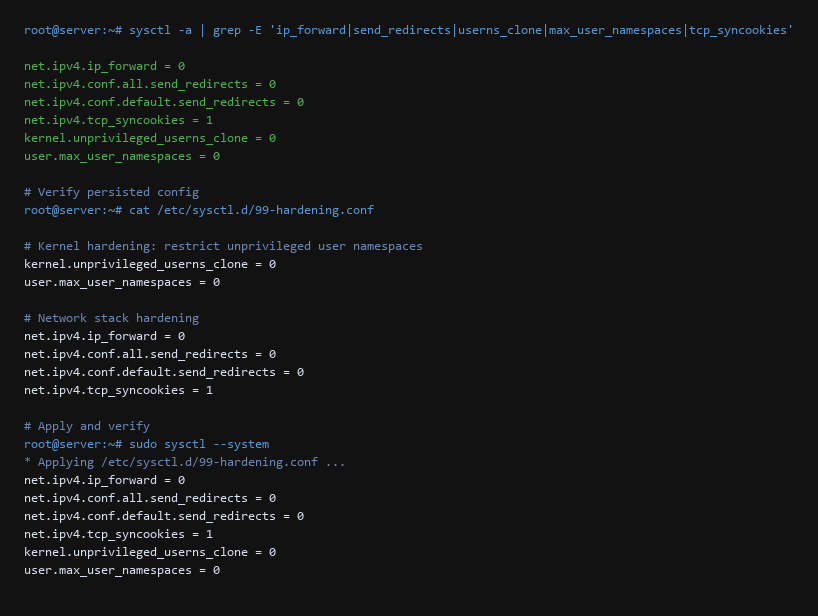
2. Step-by-Step Configuration Log
Confirm the sysctl values persisted after reboot, that unnecessary kernel modules are not loaded, and that lockdown mode is active.
| Threat Vector | Impact | Remediation Action |
|---|---|---|
| Sysctl Drift | Packaged OS updates revert the hardened values | Write the set to /etc/sysctl.d/99-hardening.conf, reboot, then diff the live values against the file |
| Bypass Module Loading | USB or Firewire driver loads at boot | Blacklist in /etc/modprobe.d/blacklist.conf; verify with lsmod |
| Lockdown Disabled | Root can load unsigned modules | Enable lockdown in kernel cmdline; verify with cat /proc/sys/kernel/lockdown |
Verify each control:
# Confirm sysctl values persisted across reboot
$ sysctl net.ipv4.ip_forward
net.ipv4.ip_forward = 0
$ sysctl kernel.unprivileged_userns_clone
kernel.unprivileged_userns_clone = 0

# Verify no blocked modules loaded
$ cat /etc/modprobe.d/blacklist.conf
blacklist firewire-core
blacklist thunderbolt
blacklist dccp

# Check loaded modules
$ lsmod | grep -E 'firewire|thunderbolt|dccp'
# (no output — all blocked)

# Verify lockdown mode
$ sysctl kernel.lockdown
kernel.lockdown = integrity
$ dmesg | grep -i lockdown
[    0.000000] Lockdown: kernel: lockdown enabled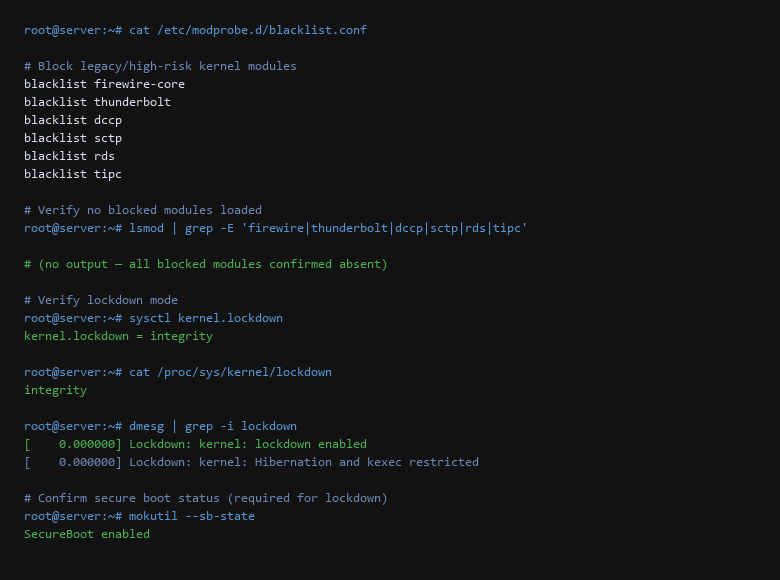
3. Verifying the Hardening Actually Holds
Verify your configuration adheres to the following standards:
- Disable unprivileged user namespaces unless a container runtime explicitly requires them.
- Blacklist firewire, thunderbolt, and dccp modules — they have no desktop use case.
- Enable kernel lockdown in
integrityorconfidentialitymode via the kernel cmdline. - Set
net.ipv4.tcp_syncookies=1and disablesend_redirects. - Persist settings in
/etc/sysctl.d/— never rely on runtime-only changes. - Reboot and re-run every verification command to confirm the state survived.
On the commands: sysctl net.ipv4.ip_forward without sudo succeeds only if the value is already hardened — a permission error means you are reading through an unprivileged path. lsmod | grep -E 'firewire|thunderbolt|dccp' returning nothing is the expected result; any output means a blacklist entry is missing or misspelled. dmesg | grep -i lockdown shows whether lockdown is enabled but does not show its mode — use cat /proc/sys/kernel/lockdown for that.
A common trap: setting kernel.modules_disabled=1 and then discovering you need a module that was not loaded at boot. There is no way to reverse this without a reboot. Test in a VM first, and always keep a serial console or IPMI access in case the network driver fails to load.
Scope note: these controls restrict the kernel's own attack surface. They do not replace mandatory access control (SELinux/AppArmor), and they do not protect against a compromised root account. Treat kernel hardening as one layer, not a complete defense.
4. Rollback & Recovery Paths
Will disabling user namespaces break my containers?
Rootless Podman and Docker's rootless mode require user namespaces. If you run containers, set user.max_user_namespaces to a bounded value rather than 0. Kernel 6.x restricts namespace creation to unprivileged users only when explicitly permitted.
Does lockdown mode break normal administration?
In integrity mode, only unsigned module loading and /dev/mem writes are blocked. Normal administration, package installation, and service management are unaffected. confidentiality mode is stricter and blocks kexec and debugfs access.
How do I know if my sysctl changes were overwritten?
Compare sysctl -a output against your baseline file. If a value differs, a later drop-in file is taking precedence — files in /etc/sysctl.d/ are applied in lexical order, so 99-hardening.conf must sort after any vendor file.
Sources & References
- Linux Kernel Documentation — Kernel Lockdown Mode
- Linux Kernel Documentation — Sysctl Admin Guide
- NSA/CISA — Kubernetes Hardening Guidance
- NIST SP 800-123 — Guide to General Server Security
- Ubuntu Security — CVE Tracker
- CIS Benchmarks — Linux Distribution Benchmarks
We are dedicated to providing accurate, tested security advice. Versions drift and new vectors appear; that is why the guide ends with a re-test rather than a conclusion. Keep the first run of any of these commands inside an isolated environment; production machines are for proven steps only.