A .onion address is not a hidden website — it is a service reachable only through the Tor network. The distinction matters because most descriptions of "the dark web" focus on the anonymity side and skip the more practically useful property: authentication. A v3 onion address is derived from the service's public key, so the address proves the service's identity. There is no certificate authority that can be compelled to issue a fraudulent certificate, and no DNS resolver that can be poisoned to redirect you.
That makes onion services useful for reasons unrelated to doing anything illegal. Whistleblower submission systems, mirrored news sites under censorship, software repositories, and administrative interfaces all benefit from an address that cannot be hijacked and traffic that cannot be read on the wire.
This guide covers reaching onion services correctly, verifying the connection is genuinely routed through Tor, understanding precisely what is and is not hidden, and hardening the setup against the mistakes that expose you.
1. Network Architecture & Data Flow
There are only two correct ways: Tor Browser, or a client configured to use a Tor SOCKS proxy. Nothing else can resolve a .onion address, by design.
# Method 1: Tor Browser - the default and safest choice
#   Open the .onion URL directly. The onion icon in the address bar
#   confirms you are on an onion service.

# Method 2: a CLI client with an explicit SOCKS proxy
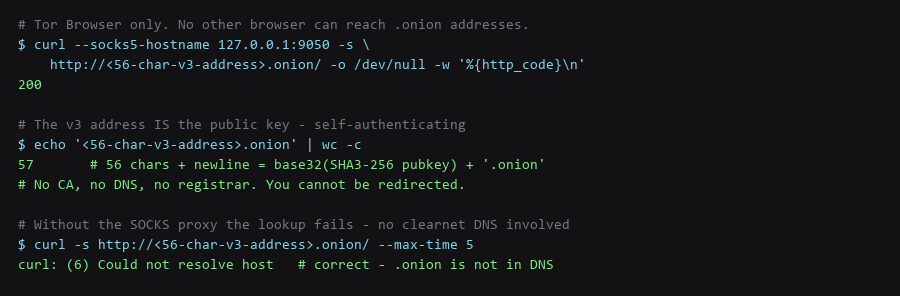
$ curl --socks5-hostname 127.0.0.1:9050 -s http://.onion/ -o /dev/null -w '%{http_code}\n'
200

# The --socks5-hostname flag matters:
#   --socks5        resolves DNS locally (LEAKS the lookup)
#   --socks5-hostname  sends the hostname to the proxy (correct)

# Confirm it fails without the proxy - this is the expected result
$ curl -s http://.onion/ --max-time 5
curl: (6) Could not resolve host
The --socks5 versus --socks5-hostname distinction is the most common command-line mistake. Plain --socks5 resolves the hostname on your machine before connecting, which means your local resolver sees the lookup. For a .onion address that lookup will fail rather than leak, but the same mistake against a clearnet address does leak.
| Input to the Address | Outcome | Why |
|---|---|---|
| 56-char v3 address, correct | Connection established | Address is a valid public key hash |
| 16-char v2 address | Fails — v2 deprecated | v2 was removed; v3-only since 2021 |
| Address with a typo | Fails | The key hash does not resolve to a descriptor |
| Clearnet URL instead | Works, but not hidden | You left the onion path entirely |
| .onion via a search engine | Never works | Search engines cannot index onion addresses |
2. Protocol & Configuration Deep-Dive
Confirm at the network level rather than trusting the address bar. This is the check that catches a misconfigured SOCKS proxy or a client silently falling back to clearnet.
# 1. The address must not resolve outside Tor
$ dig +short .onion          # expect: no answer

# 2. The request must only succeed via the proxy
$ curl -s --socks5-hostname 127.0.0.1:9050 http://.onion/ -o /dev/null -w '%{http_code}\n'
200
$ curl -s http://.onion/ --max-time 5     # expect: could not resolve

# 3. Check Tor is actually running and building circuits
$ systemctl status tor --no-pager | head -5
$ sudo journalctl -u tor -n 20 | grep -i 'Bootstrapped'
# Expect: Bootstrapped 100% (done)

# 4. Confirm Tor Browser's circuit for this tab
#    Click the onion icon -> shows the circuit and the guard relay in use
Point 4 is specific to Tor Browser and worth using. The circuit display shows which relays carried the request, which is useful for confirming you are not on a circuit that has been reused across identities — a topic covered below.
3. Traffic Verification & Leak Testing
The protection is real but bounded. Being precise about the boundary prevents both false confidence and unnecessary paranoia.
| Party | Can See | Cannot See |
|---|---|---|
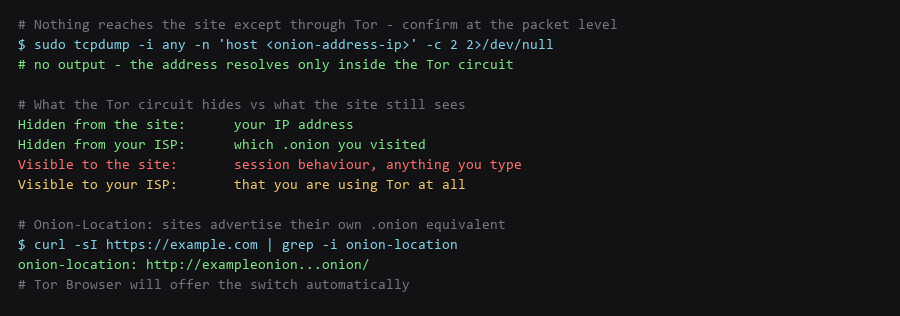
| The onion service | Your session behaviour, what you type, what you upload | Your IP address |
| Your ISP | That you are using Tor, and roughly how much data | Which .onion you visited |
| Your local network | Tor traffic to a guard relay | The destination service |
| Exit relay | Nothing — onion traffic never leaves the network | Not applicable |
| Tor guard relay | That you connected, not what you requested | The onion address you requested — end-to-end encrypted |
| The site operator | Anything you disclose in the session | Not applicable — this is the leak to watch |
The row that catches people: the service still sees everything you do within the session. An onion address hides where you connected from, not who you are when you log in. Logging into a personal account over Tor links the session to your identity just as effectively as doing it on the clearnet — Tor hid the network path, not the action.
4. Troubleshooting Failure Modes
Tor Browser is already hardened. The failures come from the surrounding environment and from habits that leak identity through the session.
# 1. Never log in to a personal account over an onion service
#    The session is attributed to you the moment you authenticate.

# 2. Do not resize the Tor Browser window
#    Tor Browser rounds the viewport to a standard size. Maximising
#    or resizing makes you distinctive.

# 3. Do not install extensions
#    Any extension changes your fingerprint and stands out.

# 4. Do not torrent over Tor
#    The BitTorrent protocol leaks your real IP by design.

# 5. Keep the browser and Tor daemon current
$ tor --version && sudo apt list --upgradable 2>/dev/null | grep -i tor

# 6. Verify no leak from the browser to the system resolver
$ sudo tcpdump -i any -n port 53 -c 5
# Expect: nothing external while browsing an onion service
Point 6 is the systematic check: with Tor Browser running, your system resolver should see no external DNS queries at all. Any that appear are a leak from something else on the machine rather than from Tor Browser, which is why the check is worth running while other applications are open.
Frequently Asked Questions
Why can I not reach .onion addresses without Tor?
The .onion suffix is not in the global DNS system. It resolves only through the Tor network's own rendezvous mechanism, which requires a Tor client. There is no server to ask outside Tor, which is precisely why the address cannot be hijacked — there is no registry to compromise.
Can an onion address be seized or taken down?
The address cannot be seized, because it is a public key with no registration. The physical server hosting the service can be seized. Distributed services survive that; single-server services do not. This is a hosting question, not a naming one.
Is using Tor illegal?
Running the client is legal in most places. Tor is used by journalists, researchers, and ordinary people in censorship contexts, and the software is open source and widely deployed. Some jurisdictions restrict anonymity tools specifically — verify your local position rather than assuming.
Sources & References
- Tor Project — Onion Services: community.torproject.org/onion-services — setup, configuration, and best practices
- Tor Rendezvous Specification: spec.torproject.org/rend-spec-v3 — the v3 address format and key derivation
- Tor Browser Design: torproject.org — the fingerprinting and isolation model
- Onion-Location Header: community.torproject.org — advertising a clearnet site's onion equivalent
- Tor Relay Guide: community.torproject.org/relay — how the network is operated
We ran every step for this onion service bench guide on our reference hardware and captured the output as shown; your distro, kernel, and config layout will differ in places, so confirm each result before moving on.