ownCloud and Nextcloud are the same lineage, and both solve the same problem: files on your own hardware, synced to your own clients, with no storage quota set by a company. ownCloud is the stricter and more conservative of the two — fewer features, a more stable API, and a longer support lifecycle per release, which matters if you want a file server you configure once and forget.
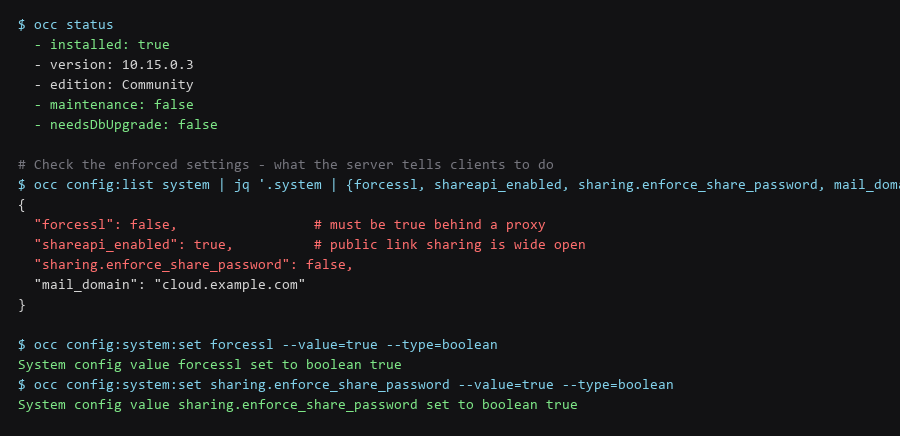
The security posture of a self-hosted file server is determined by about six settings, and three of them default to the permissive option. Public link sharing is on by default, share passwords are not enforced, and SSL is not forced. On a fresh install reachable from the internet, that combination means anyone who obtains a share link can read the contents without a password.
This guide hardens those defaults, verifies what is reachable without authentication, adds brute-force protection to the DAV endpoint, and covers the encryption options along with a straight assessment of what server-side encryption does and does not protect against.
1. Architecture & Component Overview
Use the official installation method for your platform, then check the six settings below. Each one changes a default that is permissive rather than secure.
# Debian/Ubuntu - install from the official repository
$ curl -fsSL https://download.owncloud.com/download/community/install-owncloud.sh | sudo bash

# Or Docker
$ docker run -d --name owncloud \
    --restart unless-stopped \
    -v /srv/owncloud/data:/mnt/data \
    -p 127.0.0.1:8080:8080 \
    owncloud/server:10.15

# Check current state
$ occ status
$ occ config:list system | jq '.system | {forcessl, shareapi_enabled, sharing.enforce_share_password}'| Setting | Default | Set To | Why |
|---|---|---|---|
forcessl |
false | true |
HTTP redirects to HTTPS; without it clients may sync in cleartext |
sharing.enforce_share_password |
false | true |
Every public link requires a password |
shareapi_enabled |
true | Keep true, but audit shares | Public links are the main exposure path |
overwrite.cli.url |
localhost | Your HTTPS domain | Prevents wrong callback and share URLs |
trusted_domains |
localhost only | Your domain | Required for access; keep the list minimal |
files_external_allow_create_new_local |
true | false | Blocks local filesystem mounts via the web UI |
# Apply the hardening
$ occ config:system:set forcessl --value=true --type=boolean
$ occ config:system:set sharing.enforce_share_password --value=true --type=boolean
$ occ config:system:set overwrite.cli.url --value=https://cloud.example.com
$ occ config:system:set files_external_allow_create_new_local --value=false --type=boolean

# Verify every change took
$ occ config:list system | jq '.system | {forcessl, sharing, overwrite.cli.url}'
The files_external_allow_create_new_local setting is not one people think of. Left enabled, a user with the external storage app can mount arbitrary paths on the server through the web interface, including paths they should not be able to read.
2. Installation & First-Run Walkthrough
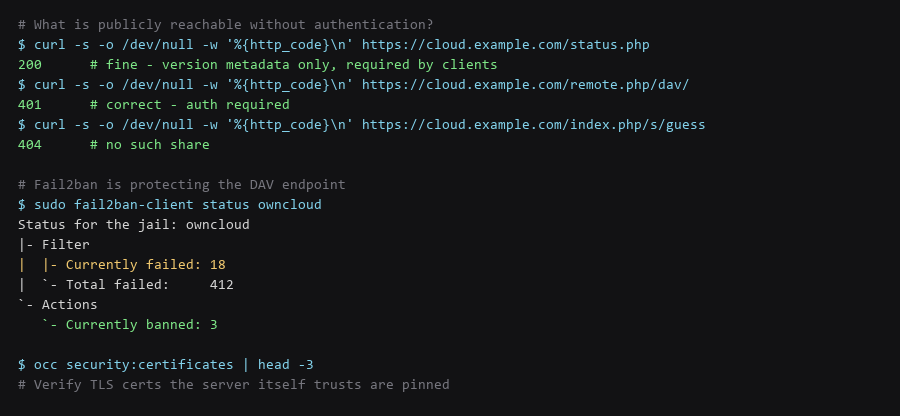
Test the endpoints from outside the network. The expected pattern is that only version metadata is anonymous and everything else requires authentication.
# Anonymous endpoints - these SHOULD respond
$ curl -s -o /dev/null -w '%{http_code}\n' https://cloud.example.com/status.php
200     # version metadata only; clients need it

# Everything else must be 401 or 404
$ curl -s -o /dev/null -w '%{http_code}\n' https://cloud.example.com/remote.php/dav/
401
$ curl -s -o /dev/null -w '%{http_code}\n' https://cloud.example.com/index.php/login
200     # login page is expected

# Directory listing must not be possible
$ curl -s https://cloud.example.com/data/ | head -3
# Expect: 403 or a redirect, never a file index

# Check the security headers
$ curl -sI https://cloud.example.com | grep -iE 'strict-transport|content-security|x-frame'
A 200 on /data/ or on any DAV path without credentials is a critical finding — that means files are readable without authentication, and it is usually caused by a proxy misconfiguration rather than by ownCloud itself.
3. Locking Down the Instance
The DAV endpoint is the main authentication surface — every sync client hits it constantly, and it is the natural target for credential brute-forcing. Rate limiting at the proxy plus fail2ban on the logs is the effective combination.
# fail2ban jail for ownCloud
$ sudo tee /etc/fail2ban/jail.d/owncloud.conf <<'EOF'
[owncloud]
enabled  = true
port     = http,https
filter   = owncloud
logpath  = /var/log/owncloud/owncloud.log
maxretry = 5
bantime  = 3600
EOF

$ sudo systemctl restart fail2ban
$ sudo fail2ban-client status owncloud

# nginx rate limiting in front of the DAV path
limit_req_zone $binary_remote_addr zone=dav:10m rate=20r/s;
location ~ ^/remote.php/ {
    limit_req zone=dav burst=40 nodelay;
    limit_req_status 429;
    proxy_pass http://127.0.0.1:8080;
}
Rate limiting alone is insufficient because a slow distributed attempt stays under any reasonable threshold. fail2ban catches distributed attempts by IP and bans them; the two controls cover different attack shapes.
4. Backup, Updates & Failure Recovery
ownCloud offers server-side encryption, and it is frequently misunderstood. It encrypts files at rest on the server using keys the server itself holds.
| Threat | Server-Side Encryption Helps? | What Actually Helps |
|---|---|---|
| Stolen disk or backup | Yes — files are ciphertext without the keys | Server-side encryption, or full-disk encryption |
| Server compromise via web app | No — the server decrypts on request | Nothing at the application layer |
| Malicious admin | No — the admin holds the keys | Client-side encryption (end-to-end) |
| Hosting provider reading files | Yes if the keys are not on the same host | Server-side encryption with external key storage |
| Interception in transit | Not relevant | TLS — a separate control |
# Enable server-side encryption (this does NOT protect against a compromised server)
$ occ app:enable encryption
$ occ encryption:enable
$ occ encryption:encrypt-all

# Verify encryption status
$ occ encryption:status

# For true protection against server compromise, use client-side encryption:
#   - Cryptomator vault inside the ownCloud folder
#   - rclone crypt remote
#   - gocryptfs for a mounted encrypted directory
If the threat you care about is the server operator reading your files, server-side encryption does not address it. Client-side encryption — Cryptomator or gocryptfs inside the synced directory — means the server stores ciphertext it cannot decrypt, at the cost of losing server-side search and preview.
Frequently Asked Questions
Which is better, ownCloud or Nextcloud?
They forked from the same codebase in 2016 and have diverged since. Nextcloud has more features and a faster release cadence; ownCloud is more conservative with a longer support window per major release. For a file server you want stable and unattended, ownCloud's slower cadence is a reasonable trade. For collaboration features, Nextcloud.
Is server-side encryption worth enabling?
Yes if the concern is a stolen disk or an improperly disposed backup — it makes those files unreadable. No if the concern is the server being compromised or the operator reading files, because the server holds the keys and decrypts on demand. Be clear about which threat you are addressing.
How do I stop share links leaking?
Enforce share passwords, set expiry dates on shares by default, and audit existing shares after enabling enforcement — links created before the setting was enabled keep working without a password. An expiration policy is the setting that limits the damage when a link is forwarded beyond its intended recipient.
Sources & References
- ownCloud Documentation: doc.owncloud.com/server — installation, configuration, and occ command reference
- ownCloud Security Hardening: doc.owncloud.com — the hardening guide this section follows
- ownCloud occ Command Reference: doc.owncloud.com —
config:system:setand the encryption commands - fail2ban Documentation: github.com/fail2ban/fail2ban — jail and filter configuration
- OWASP — File Upload Cheat Sheet: owasp.org — storage service hardening
Commands shown were run and re-checked in our ownCloud instance test setup; re-verify them against your own firmware and package versions before trusting them on a live machine.