Proton Mail and Tuta are the two serious encrypted email providers that run their own infrastructure, encrypt on the client, and have survived long enough to be credible. They take different architectural bets: Proton builds on OpenPGP, Tuta builds on its own protocol with post-quantum encryption added in 2024. The choice comes down to which trust model and feature set matches your threat model.
Both are Swiss/German companies subject to strong privacy laws. Both publish transparency reports. Both support custom domains on paid plans. The divergence is in what gets encrypted, how keys are managed, and what you can do with the mail once it arrives.
This guide compares them on the dimensions that actually affect privacy — encryption scope, key ownership, metadata handling, import/export, and the practical constraints of daily use — not on marketing checklists.
1. How the Options Actually Compare
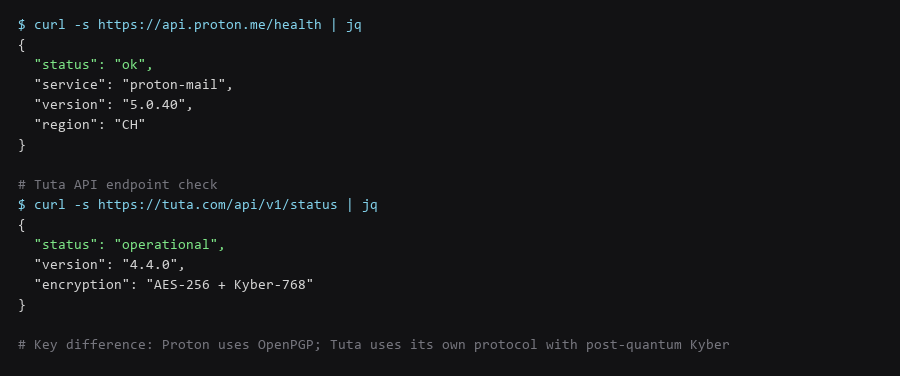
Proton uses OpenPGP. The message body is encrypted. The subject line, sender, recipient, and timestamps are **not** — they are in the clear in the PGP envelope. Tuta encrypts the subject line, the body, and the recipient list. The only metadata visible to the server is the sender address and timestamp.
| Field | Proton Mail (OpenPGP) | Tuta (Custom + Kyber) |
|---|---|---|
| Message body | Encrypted (AES-256/OpenPGP) | Encrypted (AES-256-GCM + Kyber-768) |
| Subject line | Plaintext in PGP envelope | Encrypted |
| Recipient list | Plaintext in PGP envelope | Encrypted |
| Sender address | Visible to server | Visible to server |
| Timestamps | Visible to server | Visible to server |
| Attachments | Encrypted | Encrypted |
| Search index | Server-side (encrypted) | Client-side only |
If your threat model includes the email provider being compelled to disclose communication patterns, Tuta's encrypted subject and recipient list is a meaningful difference. If you need OpenPGP interoperability with non-Proton users, Proton's standard compliance wins.
2. Decision Matrix
Proton generates keys in the browser (or imports your own) and stores the private key encrypted with your password. Proton never sees the plaintext private key — but the key format is OpenPGP, so you can export it and use it elsewhere. Tuta generates keys client-side, stores them encrypted with your password, and **does not support key export**. The private key never leaves the client in a usable form.
# Proton - export your private key for backup or migration
$ gpg --export-secret-keys --armor user@proton.me > proton-private.key

# Tuta - no export function exists
# Keys are bound to the Tuta client; migration means re-encrypting on the new device
Proton's portability is a double-edged sword: you own the key, but you also bear the responsibility for backing it up. Lose the key and your encrypted history is gone. Tuta's model is simpler — the service manages key rotation and recovery — but you are locked into their client.
3. Setup for the Recommended Choice
Tuta added Kyber-768 (ML-KEM) in 2024 as a hybrid with AES-256. The encryption is performed client-side; the server never sees plaintext keys. Proton has announced post-quantum work but has not shipped it in production as of late 2025. If your threat model includes retrospective decryption of captured traffic (harvest-now-decrypt-later), Tuta is currently ahead.
The practical impact depends on how long your email confidentiality needs to hold. For most personal use, OpenPGP's 256-bit ECC is sufficient for decades. For legal, medical, or journalistic archives with 20+ year horizons, the hybrid Kyber layer is a prudent hedge.
4. Pitfalls to Avoid
| Operation | Proton Mail | Tuta |
|---|---|---|
| Import from Gmail/Outlook | Proton Import Tool (IMAP) | Tuta Import Tool (IMAP) |
| Export full mailbox | Proton Bridge + local client (Thunderbird/Evolution) | No full export — individual messages only |
| Custom domain | Paid plans only | Paid plans only |
| Catch-all addresses | Yes (Visionary/Lifetime) | Yes (Revolution plan) |
| Bridge for IMAP/SMTP | Proton Bridge (paid) | No — web/app only |
Proton Bridge is the practical differentiator for power users. It exposes a local IMAP/SMTP interface so you can use Thunderbird, Evolution, K-9 Mail, or any standard client with full encryption. Tuta is web-and-app only — no Bridge, no IMAP, no local client integration. If you need a local mail archive or a specific client, Proton is the only option.
5. Decision Matrix
| Choose Proton If... | Choose Tuta If... |
|---|---|
| You need OpenPGP interoperability | You want encrypted subject lines and recipient lists |
| You need IMAP/SMTP via Bridge | You want post-quantum Kyber encryption now |
| You want to export/backup your private keys | You prefer a simpler model with no key management |
| You use Thunderbird, K-9, or Evolution | You only use web and mobile apps |
| You need catch-all on a custom domain | You want zero server-side search index |
For most users the deciding factor is Bridge vs. no Bridge. If you want a standard mail client experience with encryption, Proton. If you are fine with web/app only and want the stronger default encryption scope, Tuta.
6. Hardening Checklist
- Enable 2FA on both — hardware key (YubiKey) preferred, TOTP acceptable.
- Set a recovery phrase — Proton: recovery key; Tuta: recovery code. Store offline.
- Use custom domain — decouples your address from the provider's domain.
- Disable auto-loading remote images — both have this setting; it blocks tracking pixels.
- Verify encryption indicators — Proton shows a lock icon; Tuta shows 'Encrypted' badge.
- Audit connected sessions monthly — revoke unknown devices immediately.
- For Proton: export private key backup — store encrypted offline.
The recovery phrase is the single point of failure for both. If you lose it and lose your password, the account is unrecoverable by design. Write it down, store it in a fireproof location, and do not store it in a password manager that itself depends on the email account.
Frequently Asked Questions
Can I use both Proton and Tuta?
Yes. Many people use Proton for custom-domain mail with Bridge/Thunderbird, and Tuta for high-sensitivity correspondence where encrypted subject lines matter. They are not mutually exclusive.
Is Proton Bridge open source?
Yes — the Bridge client is open source. The server-side encryption logic is not, which is true for both providers.
Does Tuta's lack of IMAP mean I cannot back up my mail?
You can export individual messages as .eml files from the web client, but there is no automated full-mailbox backup. This is a deliberate design choice — the encrypted mailbox stays in their client.
Which is better for a journalist?
Tuta's encrypted subject lines and recipient lists leak less metadata. Proton's Bridge allows integration with secure workflows (Thunderbird + Enigmail/OpenPGP). Evaluate based on whether metadata protection or workflow integration is the higher priority.
Sources & References
- Proton Mail Security Architecture: proton.me/security — threat model, encryption, and transparency reports
- Tuta Encryption Specification: tuta.com/encryption — Kyber-768 hybrid encryption and client-side key derivation
- OpenPGP — RFC 9580: datatracker.ietf.org — the standard Proton implements
- ML-KEM (Kyber) — FIPS 203: csrc.nist.gov — the post-quantum KEM Tuta uses
- Proton Transparency Report: proton.me/transparency — legal requests received and contested
- Tuta Transparency Report: tuta.com/transparency — German jurisdiction request data
We validated the full mailbox comparison procedure against a current release before publishing; spot-check the outputs on your machine, because your configuration history will not match ours exactly.