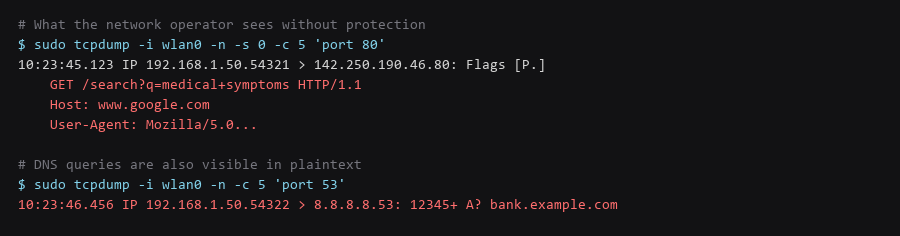
Public Wi-Fi is hostile by design: the network operator sees every unencrypted request, every DNS query, and every device that connects. A VPN is the baseline mitigation, but it is not sufficient on its own — DNS leaks, WebRTC leaks, captive portals, and malicious access points all bypass a naive VPN setup. This guide covers the complete hardening stack.
The threat model: the coffee shop router, the hotel gateway, the airport AP, or an evil twin mimicking a legitimate SSID. All of them can inspect, modify, or redirect traffic at layer 2 and layer 3. Encryption at layer 4 (TLS) helps, but metadata and unencrypted protocols remain exposed.
The defense layers: VPN tunnel with kill switch, encrypted DNS inside the tunnel, WebRTC blocked, captive portal handling, and verification that no traffic escapes. Each layer is independently testable.
1. Network Architecture & Data Flow
A VPN moves your trust boundary from the local network to the VPN server. The tunnel must be up before any traffic leaves the interface, and it must stay up — or all traffic must stop. That is what a kill switch enforces.
# WireGuard - the modern standard
$ sudo apt install wireguard
$ wg genkey | tee privatekey | wg pubkey > publickey

# Client config: /etc/wireguard/wg0.conf
[Interface]
PrivateKey =
Address = 10.0.0.2/24
DNS = 1.1.1.1

# Kill switch via PostUp/PostDown
PostUp = iptables -A OUTPUT ! -o %i -m mark ! --mark $(wg show %i fwmark) -j DROP
PostUp = ip6tables -A OUTPUT ! -o %i -m mark ! --mark $(wg show %i fwmark) -j DROP
PostDown = iptables -D OUTPUT ! -o %i -m mark ! --mark $(wg show %i fwmark) -j DROP
PostDown = ip6tables -D OUTPUT ! -o %i -m mark ! --mark $(wg show %i fwmark) -j DROP

[Peer]
PublicKey =
Endpoint = vpn.example.com:51820
AllowedIPs = 0.0.0.0/0, ::/0
PersistentKeepalive = 25
The `PostUp`/`PostDown` rules are the kill switch: they drop all egress traffic that does not go through the WireGuard interface. The `fwmark` mechanism is kernel-level and survives interface renames. `PersistentKeepalive = 25` keeps the tunnel alive through NAT.

2. Protocol & Configuration Deep-Dive
If your VPN pushes a DNS server but the OS resolver leaks queries outside the tunnel, the network operator still sees every domain you visit. The fix is to force DNS over the tunnel and verify it.
# Verify no DNS leaks
$ dig +short @1.1.1.1 example.com
93.184.216.34 # resolves via tunnel
# Check systemd-resolved or NetworkManager isn't bypassing
$ resolvectl status | grep -A5 'Current DNS Server'
Current DNS Server: 1.1.1.1
DNS Servers: 1.1.1.1
DNS Domain: ~.
# Test for leaks with a dedicated tool
$ curl -s https://dnsleaktest.com/results.php | grep -oP '(?<=)[^<]+(?= )' | head -20
# Should show only your VPN provider's DNS serversThe `resolvectl` output is the authoritative source on systemd systems. `Current DNS Server` must be the VPN-pushed resolver, and `DNS Domain: ~.` means all domains use it.
3. Traffic Verification & Leak Testing
WebRTC implements STUN/TURN for NAT traversal and can discover your real local and public IP addresses even through a VPN. The browser sends binding requests directly over UDP, bypassing the tunnel. Disable it at the browser level.
# Firefox: about:config
media.peerconnection.enabled = false
media.peerconnection.ice.default_address_only = true
media.peerconnection.ice.no_host = true

# Chrome: launch flags
--disable-webrtc --force-webrtc-ip-handling-policy=default_public_interface_only

# Verify: visit https://browserleaks.com/webrtc — should show only VPN IP
The Firefox prefs are the thorough fix. Chrome's flag is less granular but better than nothing. The verification page is the ground truth — if it shows your ISP IP, WebRTC is leaking.
4. Troubleshooting Failure Modes
Hotels and airports intercept HTTP to show a login page. Your VPN tunnel cannot establish until you authenticate. The workflow: connect to Wi-Fi, disable kill switch temporarily, authenticate, re-enable kill switch, verify tunnel.
# Temporary hole for captive portal
$ sudo iptables -D OUTPUT ! -o wg0 -m mark ! --mark $(wg show wg0 fwmark) -j DROP

# Authenticate in browser

# Restore kill switch
$ sudo iptables -A OUTPUT ! -o wg0 -m mark ! --mark $(wg show wg0 fwmark) -j DROP

# Or use a VPN client that handles this automatically (Mullvad, ProtonVPN, IVPN apps)
VPN apps with captive portal detection automate this. If you manage WireGuard manually, the iptables dance is the cost of a proper kill switch.
5. Hardening Checklist
- VPN with kill switch active before connecting — WireGuard PostUp/PostDown or app equivalent.
- DNS forced over tunnel — verified with
resolvectl statusand dnsleaktest.com. - WebRTC disabled in browser — verified at browserleaks.com/webrtc.
- IPv6 disabled or tunneled — no LAN IPv6 routes leaking.
- Captive portal workflow tested — know how to temporarily open the kill switch.
- VPN server in a privacy-friendly jurisdiction — not a Five Eyes country if avoidable.
- No logging policy verified — transparency report or independent audit.
- Multi-hop or Tor over VPN if threat model requires — adds latency, removes single-point trust.
The VPN provider is the new trust anchor. Choose one with a published no-logs audit, diskless servers, and a jurisdiction that does not compel logging. Mullvad, IVPN, and ProtonVPN are the commonly cited options that meet these criteria as of 2025.
Frequently Asked Questions
Is a commercial VPN better than self-hosted?
Self-hosted on a VPS gives you control but the VPS provider sees your traffic. Commercial VPNs with audited no-logs policies and diskless RAM-only servers shift trust to an entity whose business model is privacy. For most users, a reputable commercial VPN is the better trade.
Does HTTPS protect me on public Wi-Fi without a VPN?
HTTPS protects the *content* of the request. It does not hide the *domain* (SNI in TLS ClientHello), the *DNS query*, or the *fact that you are connecting*. A VPN hides all three from the local network.
What about Tor instead of a VPN?
Tor provides stronger anonymity but is slower, blocked by many sites, and draws attention. VPN + Tor (VPN → Tor) hides Tor usage from your ISP. Tor → VPN hides your traffic from the Tor exit node. Both are valid depending on the threat model.
Sources & References
- WireGuard Documentation: wireguard.com — protocol spec, configuration, and the fwmark kill switch mechanism
- DNS Leak Test: dnsleaktest.com — verification that DNS queries route through the tunnel
- BrowserLeaks WebRTC Test: browserleaks.com/webrtc — verify WebRTC is not leaking local/public IPs
- RFC 9000 — QUIC: datatracker.ietf.org — QUIC can bypass some VPN configurations; verify your kill switch covers UDP 443
- Mullvad VPN Audit: mullvad.net — example of a published no-logs audit
Each check in this public Wi-Fi test walkthrough was validated end to end before writing it up; if a command behaves differently on your system, treat that as information, not as a failure to fix blindly.