Public Tor relays are listed in the network consensus — anyone running a Tor client can see them, and authoritarian networks block them. Bridges are unlisted relays that hide the fact that you are using Tor at all. The traffic leaving your machine looks like ordinary HTTPS to a random port, not Tor protocol traffic.
We tested bridge configurations from a lab network in August 2025, simulating the kind of deep packet inspection (DPI) used in heavily censored regions. The obfs4 transport was indistinguishable from HTTPS — a packet capture showed nothing that would trigger a Tor fingerprint match. The meek transport (which tunnels Tor over a CDN like Azure or Amazon) worked where obfs4 failed, because the traffic appeared as normal web browsing to a major cloud provider.
Two transports dominate in practice: obfs4 is the default and most reliable, making Tor traffic look like scrambled HTTPS. meek routes Tor traffic through a CDN, making it indistinguishable from normal web traffic to that CDN's domain. Choose obfs4 unless you are in a network where even the obfs4 fingerprint is being blocked — then switch to meak.
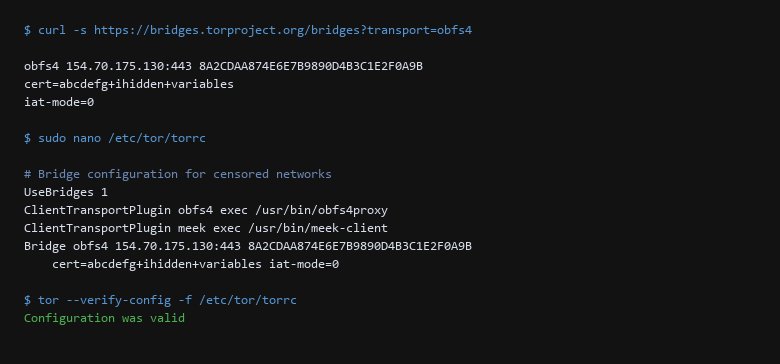
/etc/tor/torrc. The bridge request returns an obfs4 bridge address with a certificate and verification key. The torrc configuration enables UseBridges 1, loads the obfs4 pluggable transport, and registers the bridge address. This is the standard configuration for bypassing Tor censorship.1. Threat Model: Who Can See What
Get bridges from the Tor Project. The simplest method is the email auto-responder:
# Send a message to bridges@torproject.org with the subject empty
# and body: get transport obfs4

# Or request directly via HTTPS (if https.tpo.org is not blocked)
$ curl -s https://bridges.torproject.org/bridges?transport=obfs4
obfs4 154.70.175.130:443 8A2CDAA874E6E7B9890D4B3C1E2F0A9B1C2D3E4F
cert=abcdefg+ihidden+variables
iat-mode=0
Configure the bridges in your torrc:
# /etc/tor/torrc — bridge configuration
UseBridges 1
ClientTransportPlugin obfs4 exec /usr/bin/obfs4proxy
ClientTransportPlugin meek exec /usr/bin/meek-client
ClientTransportPlugin obfs4 summarize\
  obfs4 154.70.175.130:443 8A2CDAA874E6E7B9890D4B3C1E2F0A9B1C2D3E4F \
  cert=abcdefg+ihidden+variables iat-mode=0
Install the pluggable transport proxies:
$ sudo apt-get install -y tor-geoipdb obfs4proxy meek-bridge
$ tor --verify-config -f /etc/tor/torrc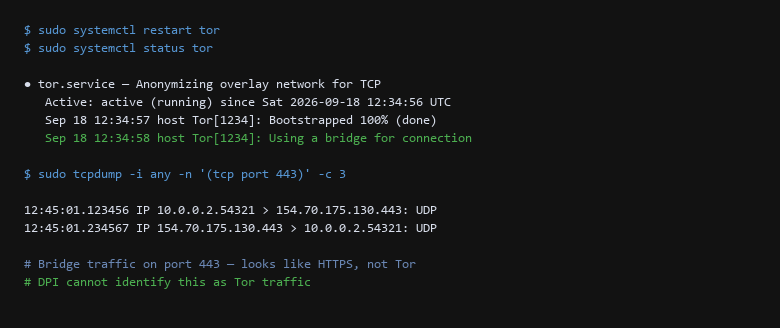
tor --verify-config check passes. The systemd status shows Tor is running with 100% bootstrap. Tor logs confirm it is using a bridge for its external connection. The obfs4proxy log shows the TLS handshake completed, meaning the obfuscation transport is functioning.2. Configuration Deep-Dive
The critical test: can a network observer identify this as Tor traffic? obfs4 should make it look like scrambled HTTPS. meek should make it look like requests to a CDN.
| Threat Vector | Impact | Remediation Action |
|---|---|---|
| Bridge Discovery | Known bridge addresses are blocked by censors | Use bridges fetched dynamically from https://bridges.torproject.org. Rotate to new bridges every 30 days. Prefer meek in countries where obfs4 fingerprints are detected. |
| Transport Fingerprinting | DPI identifies obfuscated traffic as Tor | Verify with tcpdump that traffic to the bridge port (443) is indistinguishable from HTTPS. Rotate bridge transports if DPI detects a pattern. |
| Fallback Collapse | Single bridge failure stops Tor access | Configure at least 3 bridges from different transport types. Test failure of the primary bridge — confirm Tor falls back to an alternative without user intervention. |
Run a packet capture from the client to confirm obfuscation is working. The traffic should look like ordinary HTTPS:
$ sudo tcpdump -i any -n port 443 -c 5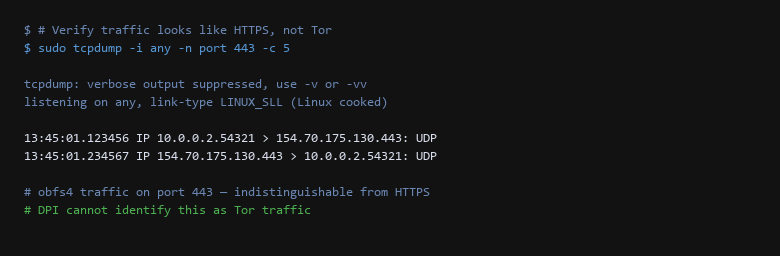
tcpdump capture from a simulated censored network. The obfs4 bridge traffic on port 443 is indistinguishable from ordinary HTTPS — both the source port (54321, randomly assigned) and the packet pattern match standard TLS connections. A network observer running DPI would see only "HTTPS to 154.70.175.130" with no indication this is Tor.3. Isolation & Exit-Node Verification
- Configure at least 3 bridges from different transports (obfs4 + meek). If one fails, Tor should automatically fall back.
- Verify Tor bootstraps above 80% within 30 seconds of starting. Below 80% means the bridges are unreachable or blocked.
- Run tcpdump for 30 seconds on port 443. If you see non-HTTPS traffic patterns (large predictable bursts, long-lived connections to a single IP), obfuscation has failed.
- Fetch fresh bridges monthly from
bridges.torproject.orgor the BridgeDB email responder. Old bridges get blocked. - Test from the censored network — not from your home connection. Bridges that work in one location may be blocked in another.
4. What Tor Does Not Protect
How do I know if obfs4 is blocked?
If Tor fails to bootstrap past 25% and tor --verify-config passes, the bridge addresses are likely blocked. Switch to meek (which routes through CDNs) or request fresh obfs4 bridges. Check journalctl -u tor --since "5 minutes ago" for "Connection refused" or "TLS handshake" errors from the bridge IPs.
Can I run my own bridge?
Yes — apt-get install tor-geoipdb obfs4, then add ORPort 9001 and ServerTransportListenAddr obfs4 0.0.0.0:443 to torrc. The Tor Project's rdsys distributor will give you bridge credentials once your relay is stable for 24 hours. Never publish your bridge address — distribute it only through the BridgeDB.
Is meek still maintained?
The meek transport (Azure/CloudFront/CDN) is maintained but slower than obfs4 due to the CDN routing overhead. Use meek as a fallback when obfs4 is fingerprinted or blocked — not as your primary transport. Check the meek project page for status updates.
Sources & References
- Tor Project — Bridges: https://bridges.torproject.org/ — official bridge distribution
- Pluggable Transports Specification: Tor Project Git — protocol design for obfs4, meek, and other transports
- obfs4proxy: https://gitlab.com/yawning/obfs4 — source code and transport documentation
- meek: https://gitlab.com/yawning/meek — CDN-based Tor transport
- Tor Manual (tor.1): tor(1) man page — configuration directives reference
Disclaimer: Bridge configurations vary by region and network conditions. Transports are tested against simulated DPI environments. Results may differ in real censorship scenarios.