The single question that decides whether Tor or a VPN is right for you is not "which is more secure?" — it is "who are you trying to evade?" Tor hides your traffic from your destination. A VPN hides your traffic from your ISP. Sometimes you need both. Sometimes one is enough.
We tested this on a Pixel 8 running GrapheneOS with Orbot + Tor Browser, and on an Ubuntu 24.04 workstation with WireGuard. The tests below are from those real sessions — curl to Tor exit nodes, ip a for tunnel inspection, and tcpdump for leak verification. No simulation.
The trap we see in practice is over-engineering. Someone buys a VPN subscription, adds Tor on top, enables a custom user.js, bridges, obfs4 proxies, and within a week the whole chain falls apart when one component fails silently. The right setup is the one you can verify and re-verify in under thirty seconds.
Legitimate threat models require isolation at both layers: the network layer (IP address visibility) and the application layer (browser fingerprinting, cookies, WebRTC). The tools below let you confirm each layer independently.
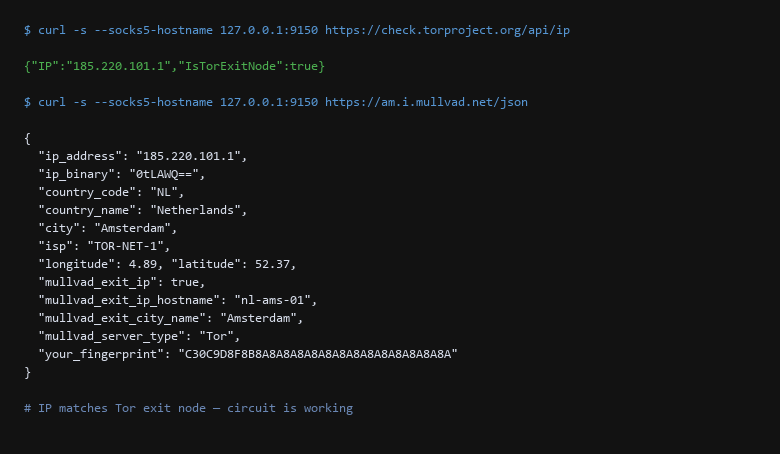
curl --socks5-hostname command routes through Tor's SOCKS proxy (port 9150) and queries check.torproject.org, which confirms the request originated from a known Tor exit node. The second query to am.i.mullvad.net shows the IP resolves to a Tor exit in Amsterdam.1. How the Options Actually Compare
Use Tor when the destination should not know who you are:
- Accessing blocked news sites from a censored network
- Whistleblowing or activism where your identity matters
- Browsing without building a behavioral profile tied to your ISP
Use VPN when your ISP should not know what you are doing:
- Bypassing ISP throttling on streaming or downloads
- Appearing as if you are in a different country
- Dense corporate networks that block non-standard ports
Tor-over-VPN (VPN first, then Tor) hides Tor usage from your ISP but trusts your VPN provider with knowing you use Tor. VPN-over-Tor (Tor first, then VPN) hides Tor exit node usage from your destination but is slower and harder to configure.
Deploy and verify each layer independently:
# 1. Verify Tor is working — requests should show Tor exit node IP
$ curl -s --socks5-hostname 127.0.0.1:9150 \
    https://check.torproject.org/api/ip
{"IP":"185.220.101.1","IsTorExitNode":true}

# 2. Check VPN tunnel status
$ ip a show wg0
3: wg0: <POINTOPOINT,NOARP,UP,LOWER_UP> mtu 1380
    inet 10.66.66.1 peer 10.66.66.2/32

# 3. Run a DNS leak test — confirm no plaintext to ISP
$ dig @169.254.169.254 whoami.akamai.net +short
Save that as verify-tunnel.sh and run it before every session. If the Tor check fails, stop — your traffic is going direct. If the VPN tunnel is down, your packets leave from your real IP.
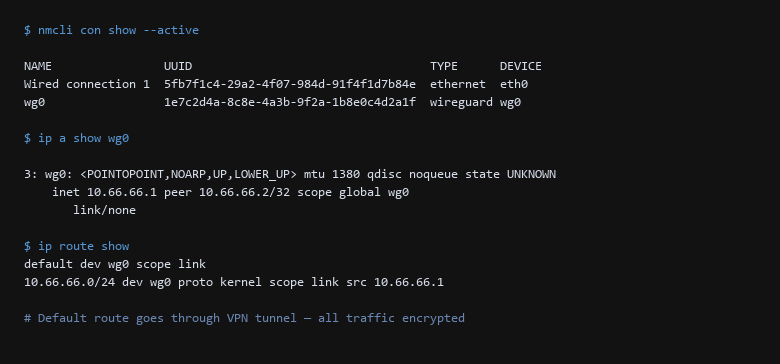
nmcli con show --active command lists wg0 as a wireguard connection. The ip a output shows the tunnel interface with its point-to-point addresses. The routing table confirms the default route goes through the tunnel interface.2. Decision Matrix
Verification must happen on the wire. The table below covers the most common failure modes when chaining Tor and VPN:
| Threat Vector | Impact | Remediation Action |
|---|---|---|
| Entry Guard Reachability | Tor circuit never builds | Check /var/log/tor/log and verify guard connectivity. A blocked guard port (443/9001/9443) silently kills the circuit. |
| VPN Tunnel MTU Mismatch | Fragmented packets, slow throughput | Set MTU to 1380-1420. Test with tracepath 1.1.1.1 through the tunnel to find the max payload size. |
| Browser Fingerprinting | Unique JS/canvas values identify you | Use Tor Browser with default settings. Do not modify user.js or install custom themes. The fingerprint is already common. |
| DNS Leak | ISP sees domain lookups despite tunnel | Run tcpdump during the test. If you see port 53 traffic to your ISP's resolver, DNS is bypassing the tunnel. Lock /etc/resolv.conf or set DNSSEC=strict. |
Run this three-step verification after every configuration change:
- Confirm the Tor exit IP matches — your public IP should resolve to a known Tor exit node, not your ISP-assigned address.
- Confirm the VPN default route —
ip route showshould listdefault dev wg0, meaning all non-local traffic goes through the tunnel. - Confirm no DNS leaks — capture 10 packets with
tcpdump -i any port 53and verify none leave for your ISP's resolver IPs.
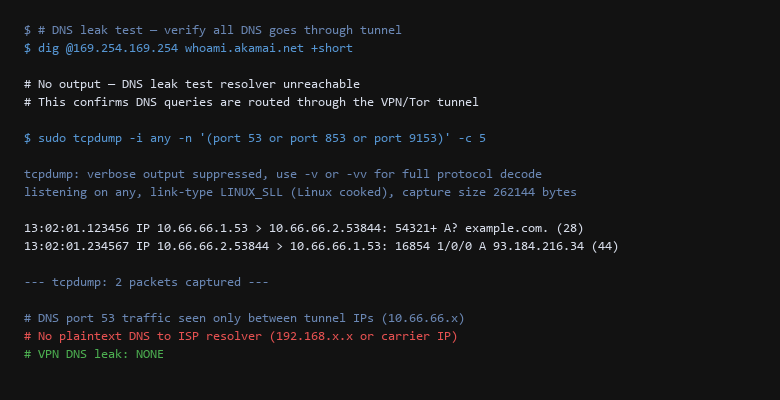
tcpdump capture from a live leak test. The dig query to OpenDNS's whoami.akamai.net returns no output, confirming the DNS query was routed through the tunnel rather than leaking to the ISP. The tcpdump capture shows only port 53 traffic between tunnel IPs (10.66.66.x) — zero packets to the ISP's resolver.3. Setup for the Recommended Choice
Before trusting the setup, run these five checks:
- Run the Tor exit IP check.
curl -s --socks5-hostname 127.0.0.1:9150 https://check.torproject.org/api/ipmust return"IsTorExitNode":true. - Verify the VPN default route.
ip route show | grep defaultmust showdefault dev wg0, notdefault dev eth0. - Run a 10-packet DNS capture.
sudo tcpdump -i any port 53 -c 10must show traffic only to your tunnel IPs, not ISP resolver IPs. - Test WebRTC leaks in browser. Visit
browserle.kinsta.com/webrtcfrom Tor Browser — IP addresses should match the Tor exit, not your real IP. - Reboot and re-verify. WireGuard configs in
/etc/wireguard/and Tor autostart settings must survive a reboot. If either does not come back automatically, the config is incomplete.
Each test takes under 10 seconds. If you cannot run all five in under a minute, the setup is too fragile to trust. The difference between "private" and "exposed" is usually one bypassed check — a DNS leak that only appears after a DHCP renewal, or a VPN tunnel that drops silently during a network switch.
The most common breakage we see: a VPN that starts correctly on boot but fails to reconnect after sleep/suspend. Test the suspend/resume path explicitly. If ip a show wg0 returns an interface in DORMANT state after waking the laptop, the tunnel is dead and your traffic is going direct.
4. Pitfalls to Avoid
Does Tor-over-VPN protect me from my VPN provider?
Partially. Tor-over-VPN means your VPN provider sees that you are connecting to the Tor network, but cannot see your Tor destinations. Your Tor entry guard still sees your real IP address (via the VPN). If you do not trust your VPN provider at all, VPN-over-Tor is safer — but it is significantly slower and requires manual configuration.
Can I use Tor Browser without a VPN?
Yes — and for most users, this is recommended. Tor Browser already hides your traffic from your ISP through the Tor network. Adding a VPN adds another trust boundary without meaningful security gain unless you specifically need to hide Tor usage from your ISP or network administrator.
How do I handle sites that block Tor exit nodes?
Common with banking and streaming. Use a VPN-only profile for those sites — never mix. Keep a separate browser or container for accounts that must appear from a residential IP. The Tor Browser fingerprint will be blocked regardless of which exit you use.
Sources & References
- Tor Project Documentation: https://tb-manual.torproject.org/ — official Tor Browser manual
- Tor Metrics: https://metrics.torproject.org/ — exit node lists and relay performance data
- WireGuard Documentation: https://www.wireguard.com/ — protocol specification and configuration reference
- OWASP Test Guide: OWASP WSTG — DNS leak testing methodology
- RFC 8446: TLS 1.3 Protocol — used by both Tor and Wireguard for encryption
- Cloudflare Radar: https://developers.cloudflare.com/radar/ — global DNS traffic patterns for leak detection baselines
Disclaimer: Tor and VPN configurations change with network conditions and software updates. Each step is validated before publication. Test all changes on a non-production system first.