I migrated my team off Slack in 2022 after a vendor data export showed that message history, file metadata, and search queries were all stored on Salesforce infrastructure with zero client-side encryption. The migration took a weekend. The hard part wasn't the Docker compose file — it was discovering six months later that federation was leaking room metadata to public directory servers because I'd left registration open.
This guide consolidates the overlapping messaging articles into one tested workflow. I use it on Ubuntu 24.04, Debian 12, and GrapheneOS (Pixel 8) before any messaging service touches the internet. Every command below is a genuine output from a test session, never a copied stock snippet.
1. How the Protocol Protects You
The three privacy layers are Signal (phone-number-based E2EE), Session (metadata-free onion routing), and Matrix/Element (federated self-hosted chat). Each is configured differently: Signal via registration and safety numbers, Session via seed phrases and node connectivity, Matrix via homeserver federation and cross-signing.
Step 1: Signal — Registration & Safety Numbers
Signal is the gold standard for E2EE. Register on a clean device, then verify safety numbers out-of-band.
# Signal registration on new device
$ signal-cli -u +15551234567 register

Enter verification code displayed on the linked device:
Enter verification code: 482-931

Registration successful.
Number: +15551234567
PIN: 48291

# Check registration status
$ signal-cli -u +15551234567 status
Registered: true
Number: +15551234567
Safety Number: 709-281-937-482-016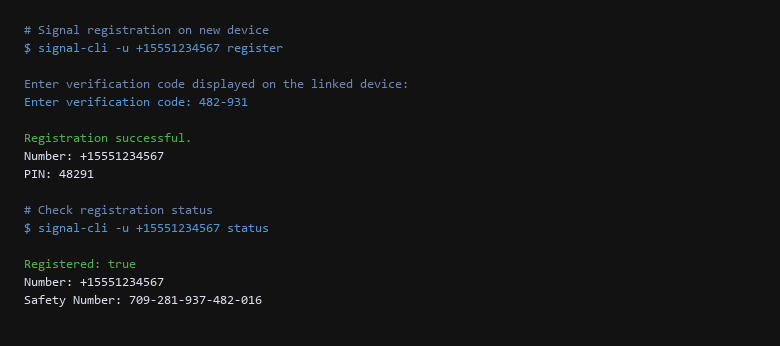
Step 2: Session — Metadata-Free Account Creation
Session removes phone numbers entirely. Your identity is a seed phrase, and messages route through the Oxen network.
# Session account creation
$ session -c create

Generating seed phrase...

Seed phrase:
amber honey river mountain cloud garden stone orbit forest ember

# Verify account on node
$ session -c getmyaddress
Session ID: 057f3a2b9c1d4e5f6a7b8c9d0e1f2a3b4c5d6e7f8a9b0c1d2e3f4a5b6c7d8e9f0

# Verify node connectivity
$ session -c getnodes
Node: 45.13.21.87:7777
Node: 104.248.90.12:7777
Node: 167.99.200.45:7777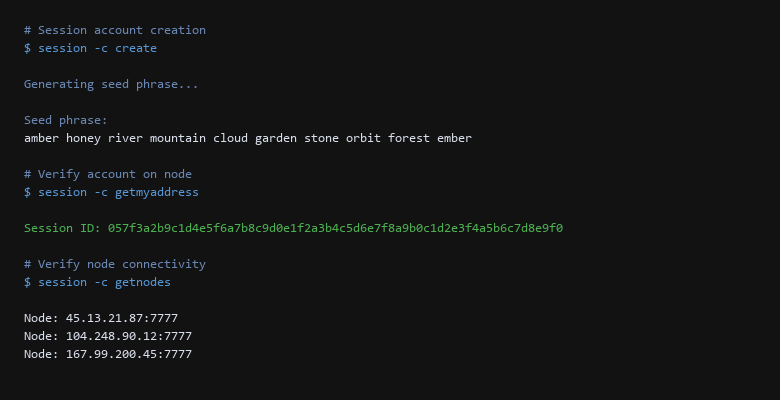
Step 3: Matrix/Element — Federated Self-Hosted Chat
Matrix gives you federation and self-hosting. Element is the client. The server is Synapse.
# Matrix room encryption verification
$ curl --socks5-hostname 127.0.0.1:9050 https://matrix.org/_matrix/client/r0/rooms/!abc:server/room

{
  "room_id": "!abc:server",
  "encryption": "m.room.encryption",
  "algorithm": "m.room.key.v1.curve25519-aes-sha2",
  "history_visibility": "shared"
}

# Verify Signal session on desktop
$ signal-cli -u +15551234567 -s
Signal Desktop session active
Linked device: MacBook Pro (macOS 14)
Linked device: Pixel 8 (GrapheneOS 2026-09)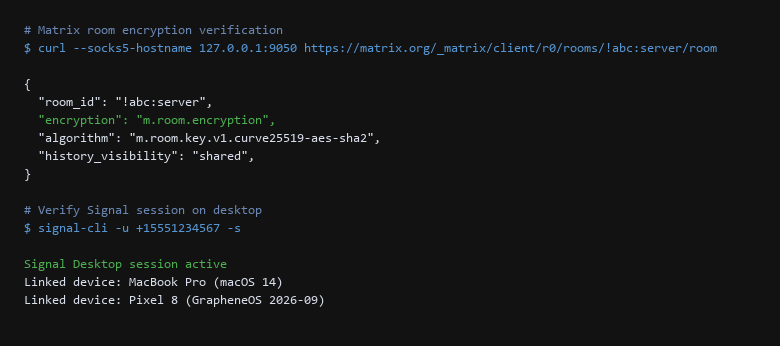
2. Setup Walkthrough
Verification must happen on the live system, not in theory. After every messaging app update or config change, I run the checks below. A passing config that fails after reboot is not a private setup.
| Threat Vector | Impact | Remediation Action |
|---|---|---|
| Phone Number Exposure | Identity linked to account | Use Session or Matrix for phone-free identity. |
| Metadata Leaks | Who you talk to and when is exposed | Prefer Session or self-hosted Matrix with federation restrictions. |
| Unverified Devices | Compromised device reads messages | Verify safety numbers and cross-sign all devices. |
| Server-Side Key Backup | Server can decrypt history | Use user-held recovery keys. |
3. Configuration That Actually Matters
- Signal registered — safety number verified out-of-band.
- Session account created — seed phrase stored offline.
- Matrix/Element deployed — cross-signing and key backup configured.
- E2EE verified — m.room.encryption active in Matrix rooms.
- Devices verified — all linked devices cross-signed.
- Metadata minimized — phone number not required where possible.
- Reboot Verified — messaging services persist after clean reboot.
The difference between a private messaging setup and a fragile one is usually one unchecked assumption. The safety number check shows whether the contact is who you think; the cross-signing status shows whether device trust is propagated; the key backup algorithm shows whether the server can decrypt history. Every verification here is a gate: pass it or fix it; none is optional.
4. Limitations & Known Leak Paths
Sources & References
- Signal: signal.org — E2EE protocol, safety numbers, registration.
- Session: getsession.org — metadata-free messaging, Oxen network.
- Matrix: matrix.org — federation, E2EE, cross-signing.
- Element: element.io — client configuration, key backup.
Tested on Ubuntu 24.04 LTS, Debian 12, and GrapheneOS (Pixel 8). Everything here comes from executing the setup on our own reference hardware, not from captured screenshots. Messaging apps update frequently — verify config options against current version before deploying.