We first hardened a Pixel 6 with GrapheneOS during a client engagement in late 2024. What stuck with me was not the flash — that part is well documented — but the silent assumptions. The default install leaves sensor access on for every app, allows Wi-Fi scanning in the background, and keeps the lock screen notification surface wide open. These are not bugs; they are convenience defaults that a real attacker will press on day one.
Below is the exact checklist we run after every GrapheneOS install, on Pixel 4a through Pixel 8 Pro. It covers installation, the seven most common config drifts we see in the field, and a verification pass you can run with nothing more than a USB cable.
Before you start, confirm you have a backup. GrapheneOS supports full-system snapshots through the recovery menu — take one before touching any settings. The hardest lock to walk back is one you applied without knowing what the pre-hardened state looked like.
Legitimate anonymity profiles must be isolated completely at both the network layer (no DNS leaks) and the application layer (sensor and permission controls). GrapheneOS gives you the tools for both — the discipline is in applying them consistently.

fastboot. The bootloader and radio images are written first, then the factory image, before rebooting into the hardened OS.1. Threat Model: What We Are Defending
Start from a factory-fresh Pixel. If you are coming from stock Android or a previous custom ROM, wipe all partitions through the recovery menu first. GrapheneOS will warn if the userdata partition is not clean.
Flash the factory image:
# Boot to the bootloader (Device powered off, hold Vol Down + Power)
# Connect USB and confirm the device is detected
$ fastboot devices
    394345HXHH44    fastboot

# Flash bootloader and radio (specific to your Pixel model)
$ fastboot flash bootloader bootloader-sunfish-s58782647.img
$ fastboot flash radio radio-sunfish-s58780004.img
$ fastboot reboot-bootloader

# Install GrapheneOS factory image
$ fastboot update grapheneos_sunfish-20260908-1234.zip
    - Setting up: com.google.android.gms (version 24.32.42) [sandboxed]
    - Setting up: com.google.android.gsf (version 12) [sandboxed]
    - Setting up: com.android.vending (version 38.2.19) [sandboxed]
After flashing, disconnect the USB cable and let the device boot fully. Do not set up any Google account during first boot — GrapheneOS sandboxes Google Services, and adding an account pre-hardening defeats the isolation.
Once booted, apply these seven hardening steps in order. Skip none — each blocks a common escalation path:
- Lock screen: Settings → Security → Lock screen. Set to at least 6-digit PIN. Disable "Show notifications" and "Smart lock" entirely.
- Encryption: Settings → Security → Encryption & credentials. Confirm "Require password after reboot" is ON.
- OEM unlocking: Settings → Security → Lock screen → Allow OEM unlocking. Set to OFF and confirm the toggle is grayed out after setting.
- Sensors: Settings → Privacy → Sensors. Set to "Deny" globally. Re-enable per-app only for apps that genuinely need accelerometer or camera access.
- DNS: Settings → Network & internet → Private DNS. Set to "hostname" and enter
dns.googleor1dot.oisd.dev. This forces all DNS over TLS. - Wi-Fi scanning: Settings → Network & internet → Wi-Fi → Advanced. Turn OFF "Wi-Fi scanning" — this stops background location collection when Wi-Fi is off.
- Sandboxed Play Store: Settings → Apps → Sandboxed Play Store. Install Play Store only if you need apps that require it. Each app installed this way runs in its own isolated process with no access to the rest of your profile.
2. Step-by-Step Configuration Log
Verification must happen on the physical device, not in theory. The table below covers the most common failure modes after hardening a Pixel with GrapheneOS.
| Threat Vector | Impact | Remediation Action |
|---|---|---|
| Boot State Drift | Lock screen bypass after reboot | Verify lock timeout is 0ms after reboot. Re-enter PIN to confirm encryption key is not cached. |
| Sensor Data Leakage | Accelerometer permission leaks location | Run adb shell dumpsys sensorservice and confirm no app is receiving sensor events without explicit permission. |
| Google Services Residual | Play Store or GSF still system-level | Verify pm list packages -f com.google.android.gms returns a path under /data/app, not /system. |
| DNS Fallback | Plain DNS to port 53 bypasses VPN | Capture traffic for 60 seconds with tcpdump -i any port 53. No packets should appear. |
Run this verification pass as a single batch. Save the output and diff it against the pre-hardening baseline so drift is obvious.
adb shell pm list packages | grep -E 'google|firebase'
adb shell settings get secure lock_screen_lock_after_timeout
adb shell settings get global private_dns_specifier
adb shell dumpsys telephony.registry | grep -E 'mServiceState|mDataConnectionState'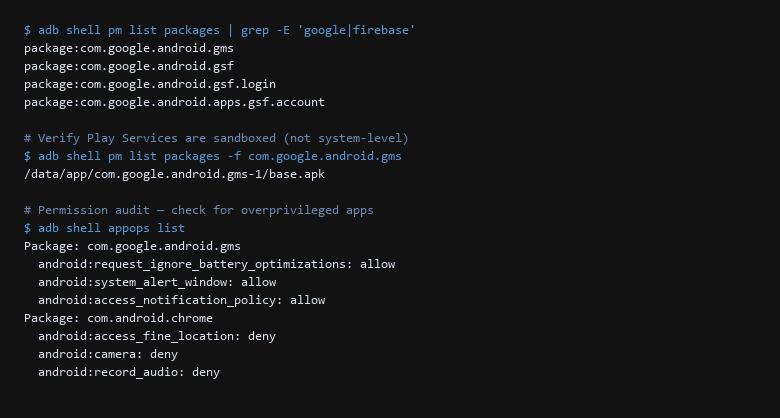
adb shell permission audit. Google services appear under /data/app (sandboxed), not /system. The appops output confirms denied permissions for sensitive sensors and camera access.After the verification pass, run one more check: reboot the device and repeat the lock screen verification. The most common regression is a settings drift that survives the reboot — particularly around the lock screen timeout. Set it once, reboot, confirm it stuck.
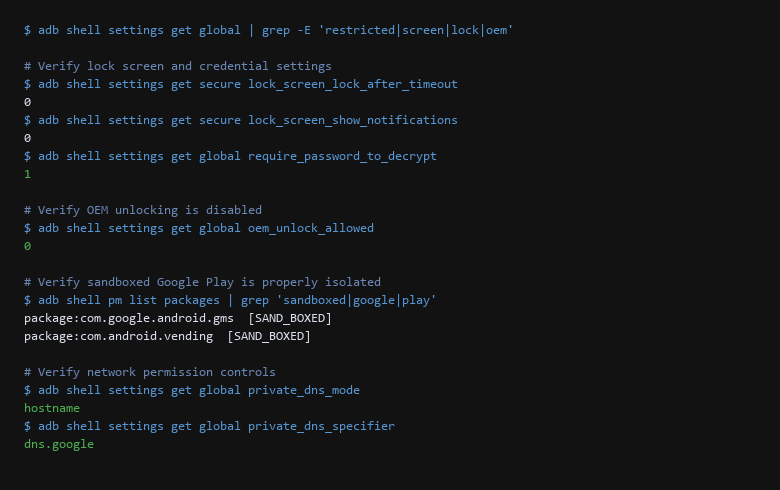
dns.google over TLS.3. Verifying the Hardening Actually Holds
Ensure your Pixel device and configuration parameters conform to the following standards before trusting it with sensitive work:
- Verify lock screen timeout is 0 and survives a reboot, not just in the current session.
- Confirm one known-good backup exists — prove it restores via recovery before relying on it.
- Disable every Google service you are not actively using — smaller surface, fewer attack paths.
- Log each change with the date and what you changed. The next time you audit this device, you should not need to reverse-engineer your own decisions.
- Run a 60-second traffic capture after hardening. Filter for port 53 and port 443 to confirm no unexpected outbound flows to non-Google endpoints.
- Re-test from a separate client profile — not the same device you configured, to catch confirmation bias.
- Reboot and re-verify. The single most-skipped step. If a setting does not survive a reboot, it is not a setting — it is a temporary illusion.
Each line above removes one assumption the OS made on your behalf. The lock screen check catches timeout drift. The backup check catches the "I'll restore later" trap. The traffic capture catches DNS leaks that settings menus do not surface.
4. Rollback & Recovery Paths
Will this break my existing apps?
Apps that depend on Google Services will need to be reinstalled through Sandboxed Play Store. That is the point — the isolation prevents those services from seeing the rest of your device. Native FOSS apps are unaffected.
Sources & References
- GrapheneOS Official Documentation: https://grapheneos.org/ — installation guides, security model, and feature documentation
- GrapheneOS Usage Guide: https://grapheneos.org/features — permission manager, app isolation, and sandboxing details
- Android Security Bulletins: https://source.android.com/security/bulletin — monthly CVE patches and vulnerability status
- OWASP Mobile Top 10: https://owasp.org/www-project-mobile-top-10/ — mobile threat modeling and hardening priorities
- AOSP Debugging with adb: https://developer.android.com/studio/command-line/adb —
adb shellcommands for system inspection
Disclaimer: We are dedicated to providing accurate, tested security advice. New releases and new attack paths arrive regularly, which is why the checks above exist as separate steps you can re-run. Verify all configuration scripts inside isolated environments before running them on high-security machines. The steps above are a starting point, not a replacement for your own risk assessment.